

High-traffic video sites live or die on one question: can a visitor find the right video in seconds, or do they give up and leave? A beautifully designed gallery with no sorting or filtering logic answers that question badly, regardless of how good the individual thumbnails look. This guide is a complete design and configuration reference for MediaHaven’s Ajax Video Live Filter — covering every sort and filter option, how to style the experience to match your brand, and how the system holds up under genuine high-traffic load.
What “Dynamic” Actually Means Here
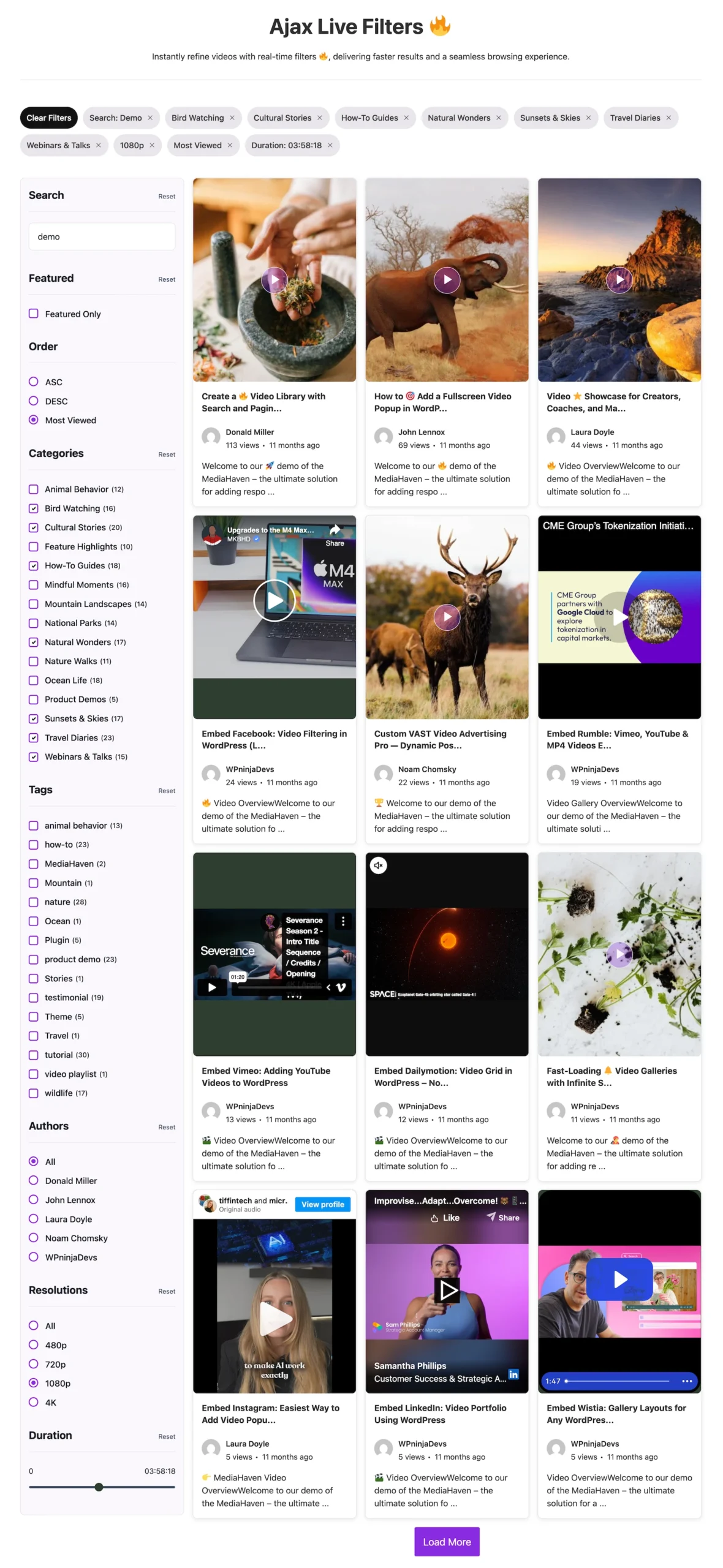
Dynamic sorting isn’t just a filter dropdown — it’s the combination of instant search, multi-dimensional filtering, and flexible sort order, all updating in place without a page reload. Confirmed directly from MediaHaven’s official WordPress.org plugin listing, the Ajax Video Live Filter includes:
- 🔍 Live search as you type
- 🏷️ Filter by category, tag, author, duration, resolution, most viewed and featured status
- 📄 Pagination options — numbered, Load More, or Infinite Scroll. It also utilizes cursor-based pagination for large video libraries—the same technology used by YouTube and other major platforms.
- 🎨 Fully customizable filter sidebar with style controls
- 🔗 SEO-friendly filter URLs
As of version 1.7.2 (July 1, 2026), the sorting capability was specifically extended with “Sort videos by most viewed” — confirmed directly in the plugin’s changelog — giving high-traffic sites a popularity-based sort option alongside category, tag, and duration filtering. That same release also improved the checkbox and radio button styling within the filter sidebar and moved the underlying pagination logic to cursor-based pagination for better performance with large video libraries — a meaningful architectural upgrade for sites with deep content archives.
The Design Layer: Making the Filter Feel Native to Your Brand
A filter system that visually looks bolted-on undermines trust even when it works perfectly. MediaHaven’s design controls are built specifically to avoid that outcome.
Filter Sidebar Styling
The filter sidebar exposes full style controls — background, borders, spacing, and typography — configurable per gallery rather than globally, meaning a video portal that runs multiple distinct galleries (say, a “Tutorials” section and a “Product Demos” section) can style each filter sidebar independently to match that section’s visual identity.
Checkbox and Radio Button Refinement
Version 1.7.2’s changelog specifically calls out “improved checkbox and radio button styles in the AJAX Live Filter” — a detail that matters more than it sounds. Filter UI controls are touched constantly by visitors actively narrowing results; inconsistent or poorly styled form controls here create a disproportionate amount of perceived friction relative to their size on screen.
Loading States That Communicate, Not Just Spin
The same release added a loading spinner while fetching additional YouTube videos, specifically to improve the “Load More” experience for YouTube feed content. This reflects a broader design principle MediaHaven applies across its Ajax interactions: every async action should give the visitor visible feedback that something is happening, rather than a silent pause that reads as the interface being unresponsive.
Card-Level Customization With Drag & Drop (Pro)
Beyond the filter sidebar itself, MediaHaven’s Drag & Drop Layout Builder (Pro) lets you rearrange what appears on each video card — media, title, meta, description — and apply custom player styles (control bar, volume bar, progress bar, play button colors) with full Google Fonts typography support. For a high-traffic site where the filtered gallery is a primary landing experience, this level of control means the filter results don’t just function correctly — they look like a purpose-built part of your site, not a generic plugin default.
Configuring Dynamic Sorting: Step by Step
Step 1: Install and Set Up MediaHaven
Install “MediaHaven – Video Gallery, HLS Player & WooCommerce Product Videos” from Plugins → Add New Plugin. Activation triggers the Setup Wizard automatically, which checks your permalink structure (the “Post name” format is required for clean filter URLs) and walks through initial configuration in a few guided steps.
Step 2: Build Your Gallery Shortcode
Navigate to MediaHaven → Views and create a new gallery. Choose your base layout — Grid, Carousel, or Multi-row Carousel — and configure responsive column counts for mobile, tablet, and desktop independently.
Step 3: Open the Filter Tab and Enable Ajax Live Filter
Inside the gallery editor, open the Filter tab and toggle on the Ajax Video Live Filter. From here, configure:
Filter dimensions to expose:
- Category
- Tag
- Author
- Duration
- Resolution
- Featured status
Sort options to expose:
- Most recent (default)
- Most viewed (added in v1.7.2)
- Alphabetical/title
Pagination mode:
- Numbered pagination — best for predictable, boundable page loads on very large libraries
- Load More — the most common choice for a scroll-friendly discovery experience
- Infinite Scroll — maximizes browsing continuity for content-heavy portals
Step 4: Preview Before Publishing
Use the Shortcode Live Preview (Pro) to see your exact configured output — filter sidebar styling, card layout, sort dropdown — rendered live inside the WordPress admin, without the traditional save-refresh-inspect cycle. This is especially valuable when iterating on sidebar styling, since visual adjustments show immediately.
Step 5: Publish and Confirm Shareable Filter URLs
Once live, test that filter combinations generate distinct, shareable URLs — for example, filtering by category and sorting by most-viewed should produce a URL reflecting both parameters. This confirms the SEO-friendly URL system is active and that a visitor (or search engine) can bookmark or link directly to a specific filtered, sorted view.
Why This Holds Up at High Traffic
A dynamic filter system is only as good as its performance under real load, and this is where the underlying architecture matters more than any UI decision.
Cursor-based pagination, added in v1.7.2, is a meaningful technical distinction from traditional offset-based pagination for large libraries. Offset-based pagination (LIMIT 1000, 20) gets progressively slower as the offset grows, because the database still has to scan past all the skipped rows. Cursor-based pagination instead uses a reference point (like the last item’s ID or timestamp) to jump directly to the next batch — meaning page 50 of results loads just as fast as page 2, which matters enormously for a high-traffic archive that visitors are actively paging or scrolling through.
The custom lookup table — confirmed in MediaHaven’s own description as the mechanism that keeps AJAX filtering “lightning-fast” even at scale — means sort and filter queries aren’t running against WordPress’s generic post-meta structure, which was never designed for this access pattern. This is the same architectural principle that separates a filter that works fine in a demo from one that holds up when your site actually gets popular.
Smart asset loading and lazy loading (both free-tier features) mean the filter’s JavaScript and CSS load only on pages that use it, and video thumbnails load only as visitors scroll to them — protecting your site’s baseline performance for every page that isn’t the filtered gallery itself.
Real-World Configuration Patterns by Site Type
High-volume tutorial or course platform Sort by most-viewed as the default (surfaces your most validated content first), filter by duration and category, and use numbered pagination for a library in the thousands — predictable page loads matter more than infinite scroll’s continuity for a reference-style content library visitors return to repeatedly.
YouTube channel feed gallery Combine MediaHaven’s YouTube Feed source with Load More pagination and the v1.7.2 loading spinner improvement, which was specifically built to smooth this exact interaction pattern. Sort by most-recent as the default to mirror how a YouTube channel page itself behaves.
Media publisher or news video archive Numbered or cursor-paginated results with category and tag filtering, sorted by most-recent by default with a most-viewed option available — the SEO-friendly filter URLs become genuinely valuable here, since a filtered category-plus-date view can independently rank in search.
E-commerce video demo library Categories mirroring your WooCommerce product categories, with tag-based filtering for finer navigation (style, use case, material). Pair with MediaHaven Pro’s shoppable video overlays so that once a visitor filters down to relevant content, the video itself can drive a direct add-to-cart action.
Free vs. Pro Feature Reference
| Feature | Free (Lite) | Pro |
|---|---|---|
| Grid, Carousel, Multi-row Carousel layouts | ✅ | ✅ |
| Responsive column controls | ✅ | ✅ |
| Smart asset loading + lazy loading | ✅ | ✅ |
| Schema.org VideoObject markup | ✅ | ✅ |
| Ajax Video Live Filter (search, category, tag, author, duration, resolution, featured) | ❌ | ✅ |
| Sort by most viewed | ❌ | ✅ |
| Cursor-based pagination for large libraries | ❌ | ✅ |
| SEO-friendly filter URLs | ❌ | ✅ |
| Custom indexed lookup table | ❌ | ✅ |
| Shortcode Live Preview | ❌ | ✅ |
| Drag & Drop card layout builder | ❌ | ✅ |
| Custom player styles + Google Fonts typography | ❌ | ✅ |
| WebP thumbnail auto-conversion | ❌ | ✅ |
Frequently Asked Questions
What is Ajax video filtering in WordPress?
Ajax video filtering lets visitors browse and sort videos instantly without reloading the page. Instead of refreshing the entire website after every selection, only the gallery updates, creating a faster and more responsive browsing experience for users exploring large video libraries.
How does MediaHaven’s Ajax filtering improve user experience?
MediaHaven Pro updates video results in real time as visitors apply filters or search criteria. This keeps users on the same page, reduces waiting time, and makes it easier to discover relevant videos, which can increase engagement and encourage visitors to watch more content.
Which filters are available in MediaHaven’s Ajax Video Live Filter?
MediaHaven Pro supports filtering videos by category, tag, featured status, author, duration, resolution, and more. It also includes live search, sortable results, and multiple pagination options, giving visitors powerful tools to quickly find the content they’re looking for.
Can visitors search videos without reloading the page?
Yes. MediaHaven Pro includes a live Ajax search that updates matching videos instantly as visitors search or apply filters. This creates a smooth browsing experience that’s especially valuable for websites with hundreds or thousands of videos.
Is MediaHaven suitable for high-traffic WordPress websites?
Absolutely. MediaHaven is built with performance in mind, using optimized database queries, smart asset loading, lazy loading, and cursor-based pagination to help large video libraries remain fast and responsive as traffic and content continue to grow.
Does MediaHaven support SEO-friendly filtered URLs?
Yes. MediaHaven Pro generates shareable, SEO-friendly filter URLs, allowing visitors to bookmark filtered views while giving search engines the opportunity to discover valuable category and filter pages for additional organic traffic.
Can I choose different pagination styles for my video gallery?
Yes. MediaHaven supports traditional pagination, Ajax Load More, and Infinite Scroll. You can choose the navigation style that best fits your audience and content, making it easier for visitors to continue exploring large video collections.
Does MediaHaven support multiple video sources with Ajax filtering?
Yes. MediaHaven works with YouTube, Vimeo, HLS streams, Bunny Stream, self-hosted videos, TikTok, Facebook, Instagram, LinkedIn, Twitch, Wistia, Dailymotion, Rumble, and external video URLs. Ajax filtering works across supported gallery content to provide a consistent browsing experience.
Does MediaHaven work with Gutenberg and popular page builders?
Yes. MediaHaven includes native Gutenberg blocks and shortcode support for Elementor, Divi, Beaver Builder, WPBakery, and other popular WordPress page builders. You can add Ajax-powered video galleries anywhere on your website without writing code.
Does Ajax filtering help improve website performance?
Ajax filtering improves the browsing experience by updating only the gallery content instead of reloading the entire page. Combined with MediaHaven’s Smart Asset Loading, lazy loading, and optimized queries, it helps create a faster and more efficient experience for visitors.
Can I build large video portals with MediaHaven?
Absolutely. MediaHaven combines Ajax Live Filter, responsive gallery layouts, multiple video source support, advanced Views, VideoObject schema, and performance-focused architecture, making it a strong choice for creators, publishers, educational platforms, and businesses managing extensive video libraries.
Why choose MediaHaven for Ajax video filtering on WordPress?
MediaHaven brings together instant Ajax filtering, responsive video galleries, multiple video source support, SEO-friendly filter URLs, HLS streaming, WooCommerce integration, Gutenberg blocks, and performance optimization in one plugin. Instead of relying on several separate tools, you get a scalable WordPress video platform built for modern, high-traffic websites.
Recent Changelog Context (Why the Filter System Keeps Improving)
MediaHaven’s Ajax Live Filter has received consistent, dated improvements across recent releases, confirming active development rather than a static feature:
- v1.7.2 (July 1, 2026): Improved Ajax Live Filter performance for faster, smoother filtering; added shareable filter URLs for bookmarking; added sort by most-viewed; improved checkbox/radio styling; moved to cursor-based pagination for large libraries
- v1.6.4 (February 23, 2026): Added responsive grid column controls for extra-small and extra-large devices, directly benefiting how filtered results reflow across screen sizes
- v1.5.0 (October 4, 2025): Original introduction of Ajax Live Filter with SEO-friendly slugs, cursor/offset pagination options, dedicated Filter Controls, and sidebar style/border customization
This cadence matters for a high-traffic site specifically because filter performance issues tend to surface only once real scale is reached — an actively maintained plugin with a track record of shipping performance-specific fixes (like the cursor-pagination change) is a meaningfully lower-risk choice than a filter system that hasn’t been revisited since initial launch.
- Install free: wordpress.org/plugins/mediahaven-lite
- See the Ajax Live Filter live: demo.mediahaven.io/ajax-live-filters
- Official documentation: mediahaven.io/docs/
- Upgrade to Pro: mediahaven.io/pricing — from $79/year · 14-day money-back guarantee
- Support
Leave a Reply