


Beyond shoppable video, most eCommerce growth strategies still rely on one familiar formula: spend more on ads. Raise your budget. Run additional campaigns. Scale the winners.
But a growing group of WordPress store owners is scaling revenue without touching their ad budget — by making their existing product videos do more work.
Shoppable video embedded directly on your WordPress site is the mechanism. MediaHaven is the implementation. This article explains the strategy and the specific steps to execute it.
The Hidden Cost of Ad-Dependent Revenue
Paid advertising delivers traffic. It does not build assets.
Every dollar you spend on Google Shopping or Meta Ads generates revenue for exactly as long as the campaign runs. The moment you stop paying, the traffic stops. The revenue stops. Nothing has been built; nothing compounds.
Shoppable video is the opposite model. A well-produced product video embedded on your WordPress site continues to:
- Generate traffic through organic search (via schema.org video rich results)
- Convert browsers into buyers through engagement and product overlays
- Build brand trust through repeat viewership
- Create indexable SEO pages for every product category and filter combination
All of this continues indefinitely — without additional spend.
| Metric | Data | Source |
|---|---|---|
| Businesses using video | 93% now use video as a marketing tool in 2026 | SellersCommerce, 2025 |
| Consumer video preference | 78% prefer learning about products via video vs. 9% preferring text | SellersCommerce, 2025 |
| Purchase influence | 46% of shoppers say short-form video is the most influential format for purchase decisions | AutoFaceless, 2026 |
| Social commerce | Global social commerce exceeded $1.17 trillion in 2025, growing 30%+ annually | Firework, 2026 |
The business case is not that you should stop advertising. It is that shoppable video converts organic traffic at rates high enough to meaningfully reduce your dependence on paid channels.
What “Shoppable” Actually Means for WordPress
Shoppable video is frequently used as a buzzword with inconsistent meaning. For clarity, it means one specific thing: video content that includes a direct purchase mechanism, embedded on your WordPress site, enabling a viewer to take a commerce action without leaving the page.
On a WordPress site using MediaHaven Pro, this looks like one of the following:
- A product demo video with a WooCommerce product overlay that lets the viewer add the product to cart from inside the player
- A category video gallery where each video links directly to its associated product page — keeping the buyer in a discovery-to-purchase flow on your site
- A review or tutorial video with a VAST ad overlay promoting a related product at the video’s most persuasive moment
Each of these eliminates at least one navigation step between interest and purchase. That friction reduction is precisely where the conversion lift comes from.
Why Hosting Video on Your Site — Not YouTube — Matters
The instinct to publish all video to YouTube is understandable. YouTube is free, has a built-in audience, and handles hosting costs. But for e-commerce businesses, there are four specific ways YouTube hurts your conversion rate:
1. YouTube Shows Competitor Ads
When a viewer watches your product video on YouTube, they are actively shown ads for competing products. You paid to produce the content. Your competitor benefits from the audience.
2. YouTube Suggests Competing Videos
After watching your product demo, YouTube’s algorithm recommends videos from competitors, reviewers, and alternative products. Your viewer’s purchase intent is interrupted at the worst possible moment.
3. YouTube Doesn’t Benefit Your Site’s SEO
Video views on YouTube don’t increase dwell time on your site, don’t reduce your bounce rate, and don’t generate the behavioral signals Google uses to rank your pages.
4. YouTube Doesn’t Allow WooCommerce Integration
You cannot embed an “Add to Cart” button inside a YouTube player. The purchase path requires multiple steps across multiple pages — every extra step costs you conversion rate.
MediaHaven solves all four problems by letting you self-host or embed video through a player you fully control — on your site, inside your layout, with your product overlays and your commerce actions.
MediaHaven Feature — Universal Video Support: MediaHaven supports 12 video sources in a single gallery: YouTube embeds, Vimeo, self-hosted MP4, TikTok, Facebook, Instagram, LinkedIn, Twitch, Wistia, Dailymotion, Rumble, and HLS live streams. You can mix sources in one gallery — getting the production convenience of any platform while keeping the viewer on your site.
Setting Up Shoppable Video on WordPress with MediaHaven
Installation: Free in Under 5 Minutes
MediaHaven Lite is available free from the WordPress plugin directory. Install and activate it from Plugins → Add New, search “MediaHaven,” and the built-in setup wizard launches automatically. The wizard includes server checks, sample gallery creation, and optional YouTube API connection. Most stores are displaying their first gallery within 5–10 minutes.
Creating Your First Shoppable Video Gallery
Navigate to MediaHaven → Videos in your WordPress dashboard. Add your product videos — either by uploading self-hosted files or pasting URLs from any of the 12 supported platforms. For each video, configure:
- Title and description (auto-populated from YouTube or Vimeo if embedding from those platforms)
- Categories and tags (used for both navigation and the Ajax live filter in Pro)
- Thumbnail image with automatic WebP optimization
- Schema.org metadata for SEO — automatically generated, no configuration required
Once videos are added, go to MediaHaven → Views and create a gallery shortcode. Choose your layout — Grid, Carousel, or Multi-row Carousel — configure responsive column counts for mobile/tablet/desktop, and match colors and typography to your brand. The Shortcode Live Preview (Pro) shows exactly how the gallery renders before you publish.
Embedding the Gallery on Product Pages
Copy the generated shortcode and paste it into any product page, landing page, or blog post using:
- The MediaHaven Shortcode View Gutenberg block (shows live preview in editor)
- Any page builder’s shortcode widget (Elementor, WPBakery, Divi, Beaver Builder, and all others)
No coding is required at any step.
Adding WooCommerce Commerce Actions (Pro)
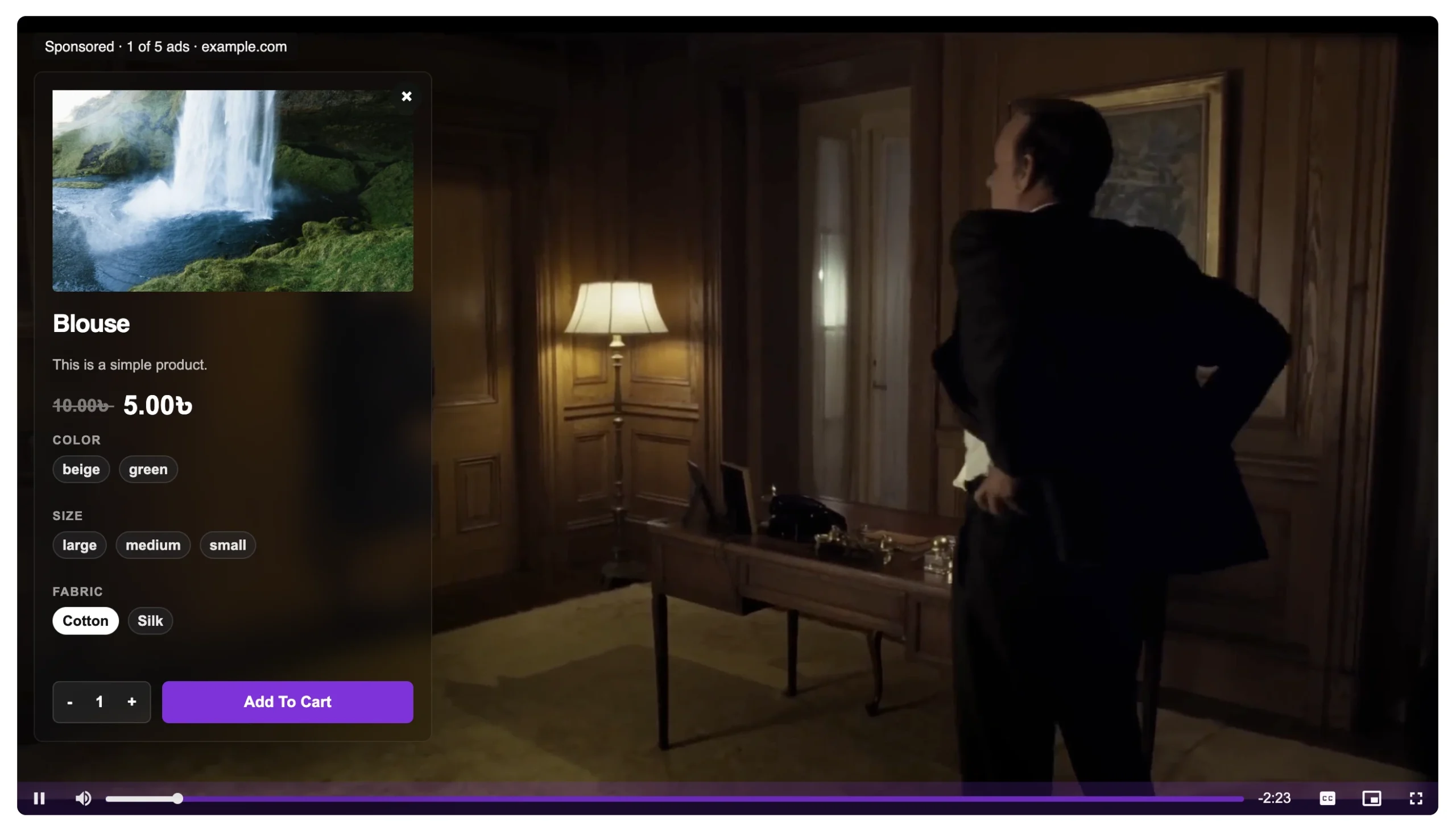
With MediaHaven Pro, enable WooCommerce product video overlays in your video settings. For each video:
- Link the corresponding WooCommerce product (or category for multi-product videos)
- Set the CTA label: Add to Cart, View Product, Shop Now, or custom text
- Configure trigger timing — overlay appears at video start, a specific timestamp, or video end
This creates the complete shoppable video experience: the viewer watches your product demo, then is prompted to purchase at precisely the moment their interest is highest.
Organic Traffic Strategy: Making Video Findable
A shoppable video that no one finds generates zero sales. MediaHaven’s SEO features ensure your video content is discoverable through organic search — which is where ad-free growth lives.
Schema.org Structured Data (Free + Pro)
Every video gallery published with MediaHaven automatically includes VideoObject schema markup. This markup tells Google your video’s name, description, thumbnail URL, upload date, and duration. Pages with valid video schema are eligible for video rich results — the thumbnail previews that appear directly in Google search results, significantly increasing click-through rates.
This works in both the free and paid versions — zero configuration required.
SEO-Friendly Ajax Filter URLs (Pro)
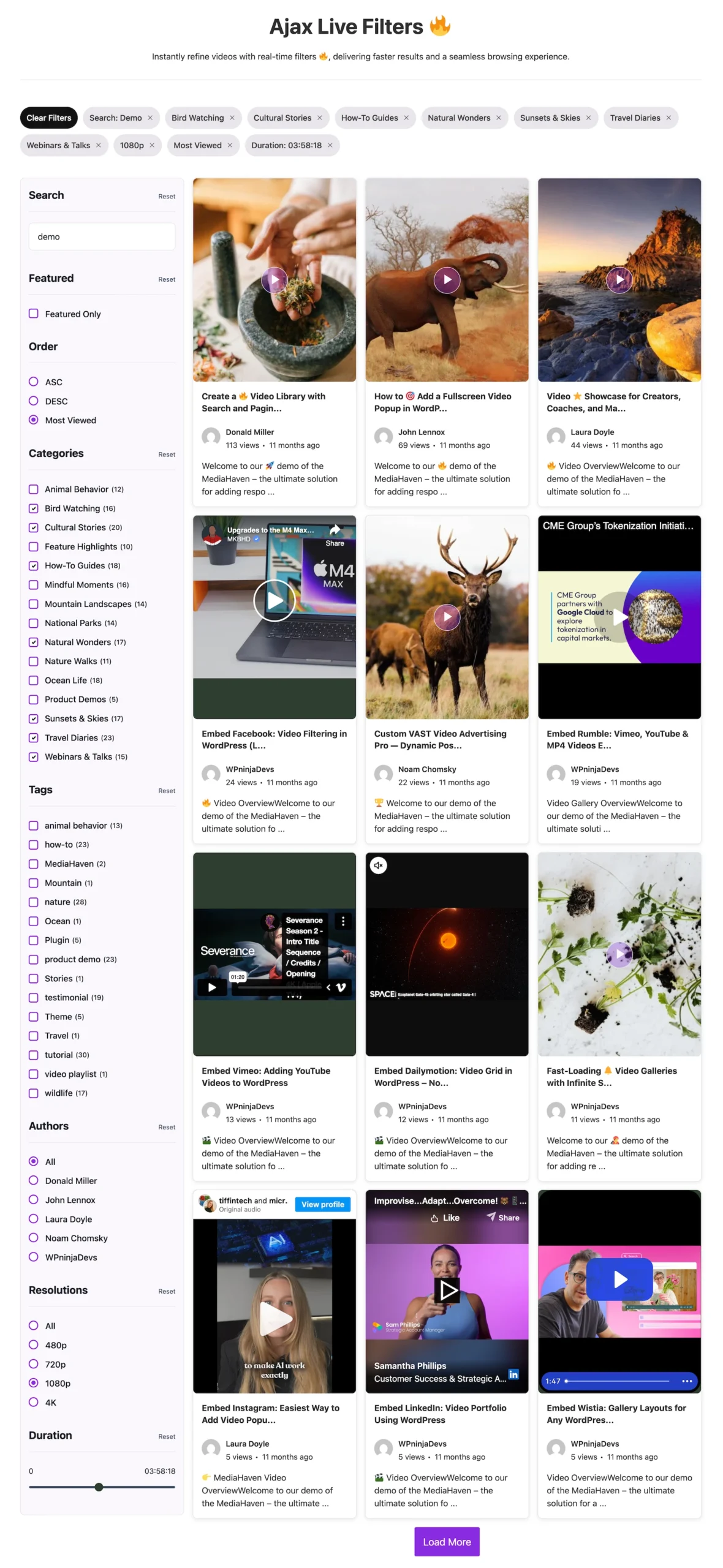
In MediaHaven Pro, the Ajax Video Live Filter generates SEO-friendly URLs for every filter combination. When a visitor filters your gallery by category, tag, or product type, the URL updates to reflect that filter (e.g., /videos/?category=running-shoes).
These filtered URLs are indexable by Google, meaning each category becomes a separate organic landing page without any additional content creation.
For a store with 10–20 product categories, this can multiply indexable video content pages by an order of magnitude — dramatically expanding the organic search surface area without writing a single additional article.
Video Subtitles for Search Visibility (Free + Pro)
MediaHaven supports WebVTT and SRT subtitle files for every video. Beyond accessibility compliance, subtitles create indexable text content that search engines can read and rank. A 3-minute product demo video with accurate subtitles gives Google thousands of words of keyword-relevant content associated with that video URL.
How MediaHaven Compares to YouTube-Only Video Strategy
| Capability | YouTube Only | MediaHaven + YouTube |
|---|---|---|
| WooCommerce add-to-cart integration | ✗ | ✓ |
| Schema.org video markup on your site | ✗ | ✓ |
| Competitor ads shown to your viewers | ✓ (yes, shown) | ✗ (eliminated) |
| VAST ad monetization on your domain | ✗ | ✓ |
| SEO-indexed filter pages | ✗ | ✓ |
| Viewer stays on your site | ✗ | ✓ |
| Custom player branding | ✗ | ✓ |
| Subtitle SEO integration | Partial | ✓ Full |
The most important row in this table is the second-to-last one: viewer stays on your site. Every visitor who leaves your site to watch video on YouTube is a visitor who may not come back — and whose engagement signals contribute to YouTube’s domain authority, not yours.
Measuring Ad-Free Revenue Growth
To quantify the business impact of shoppable video on your WordPress site, track these metrics before and 60 days after implementation:
- Conversion rate on product pages featuring MediaHaven video galleries vs. those without
- Average session duration on pages with video galleries (target: 88%+ increase vs. baseline)
- Organic search impressions and clicks to video-containing pages (Google Search Console)
- Add-to-cart rate on video product pages vs. non-video product pages
- Return rate for orders where the buyer viewed a product video before purchase
Most stores see measurable improvement within 30–60 days of implementing shoppable video galleries — driven by higher conversion rates from existing traffic combined with new organic visitors attracted by video SEO.
Pricing: High ROI, Low Cost of Entry
| Plan | Price | Sites |
|---|---|---|
| MediaHaven Lite | Free | Unlimited (core features) |
| MediaHaven Pro — 1 Site | $79/year | 1 domain |
| MediaHaven Pro — 5 Sites | $159/year | 5 domains |
| MediaHaven Pro — 10 Sites | $249/year | 10 domains |
| MediaHaven Pro — 50 Sites | $499/year | 50 domains |
All Pro plans include: WooCommerce product video overlays, VAST ads, Ajax live filters, drag-and-drop card builder, WebP conversion, unlimited player styles, 1 year of updates and premium support, and a 14-day money-back guarantee.
For a WooCommerce store generating $5,000/month in revenue, achieving even a 10% conversion rate improvement through shoppable video pays for the annual Pro license in the first week.
Frequently Asked Questions
What is a shoppable video on WordPress?
A shoppable video lets customers interact with products while watching a video, reducing the steps between discovery and purchase. MediaHaven Pro brings this experience to WordPress by combining WooCommerce product overlays, customizable CTA buttons, and responsive video playback in one powerful plugin.
How does MediaHaven help boost sales without relying on paid ads?
MediaHaven helps turn your existing product videos into long-term sales assets instead of temporary advertising campaigns. With built-in video SEO, WooCommerce integration, responsive galleries, and interactive product overlays, your videos continue attracting organic traffic and driving conversions directly from your own website.
Can I create shoppable videos with WooCommerce using MediaHaven?
Yes. MediaHaven Pro integrates directly with WooCommerce, allowing you to link products to videos and display interactive product overlays inside the player. Customers can explore products and take action while watching, creating a smoother shopping experience that supports higher conversion rates.
Why is hosting shoppable videos on my own website better than YouTube?
Hosting videos on your own website keeps visitors focused on your products instead of exposing them to competitor recommendations or external distractions. MediaHaven combines self-hosted or supported video sources with WooCommerce, SEO optimization, and complete player customization to help keep customers engaged with your brand.
Can I customize when product overlays appear during a video?
Yes. MediaHaven Pro lets you choose exactly when WooCommerce product overlays appear, whether at the beginning, a specific timestamp, or the end of a video. Presenting products at the right moment helps create a more natural shopping experience and encourages viewers to take action.
Does MediaHaven support multiple video sources for shoppable videos?
Yes. MediaHaven supports self-hosted videos, HLS streams, Bunny Stream, YouTube, Vimeo, TikTok, Facebook, Instagram, LinkedIn, Twitch, Wistia, Dailymotion, and Rumble in one unified platform. This flexibility lets you manage diverse video content from a single WordPress dashboard.
Can I improve SEO while building shoppable video pages?
Yes. MediaHaven automatically adds Schema.org VideoObject structured data to your videos, helping search engines better understand and index your content. Combined with SEO-friendly video pages and responsive galleries, this increases your opportunities to attract qualified organic traffic.
Does MediaHaven work with Gutenberg and popular page builders?
Absolutely. MediaHaven includes dedicated Gutenberg blocks and flexible shortcodes that work with Elementor, Divi, Beaver Builder, WPBakery, and other popular page builders. You can embed shoppable video galleries anywhere on your WordPress website without custom coding.
Can I monetize shoppable videos in addition to selling products?
Yes. MediaHaven Pro supports industry-standard VAST advertising alongside WooCommerce product overlays. This allows you to generate advertising revenue from video views while simultaneously promoting products, creating multiple income opportunities from a single piece of content.
Is MediaHaven suitable for growing WooCommerce businesses?
Absolutely. MediaHaven is designed for businesses that want to scale through video commerce. Its responsive galleries, WooCommerce integration, HLS streaming, video SEO, interactive shopping features, and performance-focused architecture provide a strong foundation for long-term growth.
Do I need coding knowledge to create shoppable videos with MediaHaven?
No. MediaHaven is built for beginners and professionals alike. You can create video galleries, link WooCommerce products, configure interactive overlays, and publish shoppable videos through an intuitive WordPress interface without touching code or installing multiple plugins.
Why choose MediaHaven for shoppable videos on WordPress?
MediaHaven combines responsive video galleries, WooCommerce product overlays, VideoObject schema, HLS streaming, VAST advertising, Gutenberg integration, and support for multiple video sources in one platform. Instead of managing separate plugins for video, SEO, and commerce, you get a unified solution designed to increase engagement, conversions, and long-term revenue.
The Bottom Line
Paid advertising is a traffic rental. Shoppable video on your WordPress site is a traffic-owning, conversion-compounding, SEO-building asset that continues generating revenue long after the initial investment.
MediaHaven provides the technical infrastructure to make this transition without external platforms, bloated monthly SaaS fees, or custom development — all within your existing WordPress environment.
👉 Download MediaHaven Lite free — no credit card required. 👉 Upgrade to Pro at mediahaven.io — 14-day money-back guarantee.
Data sources: SellersCommerce (2025), AutoFaceless (2026), Firework (2026), eStreamly (2026), Joyspace (2026)
Leave a Reply