

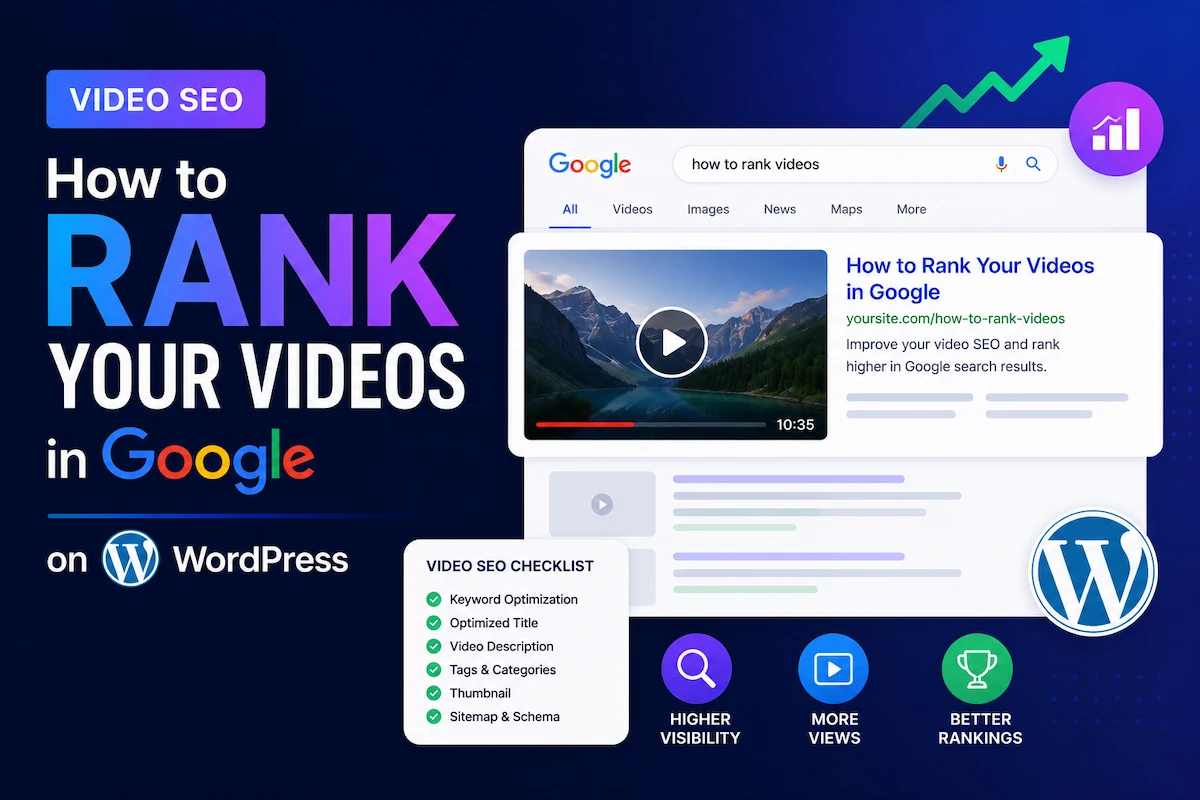
In 2026, more than 23% of all Google search results are dominated by video content (SEO Marketing Köln, March 2026). Google now uses multimodal AI models that analyze audio, visual tracks, and surrounding text simultaneously. Videos without chapters generate 40% fewer clicks from organic Google search than videos with them (SEO Marketing Köln, 2026). The CTR improvement from rich snippets — the video thumbnail that appears directly in search results — is 20–50% higher than plain text links (InfluenceFlow, 2026).
This is the landscape WordPress site owners are operating in. A video gallery that is technically correct, semantically structured, and performance-optimized can capture organic traffic that text-only pages can never compete for. A video gallery that is not — even one with excellent content — is functionally invisible to Google.
MediaHaven Lite handles the foundational technical video SEO layer automatically, without any additional plugins. This guide covers what Google requires, what MediaHaven provides for free, and the advanced layer you build on top to maximize organic visibility and business outcomes.
Why Video SEO Is a Business Priority in 2026, Not a Technical Nice-to-Have
The data connecting video SEO to business outcomes is direct:
- 91% of businesses now use video as a marketing tool (Wyzowl 2026)
- 82% of marketers report positive ROI from video marketing (AutoFaceless, March 2026)
- Video content is projected to represent 82% of all internet traffic by 2026 (WebFX)
- 82% of consumers say watching a video has directly influenced a purchase decision (Wyzowl/SellersCommerce 2026)
- 64% of consumers are more likely to buy a product featured in a video (SellersCommerce 2026)
For WordPress publishers, ecommerce stores, educators, and agencies, this means every video page that ranks in Google for a relevant query is not just a traffic asset — it is a revenue asset. Each additional ranking position drives qualified visitors who are already in the research or purchase phase.
How Google Discovers and Indexes Video in 2026
Google’s video indexing in 2026 is multimodal. It does not just read text metadata — it transcribes audio, identifies visual entities, analyzes the surrounding page content, and cross-references structured data. Understanding this process is what separates video pages that rank from those that don’t.
The three primary discovery signals:
Signal 1: VideoObject Schema.org Structured Data
VideoObject is the JSON-LD structured data markup that tells Google what your video is, who made it, how long it is, when it was published, and where the thumbnail lives. It is the single most important technical SEO element for video ranking — confirmed across every 2026 video SEO authority source.
Without it, Google must guess. With it, Google knows — and can surface your video as a rich result with a thumbnail, duration, and upload date visible directly in the SERP.
MediaHaven generates VideoObject schema automatically for every video in every gallery. This is a confirmed free feature from the official WP.org plugin page: “Includes built-in schema.org structured data for SEO.” You do not need Yoast, RankMath, or any other SEO plugin to get VideoObject output. MediaHaven outputs it natively on every gallery page that contains a video.
The schema properties MediaHaven outputs include:
| Schema property | What it tells Google | Source in MediaHaven |
|---|---|---|
name | Video title | Title field in video post |
description | What the video is about | Description field in video post |
thumbnailUrl | The thumbnail Google shows in search | Poster image you upload |
uploadDate | When the video was published (ISO 8601) | WordPress publish date |
duration | How long the video is (ISO 8601) | Auto-calculated or entered |
embedUrl | Where the video player lives | The gallery page URL |
contentUrl | Direct video file URL (for self-hosted) | Video source URL |
interactionStatistic | View count | MediaHaven’s Ajax view counter |
Google’s validation requirement: VideoObject schema is only valid on pages where the video is actually playable. Adding schema to a page that only links to an external video without embedding it is a policy violation. MediaHaven embeds the player and generates the schema simultaneously — so the markup and the embedded player are always correctly paired.
How to verify: After publishing a gallery page, go to search.google.com/test/rich-results and paste your page URL. Confirm VideoObject detects without errors.
Signal 2: Video Chapters and Clip Schema (Google Key Moments)
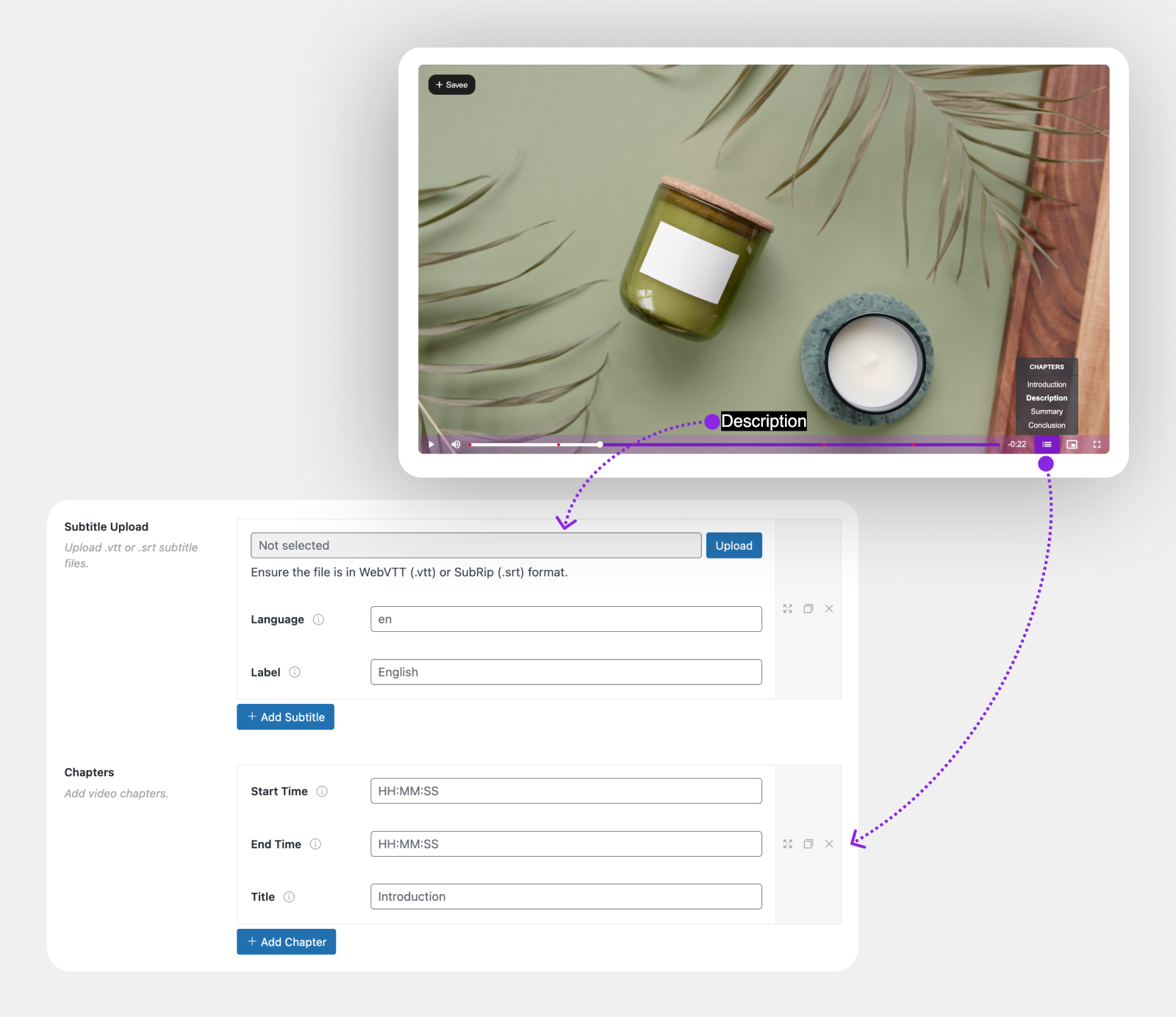
Chapter markers are described by 2026 SEO research as mandatory, not optional: “Without structured chapter markers and clean transcripts, your video remains invisible to Google” (SEO Marketing Köln, March 2026). The client data is specific: videos with chapter markers generate 40% more clicks from organic Google search than those without.
The mechanism: Google extracts chapter titles and timestamps from schema markup and embeds them directly in search results as Key Moments — clickable timestamps where users can jump to a specific point in your video without watching from the start. A user searching “how to configure Stripe in WooCommerce” who sees your video result with a chapter marker for “Stripe configuration” at 1:45 is far more likely to click your result than a generic video thumbnail without that context.
Implementation with MediaHaven Pro: Video Chapters is a Pro feature — “Divide your videos into structured, clickable chapters that let viewers jump to key moments instantly” (WP.org plugin page). In the video post editor, add chapter titles and start/end timestamps. MediaHaven outputs the Clip schema within the hasPart property of VideoObject automatically.
Chapter best practices for SEO:
- Write chapter titles using the language buyers actually search for, not internal labels
- “Stripe payment setup” beats “Step 3”
- “Waterproof test in rain” beats “Outdoor test”
- Include 3–5 chapters per video minimum for Google Key Moments eligibility
- Align chapter timestamps with natural topic transitions, not arbitrary time intervals
Signal 3: Captions, Transcripts, and Contextual Page Text
Google’s multimodal AI transcribes video audio in real time. But providing your own captions is still best practice because: automatic transcription has errors, your captions ensure accuracy, and crawlable subtitle files give Google the full spoken content in text form that it can use for keyword matching.
MediaHaven supports subtitle files in WebVTT (.vtt) and SubRip (.srt) formats — free. Confirmed from the WP.org plugin page: “Advanced Dynamic Subtitles to Make Videos Accessible & Searchable… Subtitles improve accessibility, increase viewer engagement, and help your content rank higher in search results.”
For every product demo, tutorial, or educational video: upload a .vtt subtitle file. Tools that generate them: YouTube’s auto-caption system (download as .srt), OpenAI Whisper (free, highly accurate), or paid services like Rev.com or Descript.
The page text surrounding your video also matters. Google measures alignment between the video’s transcript and the surrounding article or product copy. A video about product features embedded on a page with generic placeholder text signals a disconnect. Keep the page text specific to and supportive of the video’s content.
The Technical SEO Foundation MediaHaven Handles Automatically
Smart Asset Loading — Page Speed for Video Pages
Every video plugin that loads its CSS and JavaScript globally — on every page of your site — adds overhead to pages with no video. This hurts Core Web Vitals on your highest-traffic non-gallery pages.
MediaHaven uses per-shortcode smart asset loading. Plugin scripts load only on pages that actually contain a shortcode. Pages without a gallery load zero MediaHaven assets. This is the correct architecture for a site with both video-heavy and text-heavy pages.
Lazy Loading — Performance at Scale
Built-in lazy loading (confirmed free feature, WP.org) means video thumbnails, iframes, and video files load only as they enter the viewport. A gallery page with 12 videos behaves almost identically to a page with 1 video on initial load — only the above-fold thumbnails are fetched immediately. This directly protects Largest Contentful Paint (LCP) scores on gallery pages.
Image Compression and WebP (Free + Pro)
All gallery thumbnails are automatically compressed (free). MediaHaven Pro adds WebP conversion — WebP images are 30–50% smaller than JPEG at equivalent quality. For video gallery pages where thumbnails are the primary visual content, WebP directly reduces page weight and improves loading speed.
Semantic HTML5 and WCAG Accessibility
MediaHaven outputs semantic HTML5 elements, not generic <div> soup. This is directly relevant to how search engine crawlers interpret and categorize your video content. WCAG-compliant keyboard navigation (Space to play/pause, F for fullscreen, M to mute, arrow keys to seek — confirmed from WP.org) is an accessibility signal that factors into Google’s page experience scoring.
The Advanced Video SEO Layer
Video Keyword Research — Finding Queries Where Video Wins
Before optimizing a video for SEO, confirm Google actually serves video results for the target query. A query with no video results in Google’s SERP is not a video opportunity — it is a text content opportunity.
How to identify video keywords:
- Search your target topic in Google
- If a video carousel appears on page one → Google has determined users want video for this query → you can compete for that carousel
- Use YouTube autocomplete to find actual video search phrases — these are high-intent, video-specific queries
- In keyword tools (Ahrefs, SEMrush), filter by SERP features → Video → these are confirmed video-intent keywords
High-value video query patterns:
- “How to [do X]” — tutorial intent
- “[Product name] review” or “[Product name] demo”
- “[Product] vs [Product]”
- “Before and after [process]”
- “[Topic] tutorial for beginners”
Video Title and Description Optimization
Title:
- Optimal length: 50–60 characters (titles longer than 60 characters get truncated in SERPs)
- Include primary keyword near the front of the title
- Be specific, not creative: “How to Configure HLS Streaming in WordPress (Full Tutorial)” performs better than “The Ultimate Streaming Guide”
- Match the search intent: answer the question the title implies, in the video
Description:
- Write 150–300 words of genuine, informative text
- Include the primary keyword naturally in the first 25 words
- Reference specific topics, tools, and outcomes the video covers
- Add a timestamp list in the description for additional Key Moments signals: “0:00 Introduction, 1:30 Setup, 3:15 Configuration, 5:00 Testing”
In MediaHaven: Every video’s title and description is entered in the video post editor. These fields directly populate the VideoObject schema output and appear on single video pages and gallery cards (with show/hide controls per gallery).
Ajax Live Filter with SEO-Friendly URLs (Pro)
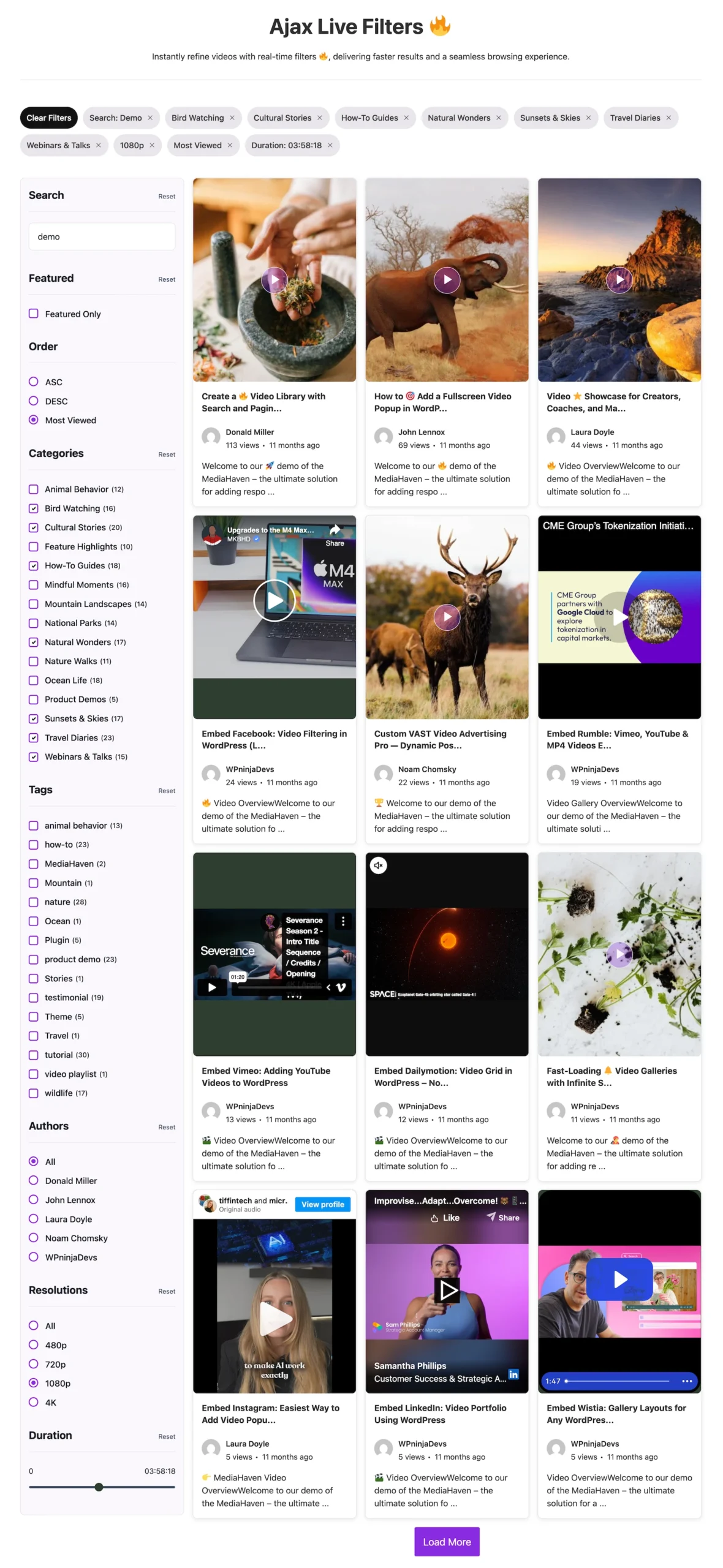
MediaHaven Pro’s Ajax Video Live Filter generates SEO-friendly URLs for filtered gallery states. When a visitor filters your video gallery by category (e.g., “Product Demos” or “Installation Guides”), the URL updates to a specific, indexable URL — not a JavaScript state that Google cannot crawl.
This means filtered gallery views become separate indexable pages in Google’s index. A filtered URL like /videos/?category=installation-tutorials can rank for long-tail queries like “WordPress plugin installation tutorial video” independently from your main gallery page.
This is an architecture advantage most competing video plugins don’t implement. Competitors often use JavaScript state changes for filtering — visually functional but invisible to search engines. MediaHaven Pro’s SEO-friendly URLs make filtered views organic traffic assets.
Video Sitemaps for Large Libraries
For WordPress sites with 20+ video pages, submitting a video sitemap to Google Search Console accelerates indexing. A video sitemap tells Google which pages contain video content and provides metadata for each video in a machine-readable format.
Basic video sitemap entry:
<url>
  <loc>https://yoursite.com/video-tutorial-page/</loc>
  <video:video>
    <video:thumbnail_loc>https://yoursite.com/thumbnails/video-1.jpg</video:thumbnail_loc>
    <video:title>How to Set Up HLS Streaming on WordPress</video:title>
    <video:description>Complete tutorial for HLS streaming setup using MediaHaven...</video:description>
    <video:content_loc>https://yourcdn.com/videos/tutorial.mp4</video:content_loc>
    <video:duration>420</video:duration>
    <video:publication_date>2026-05-15T00:00:00+00:00</video:publication_date>
  </video:video>
</url>
Submit: Go to Google Search Console → Sitemaps → Add a new sitemap and enter your sitemap URL.
Yoast SEO Premium and RankMath both generate video sitemaps. Since MediaHaven already handles the VideoObject schema layer, the sitemap adds the indexing acceleration layer on top.
Monitoring Video SEO Performance
In Google Search Console:
- Go to Performance → Search results → Filter by Search Appearance → Videos
- This shows which of your video-rich pages are generating impressions and clicks specifically from video rich results
- A growing video impressions curve confirms Google is recognizing and surfacing your VideoObject markup
In Google Search Console (Rich Results):
- Go to Experience → Core Web Vitals — verify gallery pages are passing LCP, INP, and CLS
- Go to Enhancements → Videos — shows any VideoObject schema errors detected in your markup
KPI targets:
- VideoObject errors in Rich Results: zero
- Video impressions in Search Console: growing month-over-month
- Video clicks in Search Console: growing with higher CTR than comparable text-only pages
- Core Web Vitals on gallery pages: passing green (LCP < 2.5s, INP < 200ms, CLS < 0.1)
The Complete Video SEO Stack with MediaHaven
| Layer | What it does | Free or Pro |
|---|---|---|
| VideoObject schema | Tells Google every video’s title, description, thumbnail, duration, upload date | Free (automatic) |
| Smart asset loading | Zero plugin overhead on non-gallery pages | Free (automatic) |
| Lazy loading | Fast gallery pages regardless of video count | Free (automatic) |
| Image compression | Optimized thumbnails without third-party plugins | Free (automatic) |
| Video subtitles (WebVTT/SRT) | Crawlable spoken content, accessibility compliance | Free |
| Ajax view counter | Social proof + interactionStatistic schema signal | Free |
| Keyboard accessibility (WCAG) | Page experience signal, crawler-accessible player | Free |
| Export/import (JSON/CSV) | Replicate optimized gallery setups across sites | Free |
| Video Chapters + Clip schema | Google Key Moments in SERP — 40% more clicks | Pro |
| WebP thumbnail conversion | 30–50% smaller images, better LCP scores | Pro |
| Ajax Live Filter + SEO URLs | Filterable gallery pages Google can index | Pro |
| Indexed lookup table | Performance at scale (1000+ video libraries) | Pro |
| Video Card Builder | Control metadata display for SEO-focused layouts | Pro |
Video SEO ROI: The Compounding Effect
Video SEO compounds in a way text-only SEO doesn’t. Each video page you optimize correctly:
- Ranks in Google text results (through surrounding content and on-page SEO)
- Ranks in Google video carousels (through VideoObject schema)
- Generates Key Moments in SERPs (through Clip schema from Video Chapters)
- Is indexed in Google’s video sitemap (through sitemap submission)
- Accumulates view count social proof (through MediaHaven’s Ajax counter)
- Builds AI search answer eligibility (through crawlable subtitles and structured data)
For a site publishing 2–3 videos per week with full MediaHaven optimization, this means a compounding library of multi-channel ranking assets. At 100 optimized videos over a year — each eligible for multiple search appearances, each with Key Moments in SERPs — the organic traffic surface is substantially larger than the same investment in text-only content.
Frequently Asked Questions
What is video SEO, and why is it important for WordPress websites?
Video SEO is the process of optimizing your videos so search engines can better discover, understand, and rank them. It includes structured data, descriptive metadata, and crawlable pages. A strong video SEO strategy can increase organic traffic, improve click-through rates, and help your videos appear in Google’s video search results.
How does MediaHaven improve video SEO on WordPress?
MediaHaven automatically generates Schema.org VideoObject structured data for every published video, helping search engines understand important details like the title, description, thumbnail, upload date, and duration. This improves your pages’ eligibility for Google’s video-rich results without requiring manual schema configuration.
Does MediaHaven automatically generate VideoObject schema?
Yes. Every video published with MediaHaven includes automatic VideoObject schema markup, saving you from manually writing JSON-LD code. This structured data helps Google understand your video content and increases the chances of earning enhanced video search results.
Can self-hosted videos rank in Google search?
Absolutely. Self-hosted videos can rank well when they are published on dedicated, crawlable pages with proper metadata and VideoObject schema. MediaHaven provides these SEO essentials, allowing you to build search visibility while keeping your video content on your own WordPress website.
Does MediaHaven support YouTube and self-hosted video SEO?
Yes. MediaHaven supports YouTube, self-hosted videos, HLS streams, Vimeo, and many other video sources while automatically adding VideoObject schema to published videos. This gives you the flexibility to build SEO-friendly video galleries regardless of where your content is hosted.
Will responsive video galleries help improve user experience?
Yes. Responsive galleries make videos easier to browse across desktops, tablets, and smartphones, encouraging visitors to watch more content. MediaHaven includes responsive Grid, Carousel, and Multi-row Carousel layouts that create a better viewing experience while supporting your overall SEO strategy.
Does MediaHaven help improve Core Web Vitals?
Yes. MediaHaven includes lazy loading and Smart Asset Loading, which loads plugin CSS and JavaScript only on pages containing video galleries. By reducing unnecessary resources, it helps improve page speed and Core Web Vitals while delivering a smooth video experience.
Can I organize videos into SEO-friendly galleries?
Yes. MediaHaven’s View Builder lets you organize videos into category-based galleries with responsive layouts and dedicated display settings. Well-structured galleries make it easier for visitors to discover related content while helping search engines better understand your website’s video organization.
Does MediaHaven work with Gutenberg and popular page builders?
Absolutely. MediaHaven includes dedicated Gutenberg blocks and shortcode support for Elementor, Divi, Beaver Builder, WPBakery, and other popular page builders. This makes it easy to publish SEO-friendly video galleries anywhere on your WordPress website without custom coding.
Can MediaHaven help my videos appear in Google’s rich results?
Yes. By automatically generating valid VideoObject schema and publishing videos on structured WordPress pages, MediaHaven helps make your content eligible for Google’s video-rich results. Eligibility depends on Google’s indexing and quality guidelines, but proper structured data is an important requirement.
Is MediaHaven suitable for websites with large video libraries?
Absolutely. MediaHaven is built to scale with responsive galleries, support for multiple video sources, smart asset loading, and advanced organization tools. Whether you manage dozens or thousands of videos, it helps maintain performance while making your library easier for visitors and search engines to navigate.
Why choose MediaHaven for WordPress video SEO?
MediaHaven combines automatic VideoObject schema, responsive video galleries, multiple video source support, HLS streaming, Gutenberg integration, WooCommerce compatibility, and performance optimization in one plugin. Instead of relying on several separate tools, you get a complete WordPress video platform designed to improve discoverability, user experience, and long-term organic growth.
- Install free: MediaHaven Lite
- See chapters demo: Chapters Demo
- See Ajax live filter demo: Ajax Live Filters
- Validate your video schema: search.google.com/test/rich-results
- Upgrade to Pro: MediaHaven Pro — from $79/year · 14-day money-back guarantee
- Support: assist.wpninjadevs@gmail.com
Leave a Reply