


TikTok Shop converts at 4.7%, more than double Instagram Shopping’s 2.1% and Facebook Shops’ 1.8% (widely reported eMarketer data, corroborated independently by HubSpot and Flywheel Digital, 2026). US social commerce crossed $100 billion for the first time in 2026, up 18% year-over-year (eMarketer, cited by multiple 2026 sources), and short-form video now drives roughly 58–60% of TikTok Shop’s total gross merchandise value (AutoFaceless/Statista, 2026).
The mechanism behind that conversion gap isn’t mysterious — it’s friction. TikTok Shop lets a viewer discover a product and buy it without ever leaving the video. Most WordPress stores still make a viewer watch a product video, then click away to a separate product page, then navigate to checkout — three or four steps where TikTok Shop has one.
This guide shows you how to close that gap on your own WordPress site, using MediaHaven, without rebuilding your store on a third-party platform.
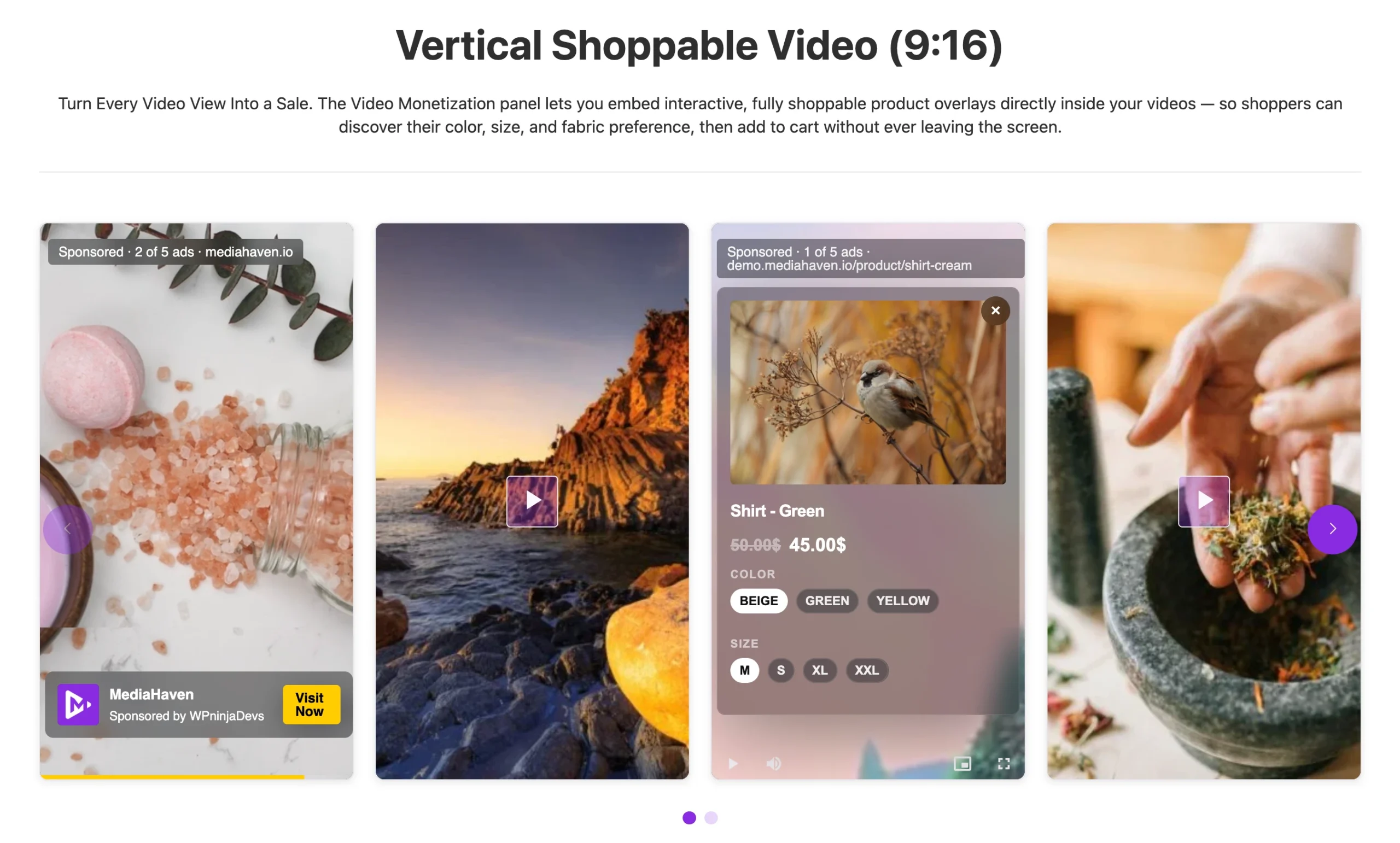
What “TikTok-Style” Actually Means Technically
A TikTok Shop video isn’t just a video with a link in the caption. It’s a video with an interactive product layer embedded inside the player itself — a product card that appears at the right moment, showing image, price, and an add-to-cart action, without interrupting playback or requiring navigation away from the content.
Recreating that on WordPress requires three components working together:
- A video player capable of rendering interactive overlays at specific timestamps
- A live connection to your product catalog (WooCommerce), so pricing and availability are always accurate
- A cart action reachable from inside the overlay itself — not a link that opens a new tab
MediaHaven Pro is built around exactly this stack.
Setting Up the Feed: Step by Step
Step 1: Install MediaHaven and Confirm WooCommerce Is Active
MediaHaven’s shoppable video system is a WooCommerce integration specifically — install and activate WooCommerce first if you haven’t already. Then install MediaHaven Lite free from Plugins → Add New Plugin, and upgrade to Pro (from $79/year, 14-day money-back guarantee) to unlock the overlay system.
Step 2: Enable WooCommerce Product Video Overlays
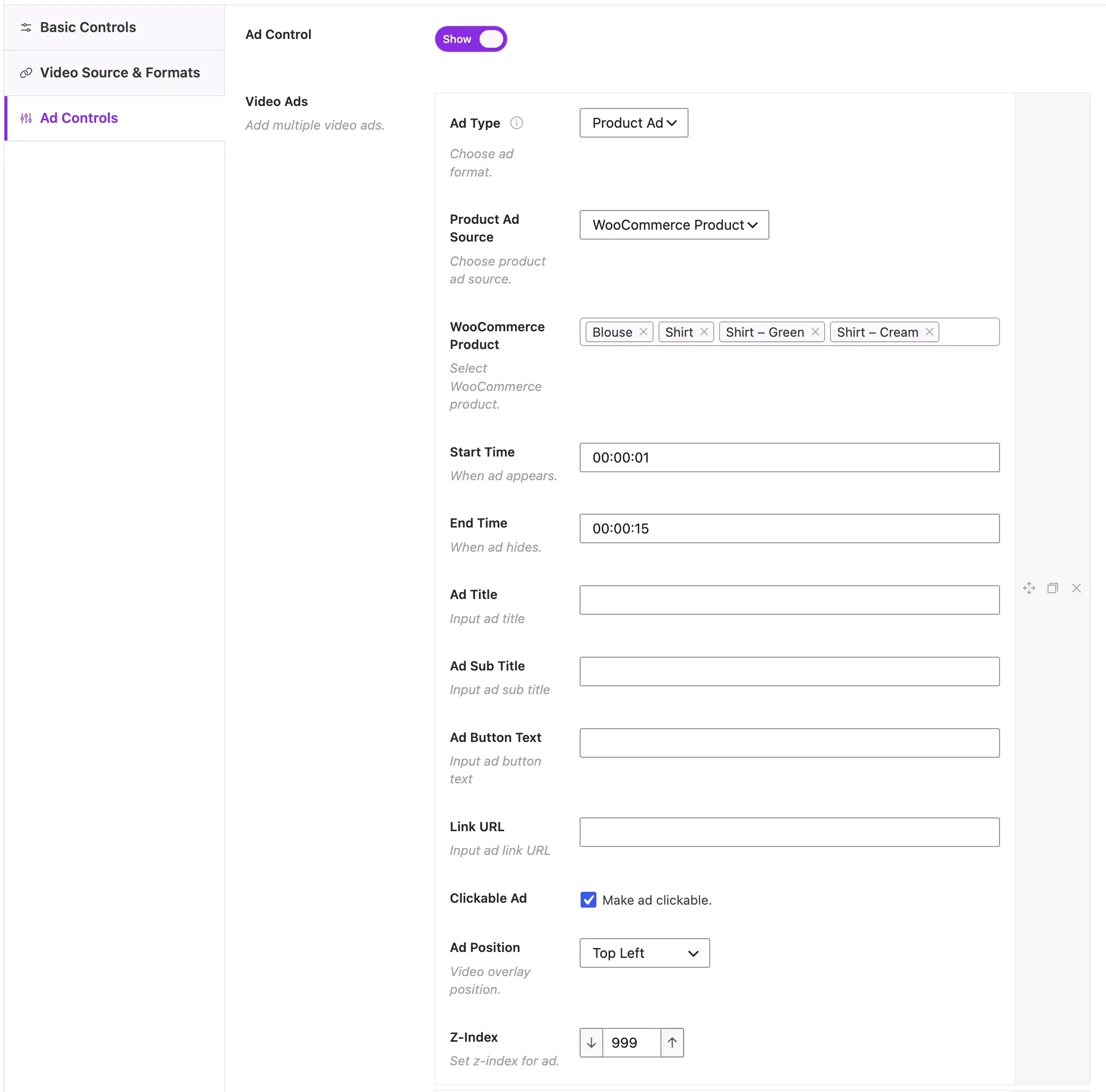
Per MediaHaven’s own implementation guide: “Navigate to MediaHaven Pro → Add New Vide -> Video Monetization and fill up the add field” This single toggle is what activates the shoppable layer across your video galleries.
Step 3: Build Your Feed Layout
Go to MediaHaven → Views → Add New View and choose your gallery layout. For a TikTok-style feed specifically, a vertical (9:16) aspect ratio — added in version 1.7.2 alongside 16:9, 4:3, 1:1, 4:5, and 21:9 options — combined with Carousel layout most closely replicates the scrollable, mobile-native feel viewers already expect from social commerce.
Step 4: Link Each Video to Its Product
In each video’s settings, link the corresponding WooCommerce product — or, for multi-product videos (a “shop the look” style piece), link a product category so multiple items can be tagged within a single video.
Step 5: Configure the Overlay Timing and CTA
Set the CTA label (per MediaHaven’s documentation, examples include “Shop Now,” “Add to Cart,” or a custom label matching your brand voice) and configure exactly when the overlay appears — ideally timed to the moment the product is actually visible on screen, not a fixed generic timestamp.
Step 6: Position the Overlay Without Blocking the Product
MediaHaven Pro provides 9 configurable ad/overlay positions — top left, top center, top right, middle left, middle center, middle right, bottom left, bottom center, bottom right. For product-focused footage, bottom-center or bottom-left placements typically avoid obscuring the item itself while remaining clearly visible.
Step 7: Add VAST Monetization (Optional)
If you want the feed to also generate ad revenue from views — not just product sales — MediaHaven Pro’s VAST ad support layers pre-roll, mid-roll, or overlay ads onto the same video, giving you two revenue mechanisms from one content asset.
Step 8: Verify Schema.org Markup Is Active
MediaHaven generates Schema.org VideoObject structured data automatically on every gallery — confirmed as a free-tier feature — meaning your shoppable feed is also discoverable through organic search, not just direct traffic.
Why This Matters: The Funnel Math
MediaHaven’s own analysis of the conversion mechanics is direct: “A typical video marketing funnel for a WooCommerce store without shoppable infrastructure…[has] four separate navigation events — four distinct opportunities for the buyer to abandon the funnel. Industry conversion data consistently shows that reducing purchase steps from 4 to 2 can double conversion rates.”
Shoppable video compresses this funnel by moving the purchase action — or at minimum, the product consideration action — inside the video experience itself. When a viewer can initiate a cart action from inside or immediately adjacent to the video player, the number of required navigation events drops from four to one.
This is precisely the mechanism behind TikTok Shop’s outsized conversion rate relative to platforms that still require the viewer to navigate away from content to buy.
Business Case: What This Is Worth to a Real Store
Per MediaHaven’s own published analysis: “For a WooCommerce store generating $5,000/month in revenue, achieving even a 10% conversion rate improvement through shoppable video pays for the annual Pro license in the first week.”
The broader strategic framing matters too: “Paid advertising is a traffic rental. Shoppable video on your WordPress site is a traffic-owning, conversion-compounding, SEO-building asset that continues generating revenue long after the initial investment.” Unlike an ad campaign, a shoppable video gallery keeps working — and keeps ranking — after the initial setup cost, rather than requiring continuous spend to sustain traffic.
FAQ: Building a Shoppable Video Feed in WordPress
Does this work with any video source, or only self-hosted video? Shoppable overlays and VAST ads work with self-hosted, HLS, and Bunny Stream videos. Per MediaHaven’s official documentation, they are not available on YouTube, TikTok, Vimeo, or other embedded platform videos, since those platforms run their own independent player and ad systems.
Do I need coding experience to set this up? No. MediaHaven’s own guide states this explicitly: “No coding required. Works with WooCommerce. Deployable in under an hour.” Every step described above happens through WordPress admin screens.
Can one video feature multiple products, like a “shop the look” video? Yes — link a product category rather than a single product, and multiple items appearing in the same video can each carry their own overlay.
Will this slow down my site? MediaHaven’s smart per-shortcode asset loading means the plugin’s CSS/JS load only on pages containing a gallery, and built-in lazy loading defers thumbnail and video loading until content is actually in view — the shoppable layer doesn’t add sitewide overhead.
Is this free, or does it require Pro? Core video galleries are free. WooCommerce product overlays, VAST ads, and the shoppable interaction layer specifically require MediaHaven Pro, starting at $79/year with a 14-day money-back guarantee.
How is this different from just putting a “Buy Now” link in a video description? A link in a description requires the viewer to stop watching, find the link, click it, and navigate to a separate page — reintroducing the exact friction shoppable video is designed to eliminate. An in-player overlay keeps the viewer inside the content while still enabling the purchase action.
Can I track which products get the most engagement from the feed? MediaHaven’s Ajax view counter and like/dislike system (free tier) give baseline engagement signals per video. For granular ad-specific performance data, MediaHaven’s own materials note that in-plugin ad performance tracking is an actively developed feature rather than a fully mature dashboard at this time — cross-reference with your WooCommerce order data for actual sales attribution today.
What aspect ratio should I use for a TikTok-style feed? Vertical 9:16 most closely matches the format viewers already associate with scrollable social shopping content. MediaHaven added dedicated aspect ratio controls (including 9:16) in version 1.7.2 specifically to support this kind of format flexibility within a single plugin.
MediaHaven Lite is available free from the WordPress plugin directory — no credit card required.
MediaHaven Pro starts at $79/year for a single site and includes every feature covered in this guide: WooCommerce product video overlays, VAST ads, Ajax live filters, drag-and-drop card builder, WebP conversion, unlimited styles, and a high-performance indexed lookup table for large video libraries.
Every Pro purchase is backed by a 14-day money-back guarantee.
 Live shoppable video demo: demo.mediahaven.io/shoppable-video-for-ecommerce/
Leave a Reply