

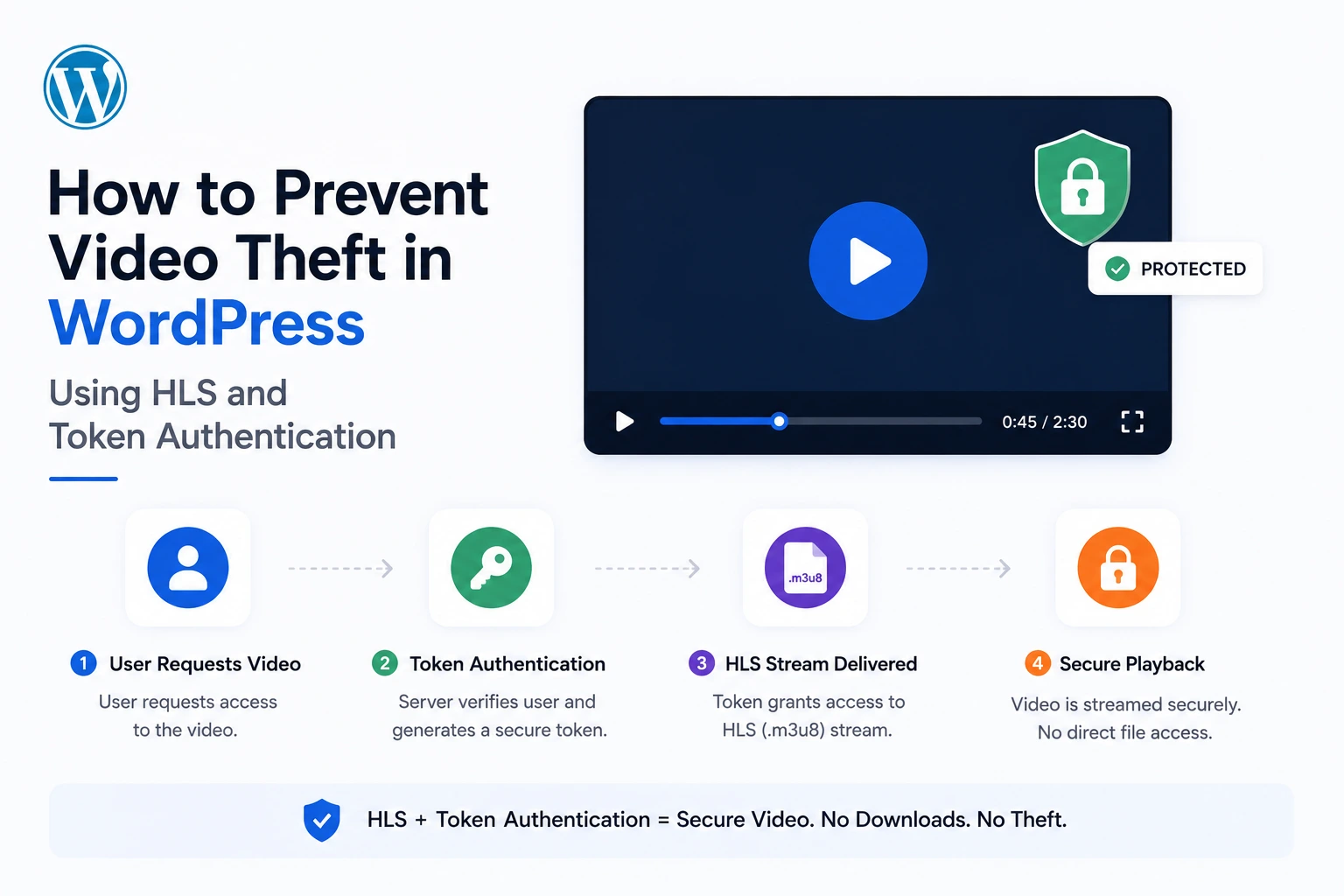
Right-click, “Save Video As,” done. If your WordPress site hosts video the default way — a direct MP4 file embedded in an HTML5 player — that’s how long it takes anyone to steal your content. No hacking skill required. No special tools. Just a browser context menu.
54% of streaming providers reported losing revenue to piracy before adopting stronger protections, according to a 2025 OTT industry report cited in current course-creator security research (Spotlightr, 2026). If your videos are the product you sell — a course, a membership library, premium tutorials — this isn’t a hypothetical risk to your business.
This guide shows you exactly how to stop the most common forms of WordPress video theft using HLS (HTTP Live Streaming) combined with signed token authentication — implemented through MediaHaven, a free WordPress plugin, connected to Bunny Stream’s CDN.
The Four Ways Your WordPress Videos Are Being Stolen Right Now
Before fixing the problem, understand exactly how it happens. Video piracy research identifies four consistent theft mechanisms relevant to WordPress site owners:
1. Direct Download via Browser
Any standard HTML5 <video> tag pointing to an MP4 file can be downloaded directly. Chrome even adds a native download icon to its default video player controls — no extension required. Hiding your player’s download button does nothing, because the underlying video file URL is still visible in the page’s network requests (Spotlightr, 2026).
2. Hotlinking
Someone copies your video’s direct URL and embeds it on their own website. This exposes your paid content to an audience that never paid for it, and it uses your server’s bandwidth to do it — a double cost (Bplugins, 2026).
3. URL and Token Sharing
If your video access relies on a static, non-expiring link — even one that “looks” secure — that link can be shared endlessly. Anyone with the URL gets access, regardless of whether they’re an authorized customer (VdoCipher, 2026).
4. Credential and Password Sharing
For membership sites and courses, one paid login can be shared among many unauthorized viewers unless the platform actively detects and restricts concurrent access. This is the same problem streaming services like Netflix have spent years fighting (VdoCipher, 2026; Tutor LMS, 2026).
What none of these have in common with screen recording: they’re all fixable at the delivery-protocol level. Screen recording is not — no technology fully prevents someone from pointing a camera or capture tool at their own screen. This guide focuses on the three vectors that can be closed, because they account for the overwhelming majority of casual and opportunistic video theft.
Why HLS Is the Foundation of Real Video Protection
HLS (HTTP Live Streaming) is the delivery protocol that makes protocol-level theft prevention possible. Instead of serving your video as one downloadable file, HLS breaks it into small segments (2–10 seconds each), referenced by a playlist file (.m3u8).
This single architectural change defeats the most common theft method automatically: there’s no single “video file” to right-click and save, because what the browser is playing is dozens or hundreds of small segments assembled in real time. A user would need to manually capture and stitch together every individual segment file — a task orders of magnitude harder than a single right-click.
HLS also solves a second problem simultaneously: adaptive bitrate streaming. The player automatically requests lower-quality segments when a viewer’s connection is slow, eliminating buffering — the same technology behind Netflix, YouTube, and Apple TV+ playback.
Why HLS Alone Isn’t Enough — You Need Token Authentication Too
Here’s the gap most “secure streaming” guides miss: an unprotected HLS stream is still stealable. If your .m3u8 playlist and segment URLs are publicly accessible without any authentication check, someone can simply hotlink the manifest URL itself, or share it freely — HLS format alone doesn’t prevent this.
Token authentication closes this gap. A signed token is a piece of cryptographic proof — generated using a secret key, the file path, and an expiration timestamp — appended to the URL:
https://yourzone.b-cdn.net/videos/lesson-1/playlist.m3u8?token=8f3a91b2c4d5&expires=1598024587Every time a segment is requested, the CDN server independently recalculates the expected token using its secret key and compares it to the one in the URL. If they don’t match — or if the current time is past the expires timestamp — the request is rejected outright, regardless of how “correct” the URL otherwise looks (Bunny.net Token Authentication documentation, 2026).
This is what actually stops hotlinking and URL sharing. A copied link isn’t just discouraged — it’s cryptographically invalid outside its authorized window. Set the expiration window short enough (tied to a normal viewing session), and a shared link becomes worthless within minutes to hours.
For HLS specifically, one additional technical piece matters: directory or path-based tokens. Because a single video generates many segment requests during playback, the token needs to authorize an entire folder path (e.g., /videos/lesson-1/) rather than just one file — this is a specific, documented capability of modern CDN token systems (BunnyNet-PHP documentation, 2026), and it’s what makes secure streaming practical rather than requiring a fresh signed token for every few seconds of video.
Setting This Up in WordPress: The MediaHaven + Bunny Stream Method
MediaHaven (free plugin, WordPress.org, v1.7.3) automates the entire HLS conversion and token-signing process — no manual encoding, no server-side signing code required.
What MediaHaven Automates, Confirmed From Official Documentation
Per MediaHaven’s WordPress.org plugin listing:
“One-click HLS conversion — hit Sync and your video is automatically converted to secure adaptive HLS format on Bunny Stream.”
“Encrypted HLS delivery — signed URLs and token authentication block hotlinking and direct downloads.”
“Same streaming technology trusted by Netflix and Apple — free with MediaHaven.”
Step-by-Step Setup (Documented Process, ~10 Minutes)
Step 1 — Create a Bunny Stream account Sign up free at bunny.net. No credit card required to start.
Step 2 — Create a Stream Library In your Bunny dashboard, create a Stream Library. Copy your API Key, Library ID, and CDN Hostname — you’ll need these in WordPress.
Step 3 — Enable Token Authentication in Bunny In your Bunny Stream library security settings, toggle Token Authentication on. This activates the signed-URL requirement at the CDN level.
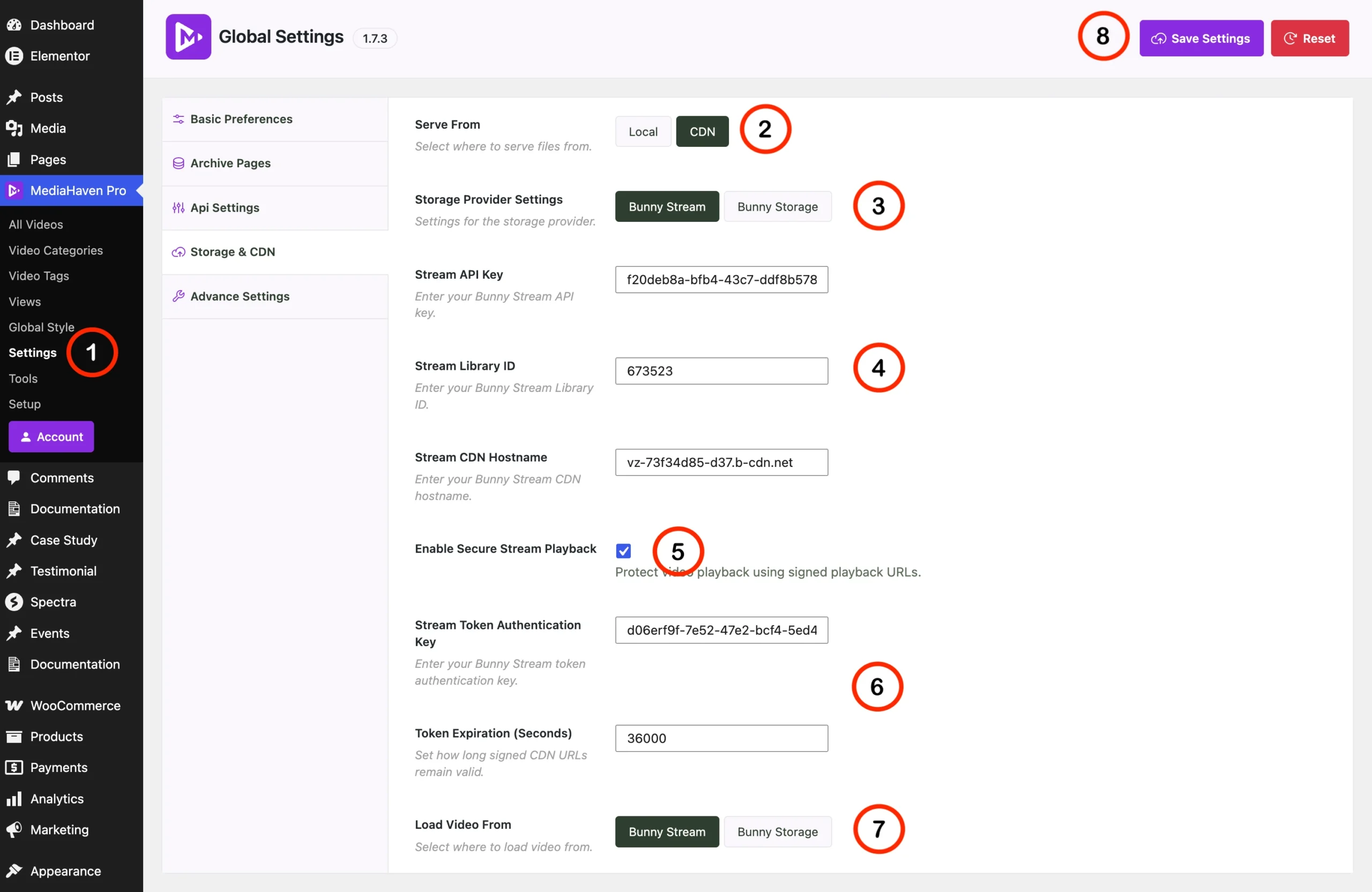
Step 4 — Configure MediaHaven’s Storage & CDN Settings In your WordPress admin, go to MediaHaven → Settings → Storage & CDN:
- Select CDN under “Serve From”
- Select Bunny Stream as your Storage Provider
- Enter your Bunny Stream API Key, Library ID, and CDN Hostname
- Enable Secure Stream Playback
Step 5 — Save and Sync Click Save Settings. Upload a test video through MediaHaven’s normal video editor, then click Sync. MediaHaven pushes the video to Bunny Stream, which automatically converts it to HLS format with token authentication active.
Step 6 — Verify Open your video’s page and inspect the network requests (browser dev tools → Network tab). You should see the .m3u8 manifest URL carrying token and expires query parameters. Copy that URL and try opening it in a fresh incognito window after the expiration time passes — it should fail.
What Gets Protected — Mapped to the Original Theft Vectors
| Theft vector | Protection mechanism | Result |
|---|---|---|
| Direct download via right-click | HLS segmentation — no single file exists to download | Eliminated for standard browser users |
| Hotlinking on another site | Signed token expires and is domain-independent of intent | Copied embed code stops working outside authorized session |
| URL/link sharing | Token expiration timestamp validated per-request | Shared link becomes invalid within the configured window |
| Server bandwidth theft | Zero video bytes served from WordPress hosting | Your server load is unaffected regardless of theft attempts |
| Password/credential sharing | Not addressed by streaming layer — requires membership plugin | Combine with LearnDash, MemberPress, etc. for access-layer control |
| Screen recording | Not preventable by any technology | Mitigate only with watermarking (enterprise DRM tools) |
Adding Domain Restriction as a Second Layer
Token authentication handles expiring, signed access. A complementary layer — domain/referrer restriction — ensures your video CDN only serves requests originating from your own site’s domain, blocking a class of hotlinking attempts even before the token check occurs.
This is configured at the Bunny Stream security level, separate from MediaHaven’s own settings, and functions as defense-in-depth: even if a token were somehow captured within its valid window, a request from an unauthorized domain can still be blocked at the CDN layer.
Layering Membership Protection on Top (For Course and Membership Sites)
If you’re selling access to video content — not just trying to prevent hotlinking on a public site — token authentication alone isn’t the whole picture. It protects the delivery layer (can this URL be played right now), not the access layer (should this specific user be allowed to view this content at all).
For course platforms and membership sites, combine MediaHaven’s secure HLS delivery with:
- A membership plugin (MemberPress, LearnDash, Tutor LMS, LifterLMS) to gate which logged-in users can even reach the page containing the video
- Concurrent session limiting if credential sharing is a specific concern — plugins exist specifically to restrict simultaneous logins per account, addressing the “one account, five viewers” problem (VdoCipher, 2026)
The combination — membership gating for who can access the page, plus signed HLS tokens for how the video itself is delivered once they’re there — closes both the access-control gap and the delivery-security gap simultaneously.
Common Mistakes That Undermine This Setup
Setting token expiration too long. A 24-hour token expiration window gives a shared link a full day of usefulness before it stops working. Match your expiration window to realistic single-session viewing length — often 1–4 hours is sufficient, though this depends on your content’s typical viewing pattern.
Forgetting to enable Token Authentication in Bunny itself. MediaHaven’s “Secure Stream Playback” setting works together with Bunny’s own Token Authentication toggle — both need to be active. If Bunny’s library-level token authentication is off, MediaHaven’s setting has nothing to enforce against.
Relying on streaming security alone for membership content. As covered above, signed HLS tokens don’t check whether a specific WordPress user is allowed to view a specific video — that’s an access-control question your membership or LMS plugin needs to answer independently.
Assuming this stops screen recording. It doesn’t, and no technology fully does. If screen-recording deterrence specifically matters for your content (rather than hotlinking and downloading), dynamic watermarking — overlaying a viewer’s email or account ID onto the video — is the appropriate mitigation, and it works by making leaked recordings traceable, not by preventing the recording itself.
Frequently Asked Questions
How can I prevent video theft on my WordPress website?
While no online video can be made completely impossible to copy, you can significantly reduce unauthorized access by using adaptive HLS streaming, secure delivery, token-based authentication, and avoiding direct MP4 links. MediaHaven integrates with Bunny Stream to help implement these protections without requiring a complex streaming infrastructure.
What is token authentication for video streaming?
Token authentication generates a unique, time-limited access token for each authorized viewer. The streaming server validates the token before serving video manifests and segments, making it much harder for shared or expired links to be reused by unauthorized users.
How does MediaHaven support secure video delivery?
MediaHaven integrates with Bunny Stream for secure adaptive HLS streaming. After syncing your videos, Bunny Stream manages HLS conversion and secure delivery features, while MediaHaven handles playback inside your WordPress website for a seamless viewing experience.
Why is HLS more secure than serving MP4 files directly?
Unlike a single downloadable MP4 file, HLS delivers video as small segments referenced through a playlist. When combined with secure delivery methods such as token authentication and signed URLs, it becomes more difficult to share or directly access the underlying video files.
Can MediaHaven automatically create secure HLS streams?
Yes. When connected to Bunny Stream, MediaHaven lets you upload or sync videos with a single click. Bunny Stream automatically converts supported videos into adaptive HLS streams, and MediaHaven plays them directly within your WordPress website.
Can I protect WooCommerce product videos from unauthorized access?
Yes. MediaHaven supports secure HLS playback for WooCommerce product videos through its Bunny Stream integration. This helps protect premium demonstrations, tutorials, and product videos while delivering reliable playback across desktop and mobile devices.
Does secure HLS streaming improve website performance?
Yes. HLS automatically adjusts video quality based on each visitor’s connection speed, reducing buffering and improving playback. When paired with Bunny Stream’s global CDN and MediaHaven’s Smart Asset Loading, your website can remain fast while serving high-quality videos.
Can I use my own HLS (.m3u8) streams with MediaHaven?
Absolutely. MediaHaven supports existing HLS (.m3u8) playlists from compatible streaming providers. If you already have HLS streams, simply add the playlist URL as a video source, or use Bunny Stream to generate adaptive HLS streams automatically.
Does MediaHaven work with Gutenberg and page builders?
Yes. MediaHaven includes native Gutenberg blocks and shortcode support for Elementor, Divi, Beaver Builder, WPBakery, and other popular WordPress page builders. You can embed secure video players and responsive galleries anywhere on your website without writing code.
Does MediaHaven help improve video SEO while protecting content?
Yes. MediaHaven automatically generates Schema.org VideoObject structured data for published videos while supporting secure HLS playback. This lets you improve search visibility without sacrificing the security or performance of your video content.
Is MediaHaven suitable for businesses with growing video libraries?
Absolutely. MediaHaven combines secure HLS streaming, Bunny Stream integration, responsive galleries, multiple video source support, VideoObject schema, WooCommerce compatibility, and performance-focused architecture in one scalable platform for creators, educators, publishers, and businesses.
Why choose MediaHaven for secure WordPress video streaming?
MediaHaven brings together secure HLS streaming through Bunny Stream, token-based access support, responsive video galleries, automatic VideoObject schema, WooCommerce integration, Gutenberg blocks, and performance optimizations in a single plugin. Instead of assembling multiple video tools, you get a complete WordPress video platform designed for secure, scalable, and professional video delivery.
Final Verification Checklist
- Bunny Stream Token Authentication enabled at the library level
- MediaHaven’s Secure Stream Playback enabled and connected to the same library
- Test video synced and confirmed serving via
.m3u8withtokenandexpiresparameters - Token expiration window set appropriately for your typical viewing session length
- Domain/referrer restriction configured in Bunny for defense-in-depth
- Membership or LMS plugin layered on top for access-layer control, if selling gated content
- Direct MP4 hosting fully retired for any premium/paid content — no fallback insecure URLs left active
- Install free: wordpress.org/plugins/mediahaven-lite
- Official documentation: mediahaven.io/docs/
- Upgrade to Pro: mediahaven.io/pricing — $79/year · 14-day money-back guarantee
- Support: support@wpninjadevs.com
Leave a Reply