

If you are still using product videos purely for brand awareness, you are leaving measurable revenue on the table. In 2026, the most profitable WordPress stores have transformed every product video into a self-contained sales funnel — one that captures attention, builds purchase confidence, and converts viewers without ever sending them off-page or onto another platform.
This guide shows you exactly how to do that using MediaHaven, the WordPress video plugin built specifically for revenue-driven video commerce.
Why Product Videos Are Now the #1 Conversion Asset
The data heading into 2026 removes any remaining doubt. Video is no longer a support asset — it is the primary purchase driver for the majority of online shoppers.
| Metric | Data Point | Source |
|---|---|---|
| Conversion lift | Products with video convert 86% higher than those with static images alone | Joyspace, 2026 |
| Add-to-cart rate | Jumps 64% on pages featuring product video | Joyspace, 2026 |
| Time on page | Increases 88% when product pages include video | Joyspace, 2026 |
| Return rate | Drops 40% when customers watch a video before buying | Joyspace, 2026 |
| Purchase probability | 73% of shoppers who watch an explainer video are more likely to buy | GoDAM, 2026 |
| Consumer conviction | 85% of people have been convinced to buy after watching a video | GoDAM, 2026 |
The problem for most WordPress store owners is not the absence of video. It is that their videos are passive — embedded from YouTube, playing in a standard player, delivering zero direct commerce interaction. The viewer watches. Nothing happens. The sale is left entirely to chance.
A video sales machine closes that gap by putting the purchase action inside the video experience itself.
What Makes a Product Video a “Sales Machine”?
A passive video shows your product. A sales machine activates around it. The distinction comes down to four operational elements:
- Commerce integration — the ability to add a product to cart from within or directly adjacent to the video player
- Trust signals — view counts, engagement metrics, and social proof rendered alongside the video
- Discovery architecture — related videos and category navigation that keep the buyer inside your ecosystem
- SEO infrastructure — structured data that attracts organic search traffic rather than relying purely on paid clicks
MediaHaven Pro is architected around all four pillars. Here is how each one translates into measurable revenue.
Pillar 1: In-Video Product Promotion (WooCommerce Integration)
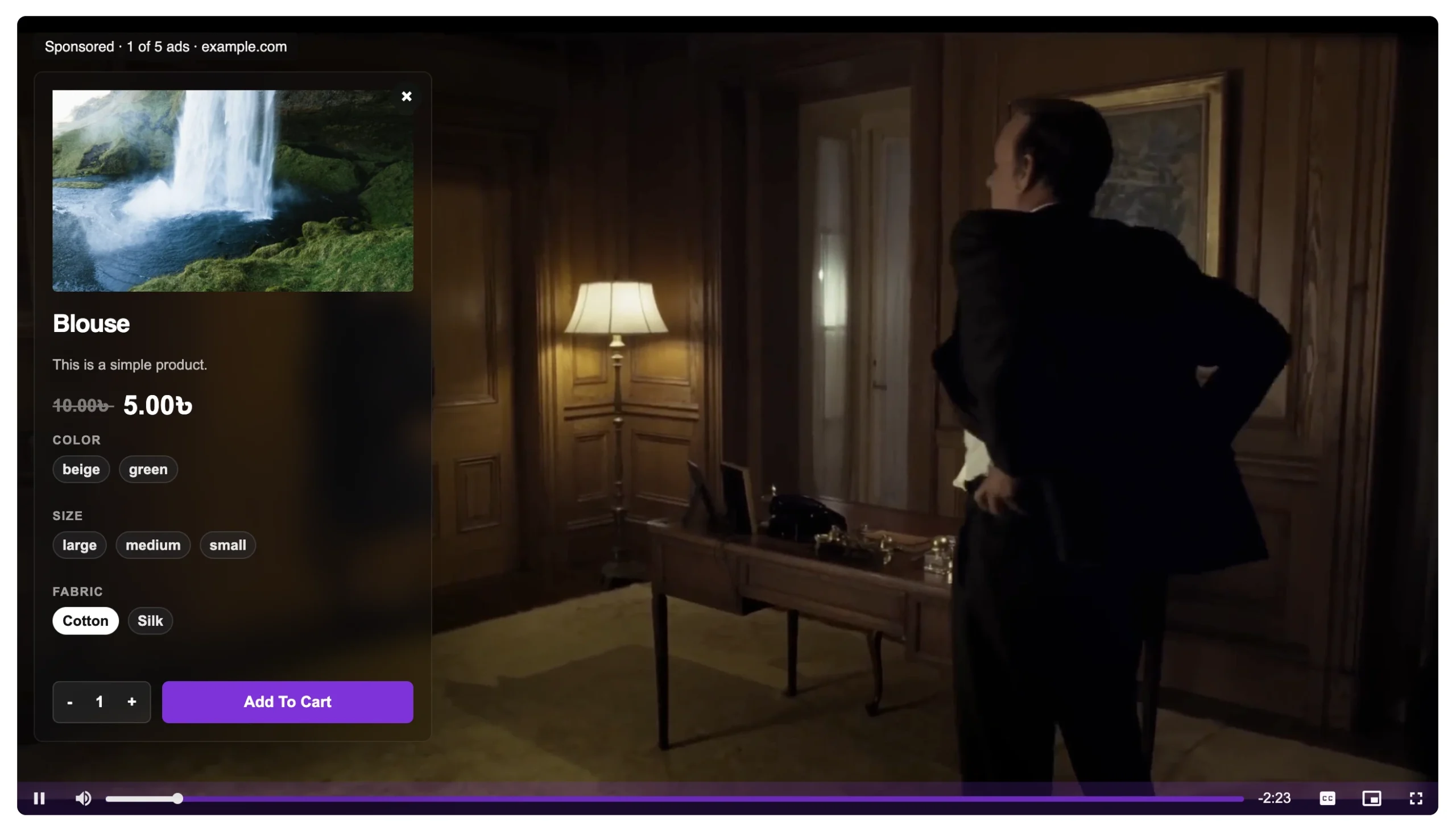
The most powerful feature MediaHaven Pro adds to any WordPress store is WooCommerce product video overlays. You can show a product demo and simultaneously prompt the viewer to add a related item to cart — directly inside the video player. The viewer never leaves the page. The browsing state is preserved. The purchase path is shortened to a single action.
MediaHaven Feature: WooCommerce product video overlays let you display a product prompt — including a fully customizable CTA button — at any point during video playback. Upsell and cross-sell without sending shoppers away from the page. Result: higher conversions, lower drop-off.
This is the core mechanism behind the conversion lifts reported across video commerce platforms in 2026. In-video checkout experiences report conversion rates as high as 9% on pre-recorded video and up to 16% on live streams — compared to the 1–3% average for standard e-commerce product pages (eStreamly, 2026).
For WooCommerce store owners, this single feature transforms every product video from a marketing asset into a direct revenue channel.
Pillar 2: VAST Ad Monetization
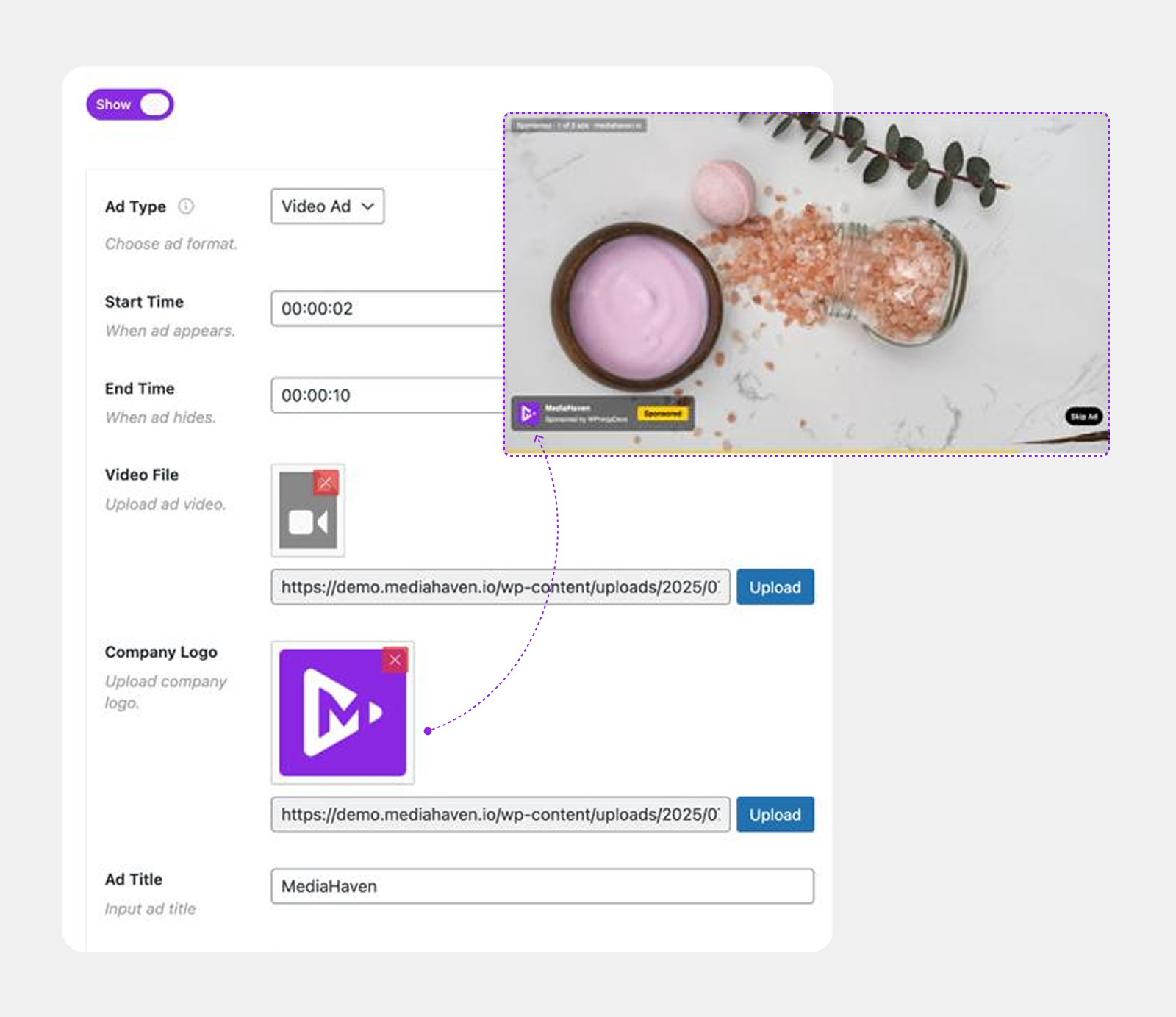
If you operate a content-heavy WordPress site — reviews, tutorials, lifestyle publishing — MediaHaven Pro’s VAST ad system gives you a second revenue stream running parallel to organic content.
VAST (Video Ad Serving Template) is the industry standard used by major ad networks. MediaHaven Pro supports:
- Pre-roll ads: Play before the main video, capturing 100% of viewers at peak attention
- Mid-roll ads: Inserted at custom timestamps — ideal for longer tutorials where engagement is already established
- Post-roll ads: Play after the video, reaching viewers who have self-selected as highly engaged
- Banner and link overlays: Static overlays that display during playback without interrupting audio
- Nine screen positions: Top left through bottom right, for pixel-precise ad placement
For a WooCommerce store embedding product review videos, mid-roll ads that promote complementary products represent pure upsell revenue with zero additional ad spend.
Pillar 3: SEO Infrastructure That Drives Organic Traffic
Most video strategies fail at a single point: they build audiences on YouTube, then have no mechanism to capture organic search traffic back to the store. MediaHaven is architected to fix this.
Schema.org structured data is generated automatically for every video gallery. This markup enables rich results in Google Search — including video preview thumbnails and timestamps directly in organic search results — without requiring a separate SEO plugin.
Organic traffic from video-rich search results converts at higher rates than paid traffic because user intent is already explicit. A shopper finding your product video through Google search for “best running shoes for flat feet review” already knows what they want.
Combined with Ajax live filters that generate SEO-friendly URLs for filtered video views, MediaHaven creates an architecture where every filtered category page becomes an independent, indexable landing page — multiplying your organic entry points without additional content creation.
Pillar 4: Performance (Because Speed Is Revenue)
A sales machine that loads slowly is not a sales machine. It is a bounce rate generator. MediaHaven is built with a performance-first architecture that protects conversion rates at every level:
- Smart asset loading: Only the CSS and JS each specific page needs are loaded — no site-wide bloat on pages that don’t contain a video gallery
- WebP thumbnail compression (Pro): Video thumbnails convert to WebP automatically, reducing file size without visible quality loss
- Lazy loading engine: Videos, images, and iframes load only when they enter the viewport, protecting initial page speed
- Smart caching for YouTube feeds: API data is cached intelligently, reducing load times and API quota consumption simultaneously
These technical decisions translate directly into Core Web Vitals scores — a confirmed Google ranking factor. Stores that load faster rank higher, attract more organic traffic, and convert more visitors into buyers.
Building Your Video Sales Machine: Step-by-Step
Step 1: Install MediaHaven and Complete the Setup Wizard
Download MediaHaven Lite free from the WordPress plugin directory and activate it. The built-in Setup Wizard launches automatically after activation and walks you through:
- Server and performance checks
- Optional YouTube API connection for channel/playlist feeds
- Sample videos and shortcode templates
- Clear next steps to explore advanced features
Most stores have their first gallery live within 5–10 minutes of activation.
Step 2: Import or Create Your Product Videos
MediaHaven supports 12 video sources in a single gallery:
YouTube (feeds, playlists, embeds), Vimeo, self-hosted MP4, TikTok, Facebook, Instagram, LinkedIn, Twitch, Wistia, Dailymotion, Rumble, and HLS live streams.
For WooCommerce stores, the typical workflow combines self-hosted product demos with existing YouTube channel content — creating a unified gallery that keeps viewers on your site rather than handing them off to another platform.
Step 3: Configure WooCommerce Product Overlays (Pro)
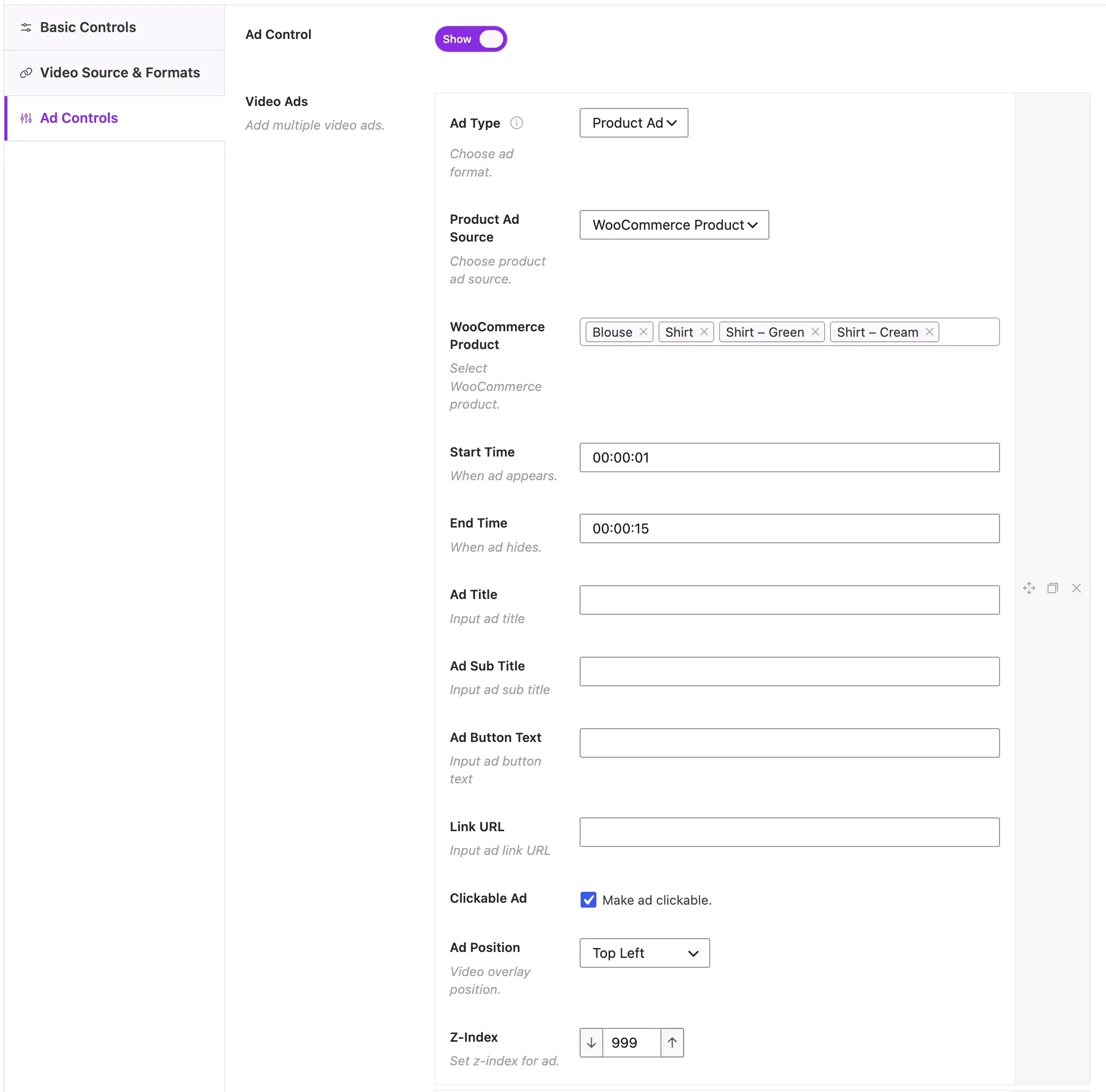
In MediaHaven Pro, navigate to your video settings and enable WooCommerce product video overlays. For each video, you can:
- Link the associated WooCommerce product (or an entire product category for multi-product videos)
- Set the CTA button label: Add to Cart, View Product, Shop Now, or any custom text
- Configure overlay timing: at video start, at a specific timestamp, or at video end
No coding required. The overlay renders inside the video player automatically.
Step 4: Set Up VAST Ads (Pro, Optional)
Connect your VAST-compatible ad network in MediaHaven Pro’s ad settings. Configure ad positions — pre-roll for maximum impressions, mid-roll for engagement-based revenue, post-roll for committed viewers. MediaHaven Pro supports multiple ad types per video and multiple placements per video session.
Step 5: Activate SEO Markup and Ajax Filters
Schema.org structured data is enabled by default in both Free and Pro. For Pro users, activate the Ajax Live Filter and configure filter options — category, tag, duration, resolution, featured status — based on how your customers naturally browse your product content. Each filter combination creates a unique, SEO-friendly, indexable URL.
Step 6: Embed with Shortcodes Across Your Store
Use MediaHaven’s unlimited shortcode builder to place video galleries anywhere: product pages, landing pages, blog posts, or a dedicated video hub. The Gutenberg Shortcode View block shows a live preview before publishing. All galleries are fully responsive across mobile, tablet, and desktop.
MediaHaven is compatible with Elementor, WPBakery, Divi, Beaver Builder, and all major page builders.
The Revenue Case: What to Expect
Based on aggregated video commerce benchmarks from 2025–2026:
- Stores adding shoppable video to product pages report conversion rate increases of 25–86% depending on product category and video quality
- Average order value increases approximately 30% when customers watch a product video before purchase
- Customer acquisition cost via video-influenced buying averages $12–22, versus $25–45 for standard paid social (McKinsey, 2025)
- Repeat purchase rates for video buyers reach 38%, versus 28% for standard e-commerce buyers — reflecting higher trust built through video
For a WooCommerce store generating $10,000 per month in revenue, a 30% conversion lift from video commerce represents an additional $3,000 per month without increasing ad spend.
Frequently Asked Questions
How can I turn product videos into sales machines on WordPress?
MediaHaven transforms ordinary product videos into interactive shopping experiences by combining WooCommerce integration, responsive video galleries, SEO optimization, and optional in-video product promotions. Instead of simply watching a video, visitors can discover products and move closer to purchasing without leaving your website.
Why do product videos increase WooCommerce sales?
Product videos help shoppers understand features, benefits, and real-world usage before making a purchase. MediaHaven enhances this experience with fast-loading video galleries, responsive layouts, and seamless WooCommerce integration, creating a smoother buying journey that encourages higher engagement and stronger conversion rates.
How does MediaHaven make WooCommerce product videos more effective?
MediaHaven combines product videos, responsive galleries, multiple video sources, VideoObject schema, and WooCommerce integration into one platform. MediaHaven Pro extends this with interactive product overlays, customizable call-to-action buttons, and VAST advertising, helping every product video contribute more directly to business growth.
Can I add clickable products inside my videos with MediaHaven?
Yes. MediaHaven Pro lets you display interactive WooCommerce product overlays directly inside self-hosted product videos. You can configure custom CTA buttons, choose when they appear during playback, and guide shoppers toward product pages or purchasing actions without disrupting the viewing experience.
Can MediaHaven display product videos from different video platforms?
Yes. MediaHaven supports self-hosted videos, YouTube, Vimeo, HLS streams, TikTok, Facebook, Instagram, LinkedIn, Wistia, Dailymotion, Twitch, and other supported platforms. You can manage them from one centralized dashboard and present them in a consistent, professional WooCommerce video gallery.
How does MediaHaven improve the SEO of product videos?
MediaHaven automatically generates Schema.org VideoObject structured data for every published video, helping search engines understand and index your content. Combined with optimized gallery pages and responsive layouts, this gives product videos a better opportunity to appear in video search results and attract qualified organic traffic.
Can I monetize product videos while selling WooCommerce products?
Yes. MediaHaven Pro supports industry-standard VAST advertising alongside WooCommerce product videos. You can earn advertising revenue from video views while simultaneously promoting your own products, creating multiple monetization opportunities from the same piece of video content.
Does MediaHaven work with Gutenberg and popular page builders?
Absolutely. MediaHaven includes dedicated Gutenberg blocks and flexible shortcodes, making it compatible with Elementor, Divi, WPBakery, Beaver Builder, and other major page builders. You can embed product video galleries anywhere without writing custom code.
How does MediaHaven help keep WooCommerce product pages fast?
MediaHaven uses smart asset loading so CSS and JavaScript are loaded only where video content appears. Combined with lazy loading and WebP thumbnail optimization in Pro, it helps improve Core Web Vitals while delivering smooth, responsive product video playback.
Can I build an entire video commerce strategy with MediaHaven?
Yes. MediaHaven is designed as a complete WordPress video commerce platform rather than just a video player. From responsive galleries and WooCommerce product videos to SEO, HLS streaming, VAST advertising, and interactive shopping features, it provides everything needed to turn video content into a scalable revenue channel.
Is MediaHaven suitable for growing WooCommerce stores?
Absolutely. MediaHaven scales from small online stores to large product catalogs with features designed for performance, organization, and future growth. As your business expands, MediaHaven Pro adds advanced video commerce tools that help increase engagement, improve customer experience, and maximize the value of every product video.
Start Free, Scale When Ready
MediaHaven Lite is available free from the WordPress plugin directory — no credit card required.
MediaHaven Pro starts at $79/year for a single site and includes every feature covered in this guide: WooCommerce product video overlays, VAST ads, Ajax live filters, drag-and-drop card builder, WebP conversion, unlimited styles, and a high-performance indexed lookup table for large video libraries.
Every Pro purchase is backed by a 14-day money-back guarantee.
👉 Get started at mediahaven.io
Data sources: Joyspace (2026), GoDAM (2026), eStreamly (2026), McKinsey (2025), SellersCommerce (2025)
Leave a Reply