

Video advertising is one of the highest-earning ad formats available to independent publishers. But most WordPress site owners either skip it entirely (because it feels too technical) or implement it in the least effective way possible (slapping a single pre-roll on everything and calling it done).
This guide is for site owners who want to do it properly.
You’ll learn exactly what each video ad placement is, why the position within your video matters for both revenue and audience retention, and how to configure pre-roll, mid-roll, and post-roll ads on your WordPress site using MediaHaven Pro — the only plugin in its class that includes VAST ad monetization inside the base license, with no separate add-on required.
The Business Case for Video Ads in 2026
The global digital video ad market is substantial. According to industry data, video ads consistently command higher CPMs than display or banner ads — because they’re more engaging, harder to ignore, and capture attention at moments of high viewer intent.
For WordPress publishers, the opportunity is real, but the catch is the same as it’s always been: you need video content on your own site, not just on YouTube.
YouTube’s Partner Program gives you roughly 55% of ad revenue from your YouTube views. That means YouTube keeps 45% of money generated from your content — and they control the ad experience, the ad types, and the viewer relationship.
With your own VAST ad setup on WordPress — your player, your gallery, your ad network — you keep close to 100% of what advertisers pay (minus the ad network’s cut, which is standard across all networks). You also control which ads appear, when they appear, and on which videos.
That’s the fundamental difference between a creator who monetizes YouTube and a publisher who monetizes video.
Understanding the Three Instream Ad Placements
Instream video ads are ads that run inside the video player — before, during, or after the content. They are distinct from display ads (banners around the player) and outstream ads (video units that appear between paragraphs of text).
Pre-Roll: The Default, and Usually the Highest Earner
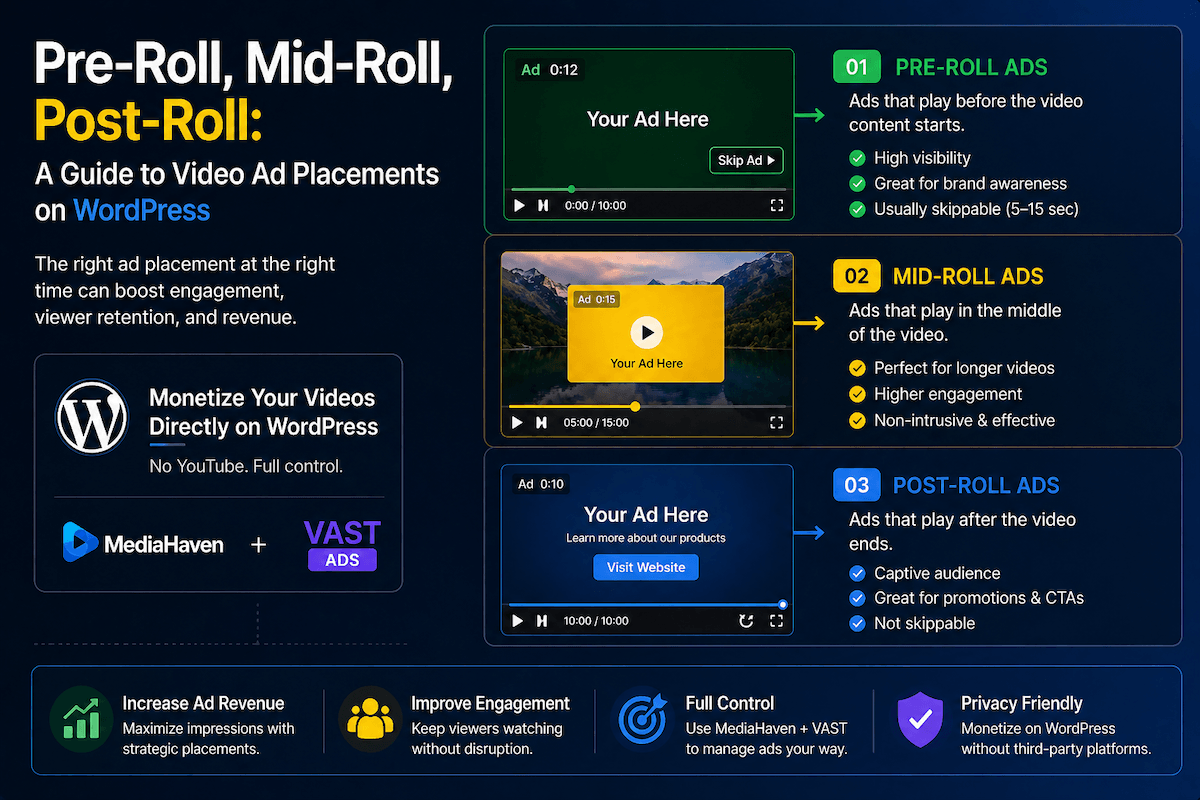
A pre-roll ad plays before your main video content starts.
The viewer clicked play. They are actively waiting for the content. They’re not browsing — they’re committed to watching. This creates the best possible ad viewing condition, which is why pre-roll consistently commands the highest CPM (cost per thousand impressions) of all three placements.
Skippable vs. non-skippable:
| Type | Duration | CPM | Trade-off |
|---|---|---|---|
| Non-skippable | 15–30 seconds | Higher | Viewer cannot skip; higher friction |
| Skippable | Viewer can skip after 5 seconds | Lower | Less friction; wider network support |
Non-skippable pre-rolls earn more per impression because the advertiser is guaranteed a full view. Skippable pre-rolls earn less per impression but often maintain better audience retention — viewers don’t abandon the session out of frustration.
Best content types for pre-roll:
- Tutorial videos where viewers arrive with a specific question
- News and current events content
- Product demo and review videos
- E-learning content with clear viewer intent
Revenue signal: Pre-roll generates the most revenue per placement. If you’re starting with one placement, start here.
Mid-Roll: The Highest CPM When Used Correctly
A mid-roll ad interrupts playback at a defined timestamp.
This is how television has worked for decades — the commercial break in the middle of a show. The viewer is already invested in the content, which means they’re more likely to sit through the interruption than they would be for a pre-roll they didn’t choose to watch.
Mid-rolls can command strong CPMs, particularly in niche audiences where advertisers compete for inventory. But they carry the highest risk of viewer drop-off when executed poorly.
The critical rule for mid-rolls: Insert them at natural stopping points — between topics, after a key conclusion, at a chapter break, or after a natural pause. An ad that fires mid-sentence or during a crucial moment feels like a betrayal of the viewer’s attention. Done at a natural transition, it feels like television.
When mid-rolls work:
- Content 10+ minutes long where a mid-point break is natural
- Educational content with distinct sections or chapters
- Webinar replays or recorded sessions
- Long-form tutorials with logical chapter breaks
When mid-rolls don’t work:
- Videos under 5 minutes (the interruption is disproportionate to the content)
- Emotional or narrative content where continuity matters
- Product demos where breaking the flow costs you conversions
MediaHaven Pro implementation note: When configuring mid-roll ads, you enter the timestamp in seconds where the ad fires (e.g., 600 for 10 minutes in). You can set multiple mid-roll positions for long-form content — giving you recurring ad slots without front-loading the experience.
Post-Roll: Low Disruption, Lower CPMs, Still Worth Running
A post-roll ad plays after the main video content ends.
Viewership at the post-roll position is the lowest of the three placements — many viewers navigate away or close the player once the content finishes. Post-roll CPMs reflect this: they’re generally the lowest of the three instream formats.
But post-roll carries a strategic advantage that the other placements don’t: zero disruption to the viewing experience. Pre-rolls interrupt before the content starts. Mid-rolls interrupt during. Post-rolls affect nothing — the viewer already got what they came for.
Where post-roll makes sense:
- When you’ve already deployed pre-roll and want to add incremental revenue with no user experience cost
- Branding and awareness campaigns where advertiser priority is reach rather than immediate action
- Remarketing situations where the goal is a follow-up impression, not a first touch
Beyond Instream: Overlay and Banner Ads
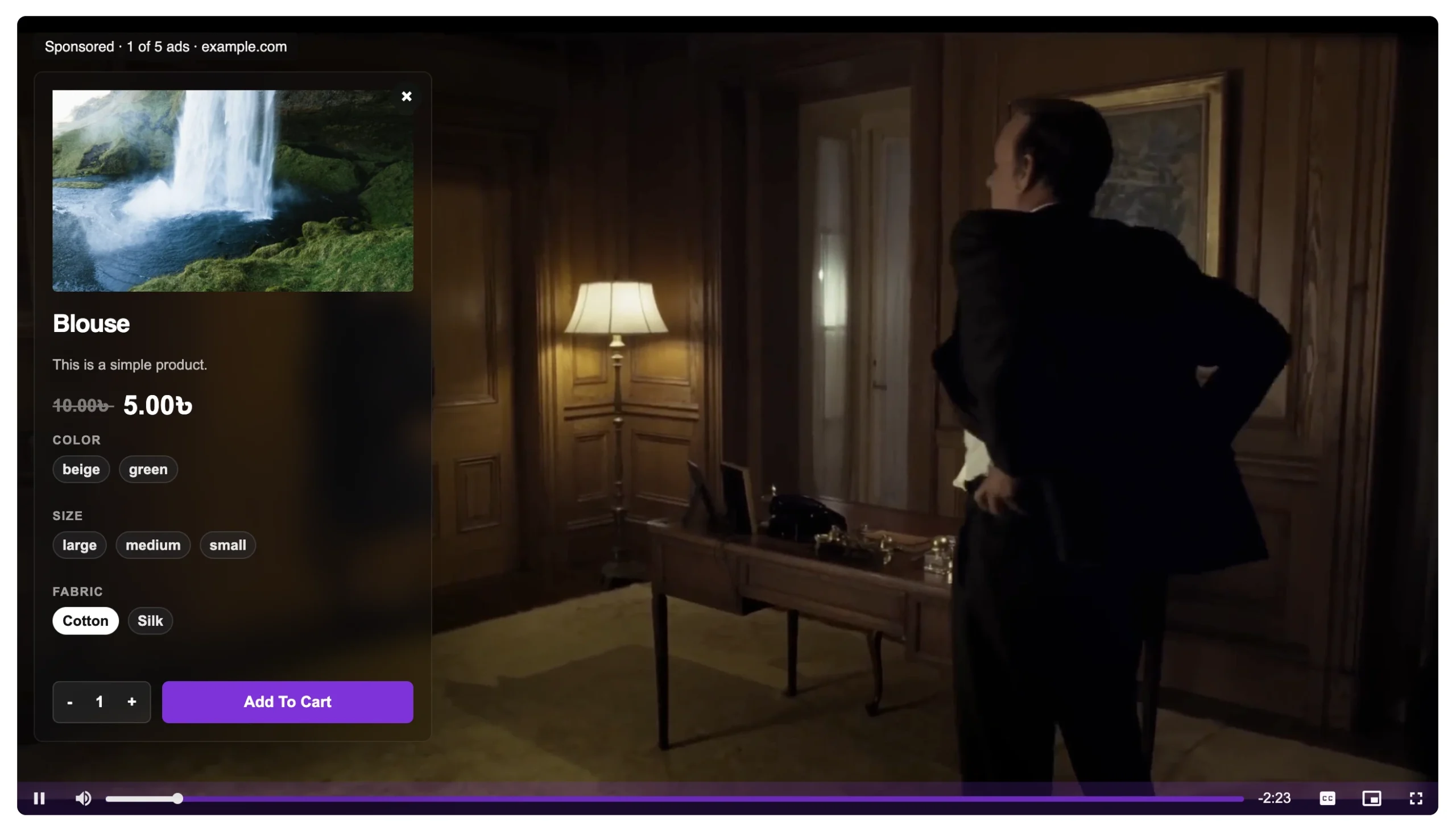
MediaHaven Pro supports additional ad formats that layer over the video while content plays, rather than interrupting it.
Video overlay ads appear as animated or static banners over a portion of the video frame while playback continues. MediaHaven Pro supports three overlay ad types:
| Ad Type | Description |
|---|---|
| Video ads | A short video clip plays in an overlay zone over the main content |
| Banner / image ads | A static image ad appears over the video with a clickable link |
| Link ads | A text-based clickable call-to-action overlay |
Overlay position options in MediaHaven Pro (added in version 1.6.2):
The plugin gives you nine configurable position zones across the video frame:
- Top left, top center, top right
- Middle left, middle center, middle right
- Bottom left, bottom center, bottom right
Each position has independent z-index control (also added in 1.6.2), so overlays layer correctly with other player elements.
You can also configure:
- Ad title — a custom headline for the overlay ad unit
- Ad button label — custom text on the CTA button (e.g., “Shop Now,” “Learn More”)
- Ad audio mute option — mutes the overlay ad’s audio to comply with browser autoplay restrictions
How VAST Connects Your Player to Ad Networks
Every ad placement described in this article is delivered via VAST — Video Ad Serving Template, the IAB-standard XML format that ad networks use to send video ads to compatible players.
Here’s how the chain works in practice:
- You sign up with a video ad network (Google Ad Manager, Google AdSense for Video, SpotX, or a programmatic SSP)
- The network gives you a VAST tag URL — a URL that points to an XML file
- You paste that VAST tag URL into MediaHaven Pro’s monetization settings
- When a visitor plays a video, the player sends a request to the VAST URL, receives the ad instructions, and plays the ad at the configured position
- Tracking pings fire back to the ad server at each milestone (impression, 25%, 50%, 75%, 100% viewed, click)
- You get paid based on the impressions and completions tracked
This works for all three instream placements — you configure which VAST URL fires at which position. You can use the same VAST tag everywhere (global setting) or override it per video (useful for direct-sold campaigns on specific content).
Setting Up Video Ad Placements in MediaHaven Pro
VAST monetization is a Pro-only feature. MediaHaven Pro is $79/year for a single site. All plans include a 14-day money-back guarantee.
Step 1: Get a VAST Tag
Google Ad Manager (free, recommended for most publishers):
- Go to admanager.google.com
- Sign up (free for publishers below traffic thresholds)
- Create a video ad unit under Inventory → Ad units
- Generate a VAST tag for the ad unit
- Copy the VAST tag URL
Google AdSense for Video (if you already use AdSense): Apply separately from standard AdSense at ads.google.com. Once approved, create a video ad unit and copy the VAST URL from your dashboard.
Other networks: SpotX, Tremor Video, Magnite, and similar SSPs provide VAST tags after approval. Most require a minimum traffic threshold.
Step 2: Configure Your VAST Settings in MediaHaven Pro
After installing and activating MediaHaven Pro, navigate to the monetization settings (the exact menu path may vary — look under MediaHaven Lite → Settings for a Monetization or Ads section, or in the individual video post editor for per-video overrides).
Global VAST configuration:
- Enable Ads — toggle on
- VAST URL — paste your VAST tag here
- Ad Position — select pre-roll, mid-roll (enter timestamp in seconds), or post-roll
Per-video VAST override: In any individual video post, you’ll find an Override VAST URL field. Use this to assign a different VAST tag to specific videos — useful for direct-sold campaigns at premium CPMs.
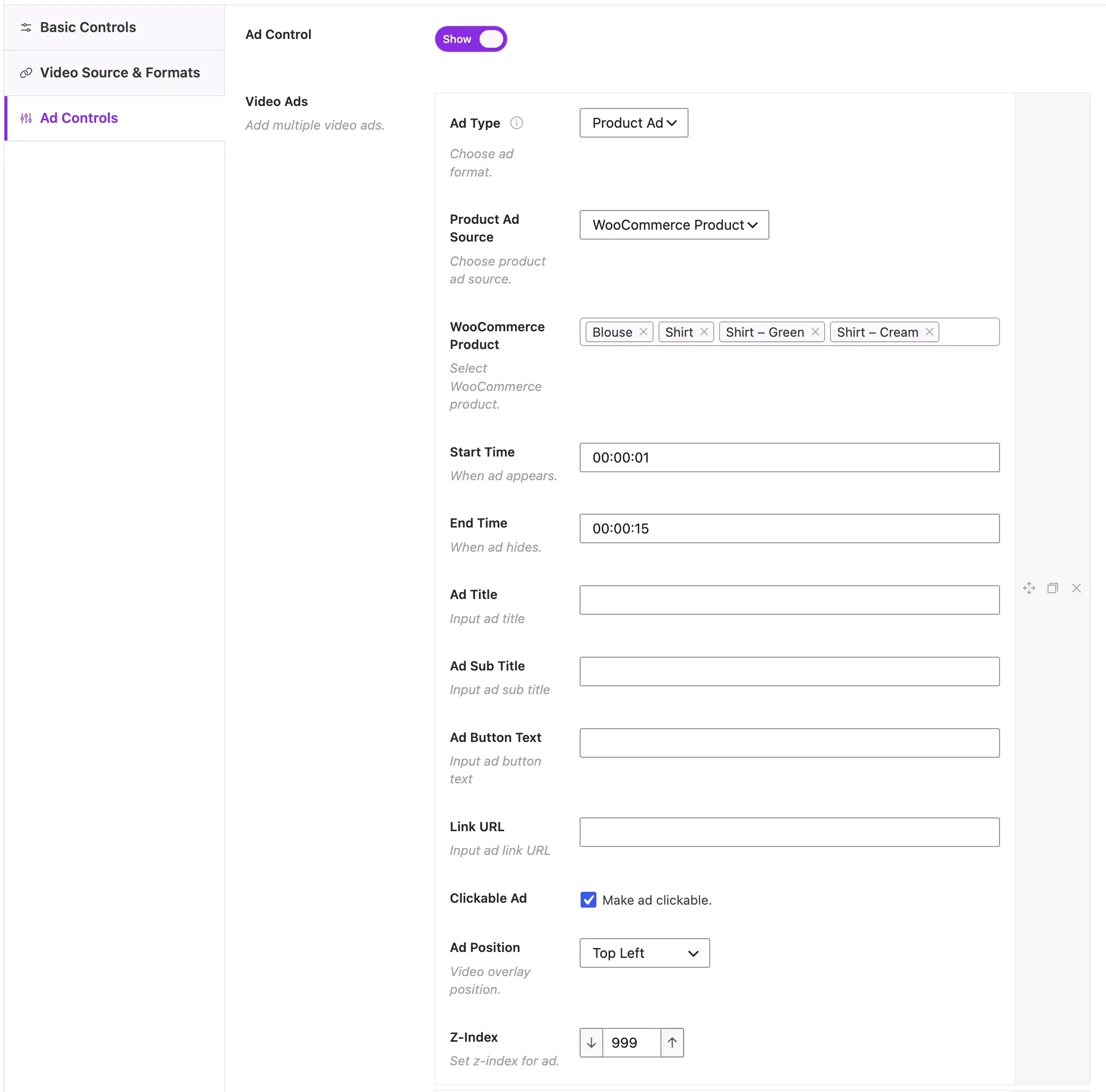
Step 3: Configure Overlay Ad Positions (Optional)
For overlay/banner ads in addition to instream positions:
- Navigate to the overlay ad settings
- Select your ad type: video, banner, or link
- Choose your overlay position from the nine available zones
- Set your ad title and button label
- Toggle Ad Audio Mute on (important for mobile and autoplay compliance)
Step 4: Test Before Publishing
Use the Google IMA Ad Tester (available at imasdk.googleapis.com/js/sdkloader/ima3.html) to verify your VAST tag returns valid ad content before going live. If the tag works in Google’s tester, it will work in MediaHaven’s player.
Then preview your video page on both desktop and mobile to confirm the ad fires at the correct position and that the mute behavior is correct on mobile devices.
Maximizing Revenue: A Placement Strategy for Different Content Types
Short videos (under 5 minutes): Use pre-roll only. A single non-skippable or skippable pre-roll is proportionate to the content length. Mid-rolls feel intrusive on short content and will increase drop-off.
Medium videos (5–15 minutes): Pre-roll + one mid-roll at the natural midpoint (or after the first major topic concludes). Consider a post-roll if you want additive revenue with zero disruption.
Long-form content (15+ minutes): Pre-roll + two or three mid-rolls placed at natural chapter breaks + post-roll. This mirrors how professional AVOD platforms like Hulu and YouTube handle long-form content. MediaHaven Pro lets you set multiple mid-roll timestamps per video.
Live streaming via HLS: Pre-roll fires when the viewer first loads the page and clicks play. MediaHaven’s VAST system works with live HLS streams, so you can monetize live events as well as on-demand video.
Product pages and e-commerce: Pre-roll only. Keep it skippable, under 15 seconds. The viewer is on a product page to convert — a long or forced ad introduction before a product demo is counterproductive. A short skippable pre-roll adds revenue without damaging the conversion path.
Revenue Expectations: What to Realistically Expect
CPM rates vary substantially based on your audience’s geography, your content niche, and the ad network you use. These are realistic benchmarks for independent WordPress publishers in 2026:
| Placement | Typical CPM Range | Notes |
|---|---|---|
| Pre-roll (non-skippable) | $3 – $15 | Highest CPM, guaranteed full view |
| Pre-roll (skippable) | $1.50 – $8 | Lower CPM, lower viewer friction |
| Mid-roll | $2 – $10 | Best for long-form, high-retention content |
| Post-roll | $0.50 – $3 | Lowest CPM, zero disruption |
| Overlay / banner | $0.30 – $2 | Additive revenue alongside other formats |
Geography matters significantly. US, UK, Canadian, and Australian traffic earns meaningfully higher CPMs. Finance, technology, legal, and business niches command rates at the top of these ranges. Lifestyle, entertainment, and general content typically sits in the middle.
Networks take a cut. The CPM above is what advertisers pay. Ad networks typically retain 15–50% before your payout. Google Ad Manager, as the ad server, lets you layer multiple demand sources — increasing competition and effective CPM.
Seasonality is real. Q4 (October–December) consistently generates the highest programmatic CPMs of the year as advertisers compete for holiday ad inventory. Q1 is typically the lowest. Plan your content calendar around this if video ad revenue is part of your business model.
Three Things That Kill Video Ad Revenue (And How to Avoid Them)
1. Stacking too many placements at launch Running pre-roll + multiple mid-rolls + overlay + post-roll on every video simultaneously lowers your effective CPM. Programmatic buyers bid less on cluttered inventory, and viewer drop-off increases. Start with pre-roll only, measure completion rates, and add placements one at a time.
2. Poorly timed mid-rolls A mid-roll that fires mid-sentence or during a critical moment trains viewers to abandon your content. Test your mid-roll timestamps by watching the video yourself at those exact points. If it feels wrong, move it to the next natural pause.
3. Not complying with browser autoplay policies Modern browsers block video ads from autoplaying with sound. This causes ad load failures and wasted inventory. MediaHaven Pro’s Ad Audio Mute option handles this automatically — confirm it’s enabled.
The Compounding Value of Video Ads on WordPress
Here’s the business model that emerges when you combine MediaHaven’s gallery system with VAST monetization:
- You publish video content (YouTube feed, HLS streams, or self-hosted)
- MediaHaven displays that content in a responsive, SEO-marked-up gallery on your WordPress site
- Visitors find your page via organic search (VideoObject schema drives rich results)
- Each play triggers a VAST ad — pre-roll CPM revenue from the first second of engagement
- Longer content drives mid-roll revenue from viewers already invested enough to stay
- Your ad network tracks completion, builds audience data, and over time improves your effective CPM
This isn’t passive income in the overnight sense. It’s a system that compounds — more content means more inventory, more inventory means better CPMs, better CPMs mean higher return per hour of content you create.
Video ad revenue on WordPress, built on HLS streaming and a proper VAST setup, is a legitimate and scalable revenue layer for content publishers in 2026. The tooling is now accessible to anyone on a WordPress site without an engineering team.
Frequently Asked Questions
What are pre-roll, mid-roll, and post-roll video ads?
Pre-roll ads play before a video starts, mid-roll ads appear during playback at selected timestamps, and post-roll ads are shown after the video ends. Each placement serves a different purpose, helping publishers balance viewer experience with advertising revenue based on their content strategy.
Which video ad placement generates the most revenue?
There isn’t a single best placement for every website. Pre-roll ads maximize impressions because every viewer sees them, while mid-roll ads often achieve higher engagement in longer videos. Post-roll ads reach viewers who finish watching, making them useful for highly engaged audiences.
Does MediaHaven support pre-roll, mid-roll, and post-roll ads?
Yes. MediaHaven Pro supports all three VAST ad placements, allowing you to configure pre-roll, mid-roll, and post-roll ads on individual videos or across your website. You can also choose custom timestamps for mid-roll ads to create a better viewing experience.
Can I choose exactly when mid-roll ads appear?
Absolutely. MediaHaven Pro lets you place mid-roll ads at custom timestamps, giving you full control over when advertisements appear. Positioning ads during natural pauses or topic transitions helps reduce interruptions while maintaining strong viewer engagement and monetization opportunities.
Can I use different VAST tags for different ad placements?
Yes. MediaHaven Pro allows you to use separate VAST tag URLs for pre-roll, mid-roll, and post-roll ads if your advertising strategy requires it. You can also reuse the same VAST tag across multiple placements when supported by your ad network.
Which ad types does MediaHaven support besides video ads?
MediaHaven Pro supports more than standard video ads. In addition to VAST video advertisements, it also supports banner/image ads and clickable text or link overlays. You can position these ads in multiple locations within the player to match your monetization strategy.
Can I monetize self-hosted and HLS videos with VAST ads?
Yes. MediaHaven Pro supports VAST monetization for both self-hosted videos and HLS streams. This lets you generate advertising revenue while keeping visitors on your own WordPress website instead of relying on third-party video platforms.
Does MediaHaven work with Google Ad Manager and other VAST networks?
Yes. MediaHaven Pro works with Google Ad Manager and other VAST-compliant advertising platforms. Simply add your VAST tag URL, configure your preferred ad placements, and the player will request and display compatible ads automatically.
Can I combine WooCommerce product promotions with VAST ads?
Yes. MediaHaven Pro lets you display WooCommerce product overlays alongside VAST advertisements within the same video player. This allows you to promote your own products while earning advertising revenue from video views, creating multiple monetization opportunities from a single video.
Does MediaHaven track video ad performance?
Yes. MediaHaven Pro is designed to store ad impression and click data within your WordPress database, giving you access to valuable performance insights while maintaining control of your advertising data on your own website.
Is MediaHaven suitable for publishers with large video libraries?
Absolutely. MediaHaven combines VAST advertising, responsive video galleries, HLS streaming, smart asset loading, indexed lookup tables, and support for multiple video sources in a scalable platform. Whether you manage dozens or thousands of videos, it helps maintain performance while growing your monetization strategy.
Why choose MediaHaven for WordPress video monetization?
MediaHaven combines VAST advertising, WooCommerce integration, responsive video galleries, HLS streaming, VideoObject schema, Gutenberg support, and multiple video source compatibility in one plugin. Instead of relying on several separate tools, you get a complete video monetization platform built specifically for WordPress publishers.
Getting Started
VAST monetization requires MediaHaven Pro. The free version (MediaHaven Lite) handles all the gallery and video playback functionality — upgrade to Pro when you’re ready to run ads.
- Install free: WordPress Plugin Directory
- View VAST ads demo: VAST Ad Live Demo
- Upgrade to Pro: MediaHaven Pricing — from $79/year, 14-day money-back guarantee
- Support
Leave a Reply