

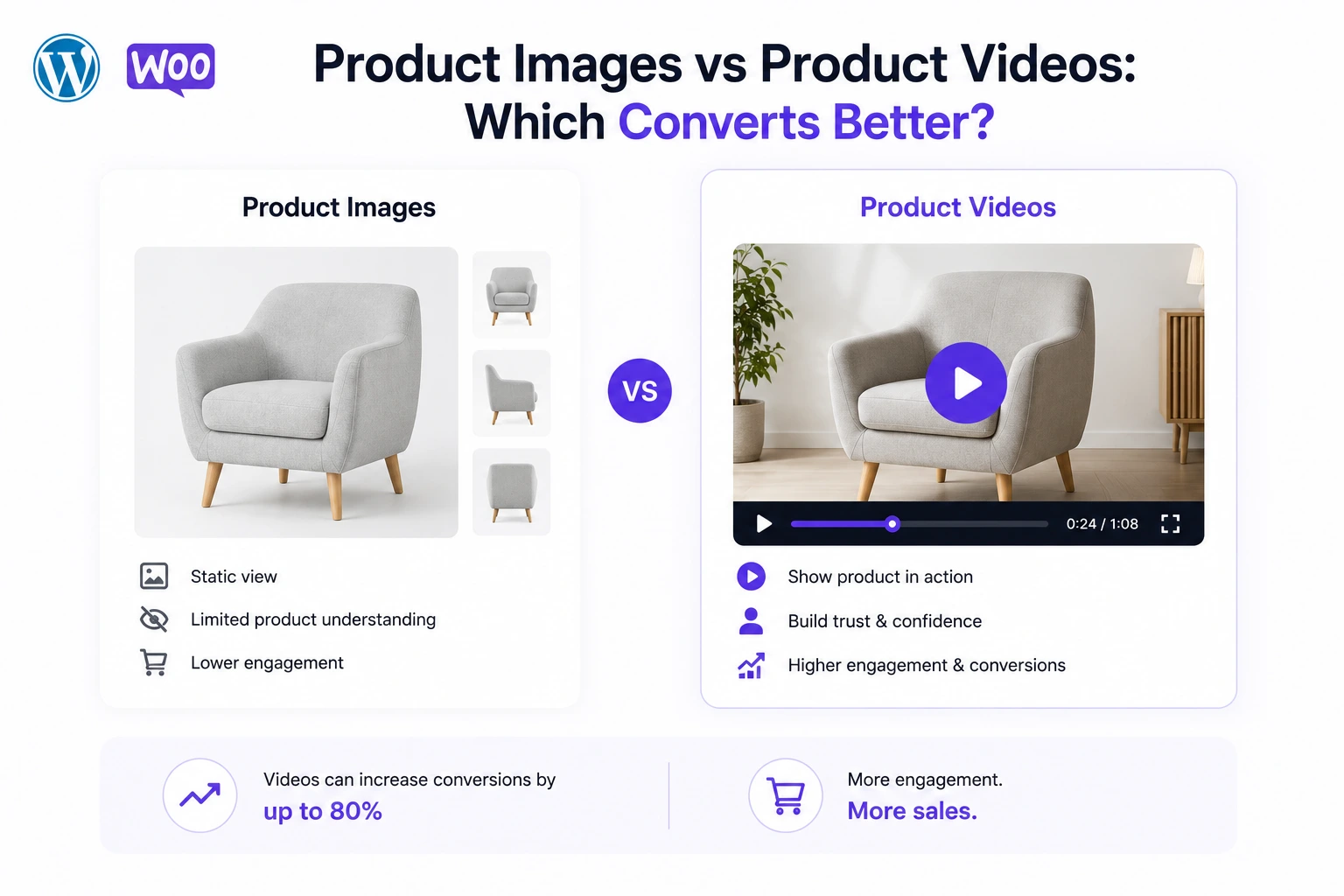
Every WooCommerce store owner eventually asks this question, usually while deciding where to spend a limited content budget: should the next dollar go toward better product photography, or toward video?
The honest answer, backed by 2026 data, is that video converts better on nearly every measurable metric — but images remain necessary, and the highest-performing product pages use both, in a specific order. This article breaks down exactly where each format wins, where they’re equivalent, and how to combine them for maximum conversion using MediaHaven.
The Head-to-Head Data
Across every major 2026 industry report, video outperforms static images on conversion-relevant metrics:
| Metric | Images only | With video |
|---|---|---|
| Average conversion rate | 2.9% | 4.8% (+65%) — WebFX, cited by Rocketium 2026 |
| Landing page conversion | Baseline | +86% higher with embedded video — Digital Applied 2026 |
| Add-to-cart likelihood | Baseline | +144% for video viewers — Invesp |
| Purchase persuasion | Baseline | 85% say video convinced them to buy — Wyzowl 2026 |
| Brand trust | Baseline | 58% trust companies with video more — Invesp, cited by XICTRON 2026 |
| Return rate | Baseline | −35% with demo video — SellersCommerce 2026 |
| Time on page | Baseline | +81% longer on video-enabled pages — LunaBloomAI 2026 |
| Search traffic | Baseline | +41% more organic traffic — LunaBloomAI 2026 |
On paper, this looks like a clean win for video across the board. But the real answer is more nuanced than “replace all images with video,” and understanding why matters for how you actually build your product pages.
Where Video Wins Decisively
Communicating Motion, Fit, and Physical Behavior
No amount of photography can show how a garment drapes when someone walks, how a hinge mechanism operates under load, or how a liquid pours from a container. This is video’s most unambiguous advantage: anything involving movement is fundamentally unshowable in a static image.
For apparel, footwear, furniture with moving parts, kitchen tools, and any product whose function involves motion, video isn’t just better — it’s the only format capable of answering the shopper’s actual question.
Reducing Purchase Anxiety on Higher-Priced Items
As covered in Videowise’s 2026 research, buyer information requirements scale with price. A $15 product needs a good photo. A $150+ product needs enough information to justify the price relative to alternatives — and video consistently outperforms images at providing that reassurance.
89–91% of consumers say video quality directly impacts their trust in a brand (Rocketium/SellersCommerce, 2026). This cuts in an interesting direction: images alone on a high-value product signal that a brand isn’t offering the full picture, which can itself raise doubt even before any specific concern is identified.
Building Trust Through Testimonial and Social Proof Formats
This is a category where images have essentially no equivalent. Video testimonials increase conversions by up to 80% and make customers 72% more likely to trust a brand (WiserReview, 2026). 79% of consumers are more likely to buy after watching a video testimonial, and businesses using them report 49% more sales than those without. A written testimonial with a photo can approximate some of this effect, but the trust mechanics of watching a real customer speak — tone of voice, facial expression, unscripted phrasing — are simply unavailable in static imagery.
SEO and Organic Discovery
Video-enabled pages see 41% more search engine traffic and 81% longer time on site (LunaBloomAI, 2026). This is partly a function of Google’s video rich results — a clickable thumbnail that appears directly in search results for pages carrying valid VideoObject schema markup — an SEO channel that simply doesn’t exist for image-only pages.
Where Images Still Win
Speed of Consumption
A shopper scanning a category page or comparing multiple products can process an image in a fraction of a second. Video requires a minimum time commitment — even a well-edited 30-second demo asks for 30 seconds of attention. For early-funnel browsing, where a shopper is comparing 10+ products before narrowing down, images remain the faster format for rapid comparison.
Zoom and Fine Detail Inspection
For products where a shopper wants to examine a specific detail — stitching quality, a material swatch, a small component — a high-resolution zoomable image often communicates this more precisely and more quickly than scrubbing through a video timeline to find the right frame.
Lower Production and Loading Cost
A well-lit photo requires far less production effort than a good video, and images load faster and lighter than video content if not properly optimized. For low-consideration, low-price items, the marginal conversion benefit of video may not justify the production time relative to simply having clear, accurate photography.
Universal Compatibility With No Playback Friction
Every browser and device displays a static image instantly with zero buffering, zero autoplay policy complications, and zero dependency on a working video player. Images carry effectively zero technical risk of a broken experience — video, if implemented poorly (unoptimized file size, missing lazy loading, autoplay conflicts), can actively hurt page speed and therefore conversion.
The Real Answer: It’s Not Either/Or
The 2026 data doesn’t support “replace images with video” as a strategy — it supports “use images for fast comparison and detail inspection, and use video for the specific job of answering the shopper’s core hesitation before they buy.”
Videowise’s 2026 framework is explicit on category-specific format selection:
- High-trust categories (beauty, apparel, wellness, fit-sensitive products) benefit most from realistic demo video, honest lighting, and accurate scale representation
- Feature-led categories (tech accessories, home tools, organizers) can rely more heavily on images for straightforward function, with video reserved for genuinely complex setup or use cases
- Premium launches perform best when polished video assets are paired with simpler, more authentic proof content (like UGC or testimonials) elsewhere on the same page
The pattern that emerges across every major 2026 source is a layered structure, not a replacement:
- Images handle fast visual scanning — the product from multiple angles, in different colors or variants, for shoppers comparing options quickly
- Video handles the trust and understanding gap — placed prominently, ideally replacing or leading the primary gallery position, answering “what is this actually like to use?”
- Testimonial or UGC video handles social proof — often in a secondary tab or section, addressing “can I trust that this works as shown?”
How to Build This Layered Structure in WooCommerce with MediaHaven
MediaHaven is built specifically to let you combine images and video without forcing an all-or-nothing choice, and without requiring custom development.
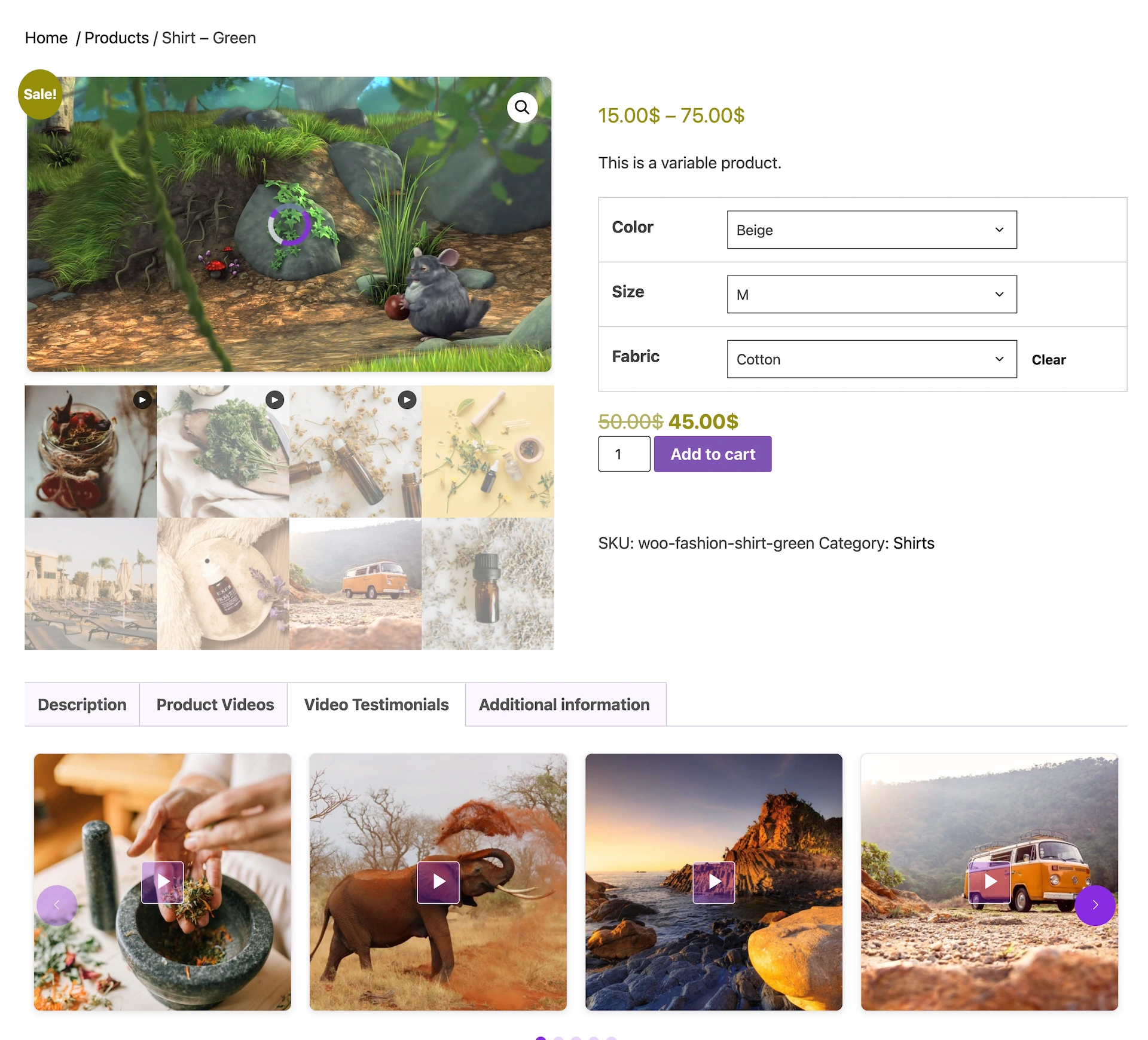
Option A — Video leads, images support: Use MediaHaven Pro’s “Assign MediaHaven Gallery” feature to place your product demo video directly in the primary WooCommerce gallery position — the first thing a shopper sees. Your existing product images remain accessible in the gallery’s thumbnail row, so shoppers who want to quickly scan angles or colors can still do so.
Option B — Images lead, video supports: Keep your standard product image gallery as the primary view, and add a dedicated Video Tab (a MediaHaven Pro feature) labeled something like “See It In Action” or “Video Demo” alongside “Description” and “Reviews.” Shoppers who want deeper understanding click through; shoppers who are ready to buy from images alone aren’t slowed down.
Option C — Layer in testimonials separately: Add a second Video Tab specifically for customer testimonial content, distinct from your primary demo video tab. MediaHaven’s documentation uses exactly this pattern in its own product demo — a “Video Testimonials” tab, separate from the main product gallery.
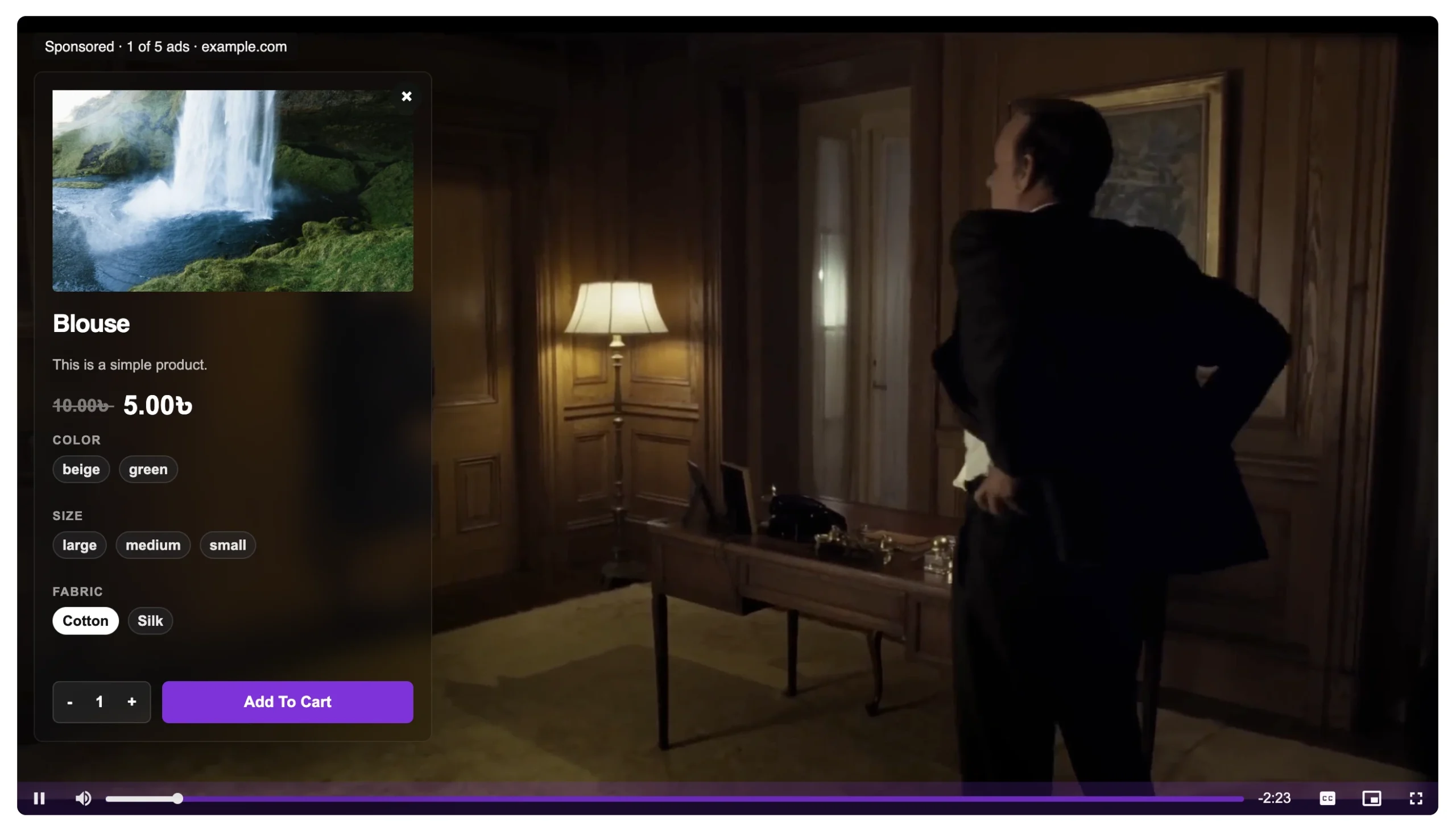
Option D — Make the video itself shoppable: For stores that want to go further than either format alone, MediaHaven Pro’s shoppable video overlay lets a demo video carry clickable product cards — image, price, variant selector, and Add to Cart button — directly inside the player. This effectively merges the fast-scan benefit of an image-based product card with the trust-building benefit of video, in a single interactive element.
Decision Framework: Which Format for Which Product
| Product characteristic | Recommended primary format |
|---|---|
| Involves movement, fit, or physical operation | Video-led (replace gallery) |
| High price point ($100+) | Video-led or video-supported |
| Simple, well-understood product category | Image-led, video-supported |
| High return rate driven by expectation mismatch | Video-led |
| Fast-turnover, low-consideration item | Image-led, video optional |
| New product with limited social proof | Video-led + testimonial tab once reviews accumulate |
| Established product with strong reviews | Image-led + testimonial video tab |
The Bottom Line
Video wins on almost every conversion, trust, and retention metric measured in 2026 — a 65% average conversion lift, an 86% landing page improvement, a 144% add-to-cart increase, and a 35% return-rate reduction are not numbers a static image can match. But images aren’t obsolete. They remain the faster format for comparison shopping and detail inspection, and they carry zero technical risk.
The highest-converting WooCommerce product pages in 2026 don’t choose between images and video. They use images for what images do best — fast, reliable visual scanning — and use video for what only video can do: closing the trust and understanding gap that turns a browser into a buyer.
Frequently Asked Questions
Do product videos convert better than product images?
Product videos and product images serve different purposes, and the highest-converting product pages typically use both. Images help shoppers scan products quickly, while videos demonstrate size, movement, and real-world use, giving customers more confidence before they buy.
Should I replace product images with videos?
No. Product images remain essential for showcasing details, colors, and multiple angles. Videos work best as a complement, helping explain features, demonstrate functionality, and answer questions that static images cannot, resulting in a more complete shopping experience.
How does MediaHaven combine product images and videos?
MediaHaven lets you display videos alongside your WooCommerce product gallery instead of replacing existing product images. Customers can browse photos for detailed inspection and watch videos for demonstrations, creating a richer product page that supports informed purchasing decisions.
Can I add product videos to the WooCommerce gallery?
Yes. MediaHaven integrates videos directly into the WooCommerce product gallery, allowing you to showcase self-hosted videos, Bunny Stream, HLS streams, YouTube, Vimeo, and other supported sources alongside your existing product images.
Which products benefit most from product videos?
Product videos are especially valuable for products that involve movement, demonstrations, assembly, premium features, or multiple use cases. Showing how a product works can reduce uncertainty and help customers make purchasing decisions with greater confidence.
Can I add clickable products inside product videos?
Yes. MediaHaven Pro includes Interactive Shoppable Video for supported videos, allowing you to display clickable WooCommerce product overlays with customizable call-to-action buttons. Customers can explore featured products while watching, creating a more engaging shopping experience.
Does MediaHaven improve SEO for product videos?
Yes. MediaHaven automatically generates Schema.org VideoObject structured data for published videos. Combined with SEO-friendly video pages and responsive galleries, this helps search engines better understand your video content and improves eligibility for video-rich search results.
Will product videos slow down my WooCommerce store?
No. MediaHaven is designed with performance in mind, featuring Smart Asset Loading, lazy loading, and optimized video delivery. Plugin assets are loaded only on pages where they’re needed, helping maintain fast page speeds while delivering a smooth viewing experience.
Does MediaHaven support secure HLS product videos?
Yes. MediaHaven supports existing HLS (.m3u8) streams and integrates with Bunny Stream for adaptive HLS delivery. This provides smoother playback across different devices while supporting secure, high-quality video streaming for WooCommerce product pages.
Does MediaHaven work with Gutenberg and page builders?
Absolutely. MediaHaven includes native Gutenberg blocks and shortcode support for Elementor, Divi, Beaver Builder, WPBakery, and other popular WordPress page builders. You can add product videos and responsive galleries anywhere on your WooCommerce website without writing code.
Can I monetize product videos with MediaHaven?
Yes. MediaHaven Pro supports VAST advertising with pre-roll, mid-roll, and post-roll placements for compatible videos. You can also combine VAST ads with Interactive Shoppable Video, allowing you to generate advertising revenue while promoting your own WooCommerce products.
Why choose MediaHaven for WooCommerce product videos?
MediaHaven combines WooCommerce product galleries, multiple video source support, Interactive Shoppable Video, HLS streaming, VideoObject schema, VAST advertising, Gutenberg integration, and performance optimization in one plugin. Instead of managing separate tools for video playback, SEO, monetization, and product galleries, you get a complete WordPress video platform built to increase engagement, customer confidence, and conversions.
- Install free: wordpress.org/plugins/mediahaven-lite
- Official documentation: mediahaven.io/docs/
- Demo: demo.mediahaven.io/
- Upgrade to Pro: mediahaven.io/pricing — from $79/year · 14-day money-back guarantee
- Support: support@wpninjadevs.com
Leave a Reply