

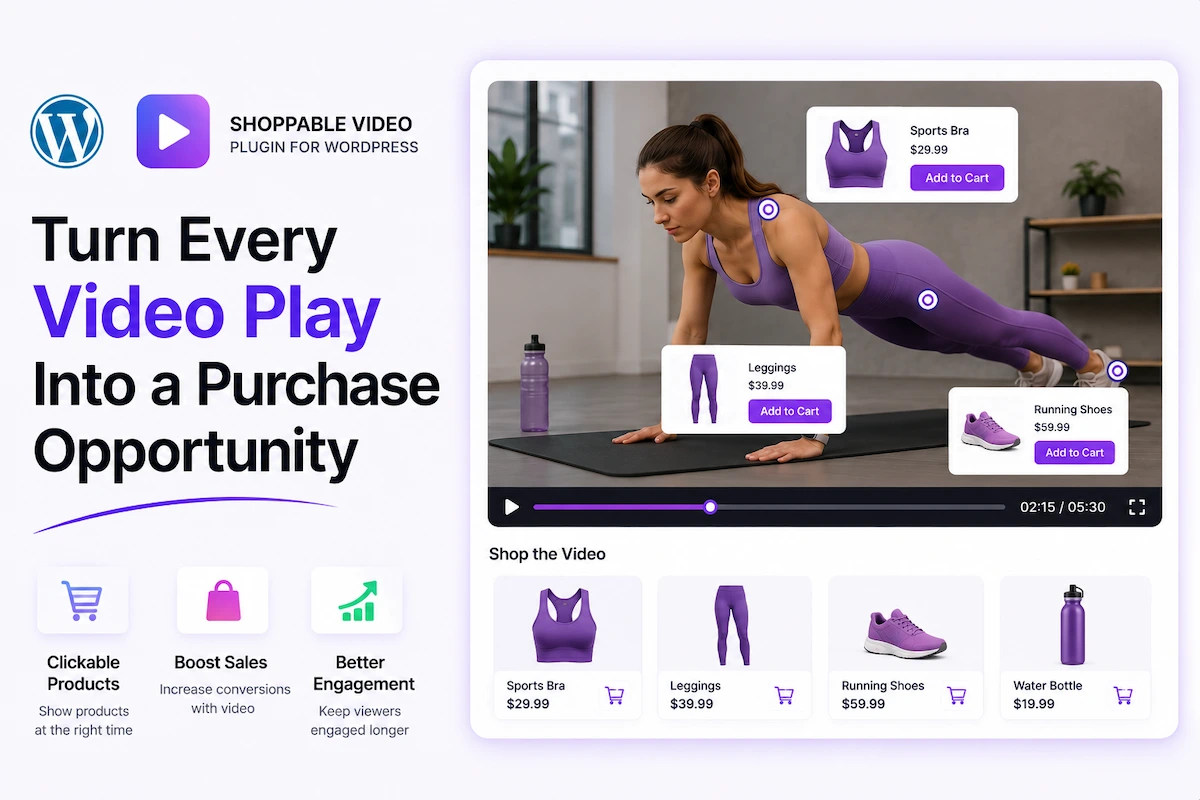
Shoppable video is currently experiencing the fastest adoption of any e-commerce format in 2026. By harnessing the power of video to persuade shoppers (showing a product in action, forging an emotional connection, defeating objections with visual proof), and pairing that content with the ability to buy instantly, shoppable video removes friction between desire and purchase.
Unlike traditional video content where a viewer watches a product demonstration and then has to navigate to a product page, locate the correct variant, and hit Add to Cart, shoppable video allows the viewer to click anywhere inside the video and buy in that moment. That one removed step can improve conversions by 30–50% on product demo videos.
MediaHaven Pro makes shoppable video a native WordPress feature — integrated directly with WooCommerce, FluentCart, and SureCart, requiring no third-party shoppable video platform and no monthly SaaS fees.
What Is Shoppable Video? (And Why It Converts Better)
Shoppable video is video content with embedded e-commerce functionality — typically a product card, “Add to Cart” button, or direct checkout link that appears within or adjacent to the video player while content plays.
The conversion science behind shoppable video is straightforward:
Traditional purchase path: Watch video → Remember product → Navigate to product page → Find variant → Add to cart → Checkout
Shoppable video path: Watch video → See “Add to Cart” in the player → Click → Add to cart → Checkout
The traditional path has 5 steps between desire and purchase. Shoppable video has 2. Every eliminated step reduces dropout probability. In e-commerce UX, fewer steps = more conversions.
Additionally, video creates purchase intent in a way that product photography cannot:
- Video demonstrates the product in use — answering “does this actually work?”
- Video creates emotional connection and aspiration — “I want to feel/look like that”
- Authentic video (TikTok-style UGC, demo footage) builds trust in a way static images don’t
When you combine that emotional trigger with an immediate purchase mechanism, you get the highest-converting product content format available.
MediaHaven Pro: Shoppable Video Natively on WordPress
MediaHaven Pro adds video-driven e-commerce product promotions directly inside the WordPress video player — integrated with WooCommerce, FluentCart, and SureCart. No third-party shoppable video platform. No additional monthly SaaS subscription. Everything runs through your WordPress installation and your existing e-commerce plugin.
Available from only $79/year for a single site.
Shoppable Video Features in MediaHaven Pro
Video-Driven E-commerce Product Promotions
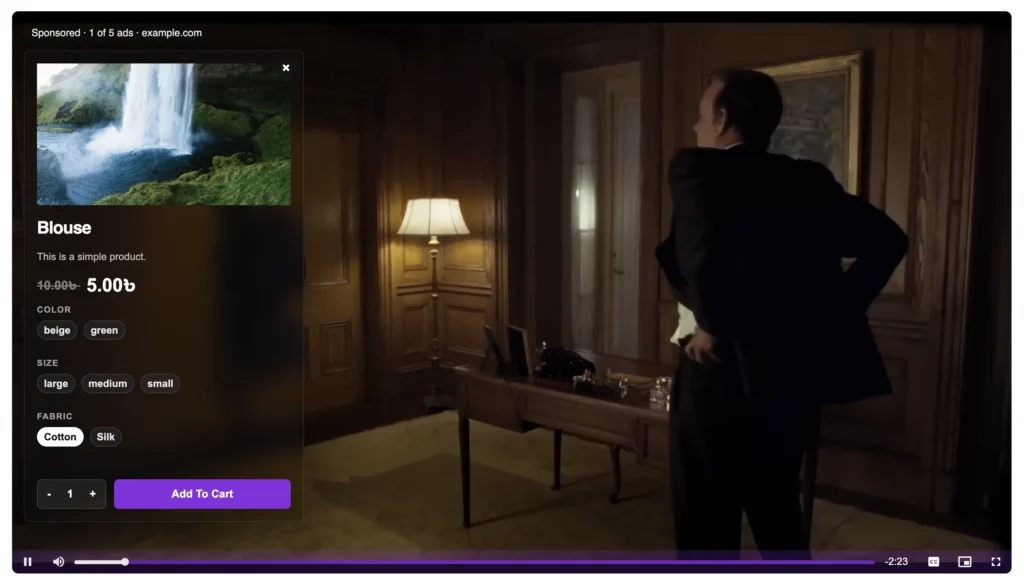
The core shoppable video feature in MediaHaven Pro displays a product overlay inside the video player. Configure:
Product Selection:
- Link any WooCommerce product to any video
- Works with simple products, variable products, and product variations
Overlay Display:
- Product image, title, and price displayed within the player
- “Add to Cart” or “View Product” CTA button
- Upsell and cross-sell: show a related product while the viewer watches a demo of a different item
Overlay Timing:
- Configure when the overlay appears (beginning, end, or specific timestamp)
- Combine with VAST ads at different positions for a layered monetization experience
No-Redirect Purchasing:
- Viewers add products to cart directly from the video overlay — without leaving the page
- Purchase flow stays on your WordPress site in your checkout
VAST Video Ad Monetization (Pro)
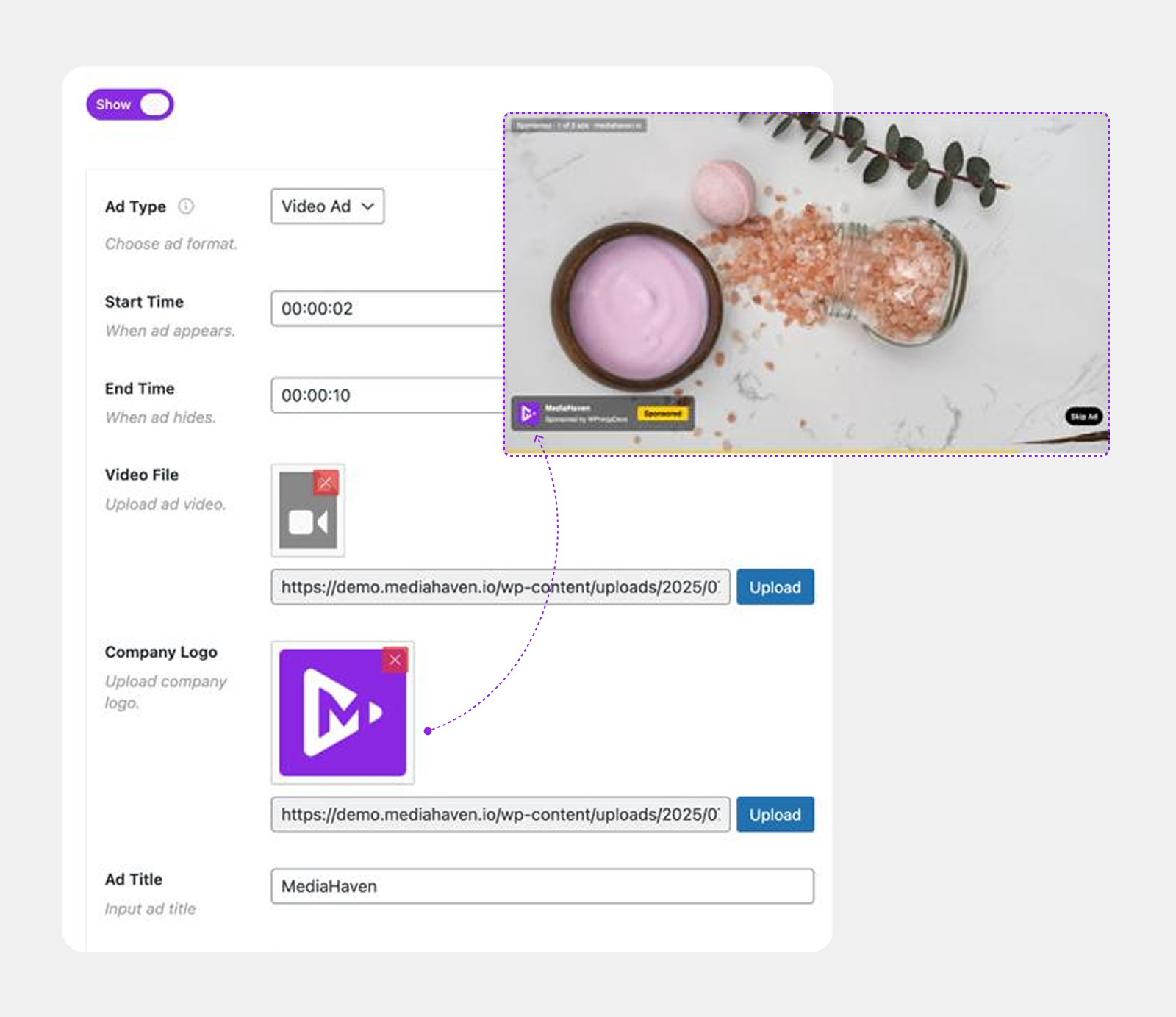
While technically a separate feature from shoppable video, VAST ad support in MediaHaven Pro creates a complete dual-monetization system:
VAST ads generate revenue from every video play, regardless of whether the viewer converts to a product purchase. This means your video content has two potential revenue outcomes per play:
- Ad revenue from the VAST pre-roll or mid-roll (even if the viewer doesn’t buy)
- Purchase revenue from the product overlay (when the viewer buys)
Configure VAST + product overlays simultaneously on the same video for maximum revenue per play.
VAST ad capabilities:
- Pre-roll, mid-roll, post-roll, or custom timestamp positions
- Video ads, banner ads, clickable link ads
- 9 position options (top-left through bottom-right)
- Custom ad button labels
- Mute/unmute control
- Data stored in WordPress database
- Performance tracking dashboard coming soon
Video Chapters — Navigate to Purchase Intent Moments
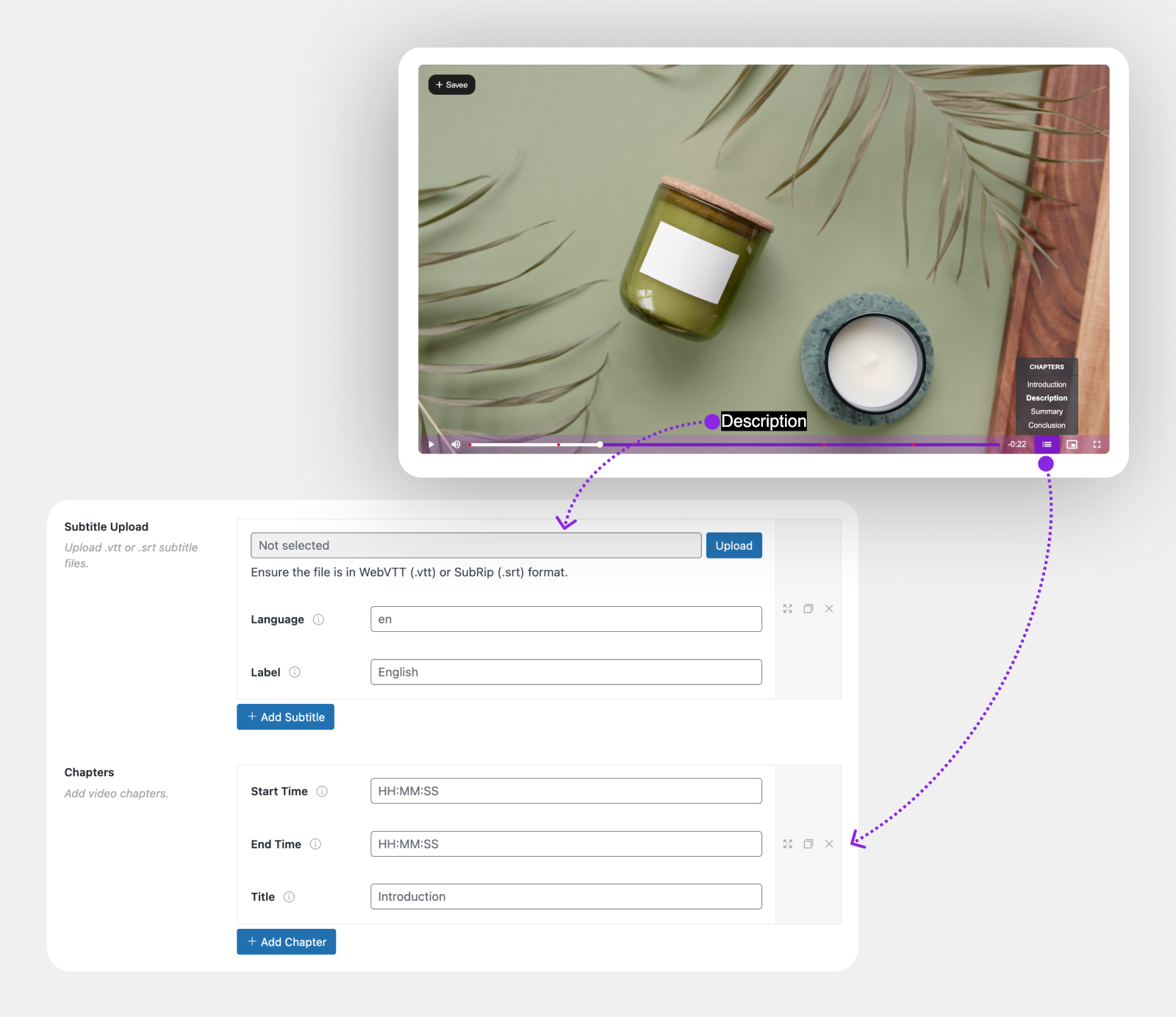
For longer product demo videos, webinars, or comparison content, video chapters (Pro) let viewers jump directly to the specific product feature or use case they care about.
Shoppable video + chapters strategy:
- Chapter 1: “Overview” → product overlay with general CTA
- Chapter 2: “Use Case A” → product overlay for Product A
- Chapter 3: “Use Case B” → product overlay for Product B
- Chapter 4: “Comparison” → overlay showing the recommended product
Viewers who navigate directly to their relevant chapter are the highest-intent buyers. Meeting them with a product overlay at that moment maximizes conversion.
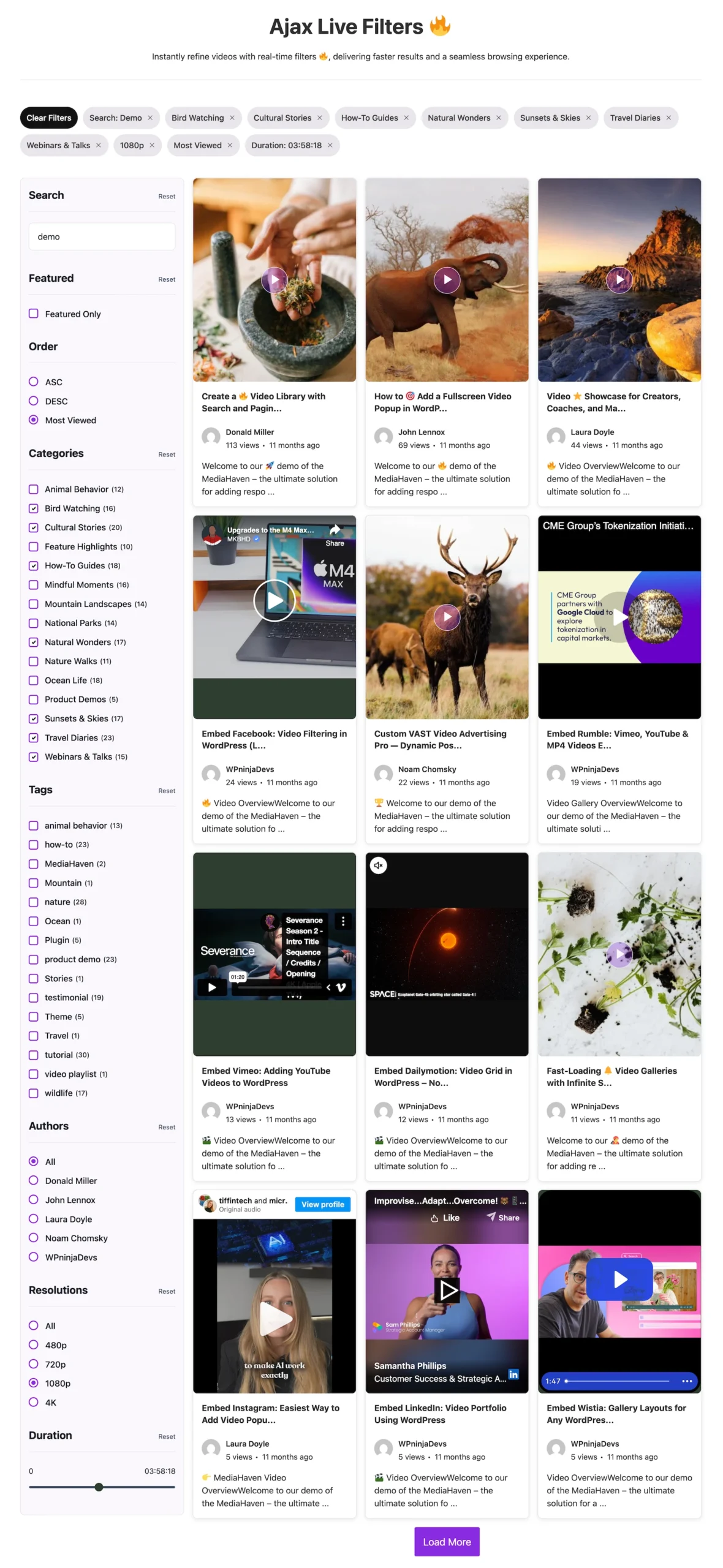
Ajax Live Filter with SEO-Friendly URLs (Pro)
For stores with large product video libraries:
- Filter shoppable videos by product category, type, use case, or tag
- Instant results without page reload
- Each filter URL is indexable by Google — creating product-category-specific video landing pages that rank for long-tail product search queries
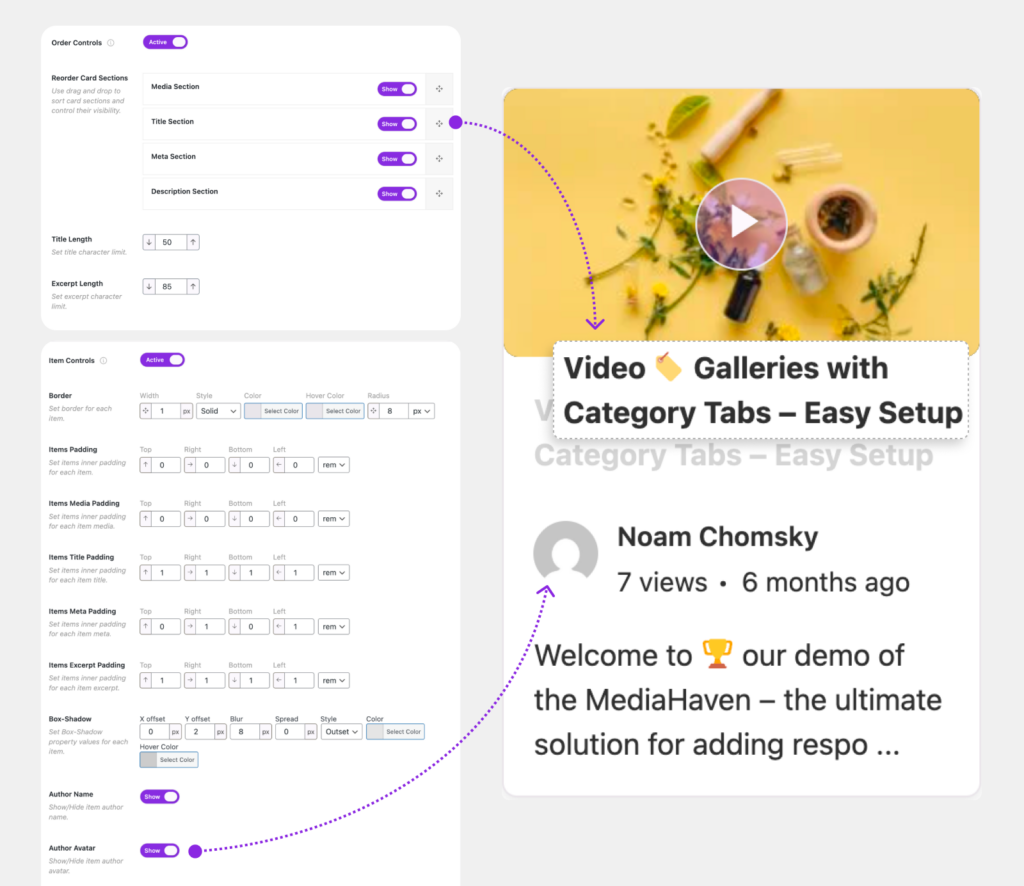
Drag & Drop Video Card Builder (Pro)
Control exactly how product demo videos display in gallery format:
- Show product name, price, or description in the video card
- Custom add-to-cart button in the card (before play)
- Badge/tag overlays on video thumbnails (“Sale,” “New,” “Best Seller”)
- Custom borders, hover states, spacing
Supported E-Commerce Platforms
MediaHaven Pro’s shoppable video works with all three leading WordPress e-commerce plugins:
| Platform | Shoppable Video Support | Notes |
|---|---|---|
| WooCommerce | ✅ Full (Deeply Integrated) | Most widely deployed WordPress e-commerce plugin, direct add to cart, variation update, quantity select etc from video. |
| FluentCart | ✅ Full | Modern, performance-focused WooCommerce alternative |
| SureCart | ✅ Full | Cloud-based checkout, simple product management |
If you’re on a different e-commerce platform, the VAST ad monetization and video gallery features of MediaHaven Pro still apply — only the direct product overlay feature is platform-specific.
Setting Up Shoppable Video on WordPress With MediaHaven Pro
Prerequisites
- MediaHaven Pro installed and activated
- WooCommerce, FluentCart, or SureCart installed with products configured
- At least one video added to MediaHaven (YouTube, HLS, Vimeo, TikTok, or any supported source)
Step 1: Install and Activate MediaHaven Pro
Purchase at MediaHaven Pricing → Download Pro → Upload and activate in WordPress Admin → Plugins → Add New → Upload Plugin.
Step 2: Add Your Product Video
MediaHaven → Videos → Add New:
- Set video source (HLS from Bunny CDN, YouTube product demo, TikTok UGC, etc.)
- Title: write for SEO (“Product Name Review,” “How to Use [Product]”)
- Description: keyword-rich product content
- Poster/thumbnail: custom branded image (not a random video frame)
- Category: assign to the relevant product category
Step 3: Configure the Product Overlay
In the video’s Pro settings panel:
- Enable product promotion overlay: Toggle on
- Select product: Search and select from your WooCommerce/FluentCart/SureCart product catalog
- Overlay timing: Configure when the overlay appears
- CTA button text: “Add to Cart,” “Buy Now,” “Get Yours,” “Shop This Look” — whatever fits your brand
- Overlay position: Choose player position (product info shows within the player)
Step 4: Add Video Chapters (Recommended for Long-Form)
For product demos over 3 minutes:
- Video → Chapters → Add Chapter
- Set chapter name and start timestamp
- Repeat for each key product feature or use case
- Chapters appear as clickable labels on the player progress bar
Step 5: Configure VAST Ads (Optional — Dual Monetization)
In the video’s VAST settings:
- Enable VAST ads
- Paste your VAST ad tag URL from your ad network
- Set position (pre-roll, mid-roll, post-roll, or custom timestamp)
- Configure ad type (video, banner, or link)
This runs alongside the product overlay — ads generate revenue even from visitors who don’t purchase.
Step 6: Create a Shoppable Video Gallery
MediaHaven → Views → Add New:
- Layout: Grid (best for product video catalogs) or Carousel (best for featured products on homepage)
- Source: filter by product video category or specific video IDs
- Enable product badges/metadata in the card builder
Step 7: Embed Strategically
[wpnd_mhpro_views id="x"]High-conversion placement locations:
| Placement | Content Type | Expected Impact |
|---|---|---|
| WooCommerce product page | Product demo + product overlay | Highest conversion impact |
| Homepage hero | Brand/bestseller demo (carousel) | Brand awareness + impulse buy |
| Category page | Product category demos | Category conversion boost |
| Blog posts | Tutorial videos with related products | Content-to-commerce conversion |
| Cart/checkout page | Upsell demo video | Average order value increase |
| Email landing page | Promotional demo + VAST ad | Multi-revenue on campaign traffic |
Shoppable Video Strategies by Business Type
Fashion and Apparel
Challenge: Buyers can’t try on clothes online. Return rates are high because fit and drape are hard to communicate through photography.
Shoppable Video Strategy:
- Film styling content (similar to TikTok format) showing each garment on real bodies
- Embed in MediaHaven gallery on the product page
- Product overlay: “Shop This Look” button appearing at the styling peak moment
- Video chapters: “Casual Look,” “Office Look,” “Evening Look” — each with the relevant product variant overlay
Expected Impact: Fashion brands using shoppable video report 30–50% lower return rates on video-featured products because buyers have better purchase information.
Beauty and Skincare
Challenge: Results take time. Before/after videos are powerful but the gap between “I want those results” and “I bought the product” is wide.
Shoppable Video Strategy:
- Embed before/after demonstration videos with immediate product overlay
- VAST pre-roll ad (monetizes traffic from visitors who don’t buy)
- Product overlay: “Add to Cart” at the “after” reveal moment — peak desire, lowest barrier
Expected Impact: Beauty brands see the highest shoppable video conversion rates of any category — particularly on UGC-style authentic videos vs. produced studio content.
Home Goods and Furniture
Challenge: Furniture and home goods are high consideration, high anxiety purchases. Buyers want to see items in real spaces, at scale, in use.
Shoppable Video Strategy:
- Video room tours or product demonstrations in real home environments
- Chapters for different room configurations or product variations
- Product overlays with multiple related products linked (table + chairs + lamp as a bundle play)
- Ajax live filter (by room type, style, price point) enabling product discovery from video
Expected Impact: High-consideration categories see the most dramatic conversion lift from shoppable video because it answers the “what will this actually look like?” objection that stops purchases.
Food and Recipe Content
Challenge: Recipe/cooking content drives massive engagement but rarely converts to product sales.
Shoppable Video Strategy:
- Recipe videos featuring your products as key ingredients
- Chapter each cooking step — product overlay at the step where your product is used
- VAST mid-roll ad generating revenue from recipe viewers who don’t buy the featured product
- Link to “Shop the Recipe” — a curated WooCommerce product bundle
Expected Impact: Contextual product placement in cooking videos drives significantly higher conversion rates than product-only photography, because the product’s value is demonstrated in use.
Digital and Software Products
Challenge: Software and digital products need to demonstrate value before purchase. Free trials help, but video demos that immediately enable trial sign-up are more efficient.
Shoppable Video Strategy:
- Product walkthrough/demo videos with “Start Free Trial” or “Buy Now” overlay
- Feature-specific chapters so high-intent buyers can jump to the specific capability they care about
- VAST pre-roll ads monetizing traffic from prospects who aren’t ready to convert
Expected Impact: SaaS and software companies using demo video with immediate CTA overlays report 35–60% higher trial signup rates vs. text-based landing pages alone.
The Dual-Revenue Model: VAST Ads + Product Sales
This is the most powerful monetization architecture in MediaHaven Pro:
Every video play has two potential revenue outcomes:
Video Plays (1,000/month)
│
├─→ Viewer converts via product overlay
│    → E-commerce revenue (varies by product price and conversion rate)
│
└─→ Viewer doesn't convert
     │
     └─→ VAST ad served
          → Ad revenue ($5–40 CPM depending on niche)
At a $15 CPM VAST rate and 1,000 monthly video plays where 2% convert to product sales:
- Product sales revenue: 20 sales × $50 AOV = $1,000
- VAST ad revenue: 1,000 plays × $15/1,000 = $15
- Total: $1,015 from 1,000 video plays
Increase video plays to 10,000/month through better SEO (helped by MediaHaven’s automatic VideoObject schema) and the numbers scale proportionally.
Performance: Shoppable Video Without Speed Penalty
A common concern about shoppable video overlays is page speed impact. MediaHaven Pro addresses this at every level:
Smart asset loading: Pro’s additional JavaScript only loads on pages where product overlays are configured.
Lazy loading: The video player (and its overlay logic) only initializes when scrolled into view.
WebP thumbnail conversion: Gallery thumbnails auto-convert to WebP for faster page renders.
Indexed lookup table: AJAX filtering on large product video libraries uses an indexed database lookup — no slow full-table queries regardless of library size.
Result: A product page with shoppable video overlays powered by MediaHaven Pro can still achieve excellent Core Web Vitals — the overlay doesn’t compromise the performance investment you’ve made elsewhere on your site.
Pricing
MediaHaven Pro plans (all include shoppable video, VAST ads, all Pro features):
| Plan | Sites | Annual Price | Per-Site Cost |
|---|---|---|---|
| Single Site | 1 | $79/year | $79 |
| Business | 5 | $159/year | $31.80 |
| Developer | 10 | $249/year | $24.90 |
| Agency | 50 | $499/year | $9.98 |
✅ 14-day money-back guarantee ✅ No credit card for Lite trial ✅ Staging sites included
ROI calculation: If one shoppable video overlay generates 5 additional sales per month at $50 each, that’s $250/month = $3,000/year in incremental revenue. MediaHaven Pro’s single site license costs $79/year — a 38x ROI in this conservative example.
Frequently Asked Questions
Does shoppable video work with WooCommerce variable products (different sizes, colors)? Yes — product overlays support WooCommerce’s product variation system. Buyers can select variants before adding to cart from within the video player.
Can I show different products in different videos? Yes — each video can have its own product overlay configuration. A product demo for Product A shows an “Add to Cart” for Product A; a demo for Product B shows Product B.
Can I use shoppable video with self-hosted HLS content? Yes — product overlays work with all 14 video sources MediaHaven supports: HLS, YouTube, Vimeo, TikTok, and all others.
Do I need both VAST ads and product overlays, or can I choose one? Both are optional and independently configurable. Use product overlays alone, VAST ads alone, or both together on the same video.
Is there a limit to how many shoppable videos I can create? No limit. MediaHaven Pro supports unlimited videos, unlimited galleries, and unlimited product overlay configurations.
Can I track which videos drive the most product sales? Configure Google Analytics 4 custom events for add-to-cart actions within video players. MediaHaven’s view counter tracks per-video play volume. Combine these for ROI tracking per video.
Conclusion: The Highest-Converting Video Format Now Works on WordPress
Shoppable video is no longer exclusive to TikTok Shop, Instagram Shopping, or expensive enterprise platforms. MediaHaven Pro brings native shoppable video to your WordPress site — integrated with WooCommerce, FluentCart, and SureCart — at a price point that makes sense for businesses of every size.
Your product demo videos are already doing the selling work. MediaHaven Pro closes the loop: the viewer watches, they want it, and they can buy it without leaving the player.
Start with MediaHaven Lite to experience the gallery system. Upgrade to Pro to unlock shoppable video, VAST ad monetization, video chapters, and the full Ajax filter.
→ Download MediaHaven Lite Free
→ Upgrade to Pro from $79/year — 14-Day Guarantee
Last updated: June 2026 | Based on MediaHaven Pro (integrated with WooCommerce) | Plugin by WPninjaDevs Support: assist.wpninjadevs@gmail.com
Leave a Reply