


Video is now the single highest-converting content format on the web. Websites with video see up to 80% higher conversion rates. Pages with embedded video hold visitors 2–3x longer than text-only pages. And Google’s algorithm in 2026 actively rewards sites that deliver rich, engaging, multimedia experiences.
Yet most WordPress site owners are still duct-taping together multiple plugins to display video — and it’s costing them rankings, revenue, and audience retention every single day.
This guide is your definitive resource for choosing and implementing the best WordPress video gallery plugin to drive real business outcomes: more organic traffic, deeper audience engagement, higher conversion rates, and new monetization streams that compound over time.
We’ll use MediaHaven — the fastest-growing all-in-one WordPress video gallery plugin in 2026 — as our primary reference, because it’s the only plugin that addresses every layer of the problem simultaneously.
Why Your Video Gallery Plugin Is a Business-Critical Decision
Most WordPress users treat a video gallery plugin as a cosmetic choice — something that makes videos look nice. That’s the wrong mental model.
Your video gallery plugin directly determines:
- How Google crawls and ranks your video content — without schema.org markup, your videos are essentially invisible to search engines
- How fast your pages load — bloated video embeds tank Core Web Vitals, hurting SEO rankings and increasing bounce rates
- Whether visitors stay on your site or leave for YouTube — the right plugin keeps audiences in your ecosystem where you control the next conversion step
- How you monetize video — most plugins offer zero monetization capability; the right one can generate direct ad revenue from every video play
- How much time your team spends managing content — a unified multi-source plugin versus six separate tools is a meaningful operational difference
In short, the plugin you choose to display video is a revenue infrastructure decision, not a design preference.
The Business Case for Video in 2026: By the Numbers
Understanding why video investment pays off sets the context for why a great gallery plugin matters:
- 86% of businesses use video as a marketing tool in 2026, up from 63% in 2019
- Product pages with video see 64–85% higher purchase intent versus image-only pages
- Video on a landing page can increase conversion rates by up to 80%
- Time on page increases by 88% when video is present
- Video-rich snippets in Google Search (enabled by VideoObject schema) have click-through rates 41% higher than standard text results
- Sites with strong video engagement signals consistently outperform competitors in Google’s Core Web Vitals scoring
These aren’t vanity metrics. Each one has a direct revenue implication. And every single one is influenced by which video gallery plugin you’re running.
What to Look for in a WordPress Video Gallery Plugin
Before evaluating any specific plugin, let’s define the criteria that separate a revenue-generating video gallery from a basic embed tool.
Multi-Source Video Support
Your content strategy will evolve. A plugin that locks you into YouTube alone creates expensive technical debt the moment you add TikTok, Vimeo, or self-hosted HLS streams to your workflow. Look for support across:
- YouTube (channel feeds + playlists with real-time view and like counts)
- Vimeo and Wistia
- TikTok, Facebook, Instagram, LinkedIn
- Twitch, Dailymotion, Rumble
- Self-hosted HLS (M3U8 live streams and VOD)
- Uploaded MP4 files
Performance Architecture
A video gallery that bloats your page load time will hurt your SEO and increase bounce rates, erasing every benefit of having video in the first place. Non-negotiable performance markers:
- Smart asset loading — CSS and JS only load on pages where a gallery is present
- Lazy loading engine — videos, images, and iframes only initialize when visible in the viewport
- Built-in image optimization — compressed thumbnails with WebP conversion support
- Smart API caching — especially critical for YouTube feeds to avoid quota limits and slow loads
SEO Automation
Without structured data, your video content generates zero SEO benefit. Look for:
- Automatic VideoObject schema.org markup — no separate SEO plugin required
- Semantic HTML5 with WCAG-compliant accessibility
- Clean, customizable URL structures via rewrite slug options
- SEO-friendly Ajax filter URLs that create indexable pages per filtered view
Layout Flexibility and Design Control
- Responsive Grid, Carousel, and Multi-row Carousel layouts
- Drag-and-drop video card section builder
- Global and per-shortcode dynamic styles
- Typography control via Google Fonts
- Custom CSS editor for advanced customization
- Multiple single video page template variations
Monetization Capability
Most plugins offer nothing here. The business-ready ones support:
- VAST video advertising (pre-roll, mid-roll, post-roll, and custom timestamp positions)
- E-commerce product video overlays (WooCommerce, FluentCart, SureCart)
- CTA overlays and conversion-focused layouts
Page Builder Compatibility
Works seamlessly with Elementor, WPBakery, Divi, Beaver Builder, and Gutenberg with a live-preview Shortcode View block.
MediaHaven: The WordPress Video Gallery Plugin Built for Business Growth
MediaHaven is a high-performance WordPress video gallery plugin built for creators, publishers, agencies, e-commerce stores, and businesses that need video to generate measurable results — not just look good.
Available as a free Lite version on WordPress.org (v1.7.1) and a Pro version with advanced monetization and customization features, MediaHaven consolidates what previously required 4–6 separate plugins into one optimized, maintainable solution.
Built by WPninjaDevs — a team with 10+ years of WordPress experience — MediaHaven is designed with a future-proof architecture that scales from solo creator to enterprise media operation.
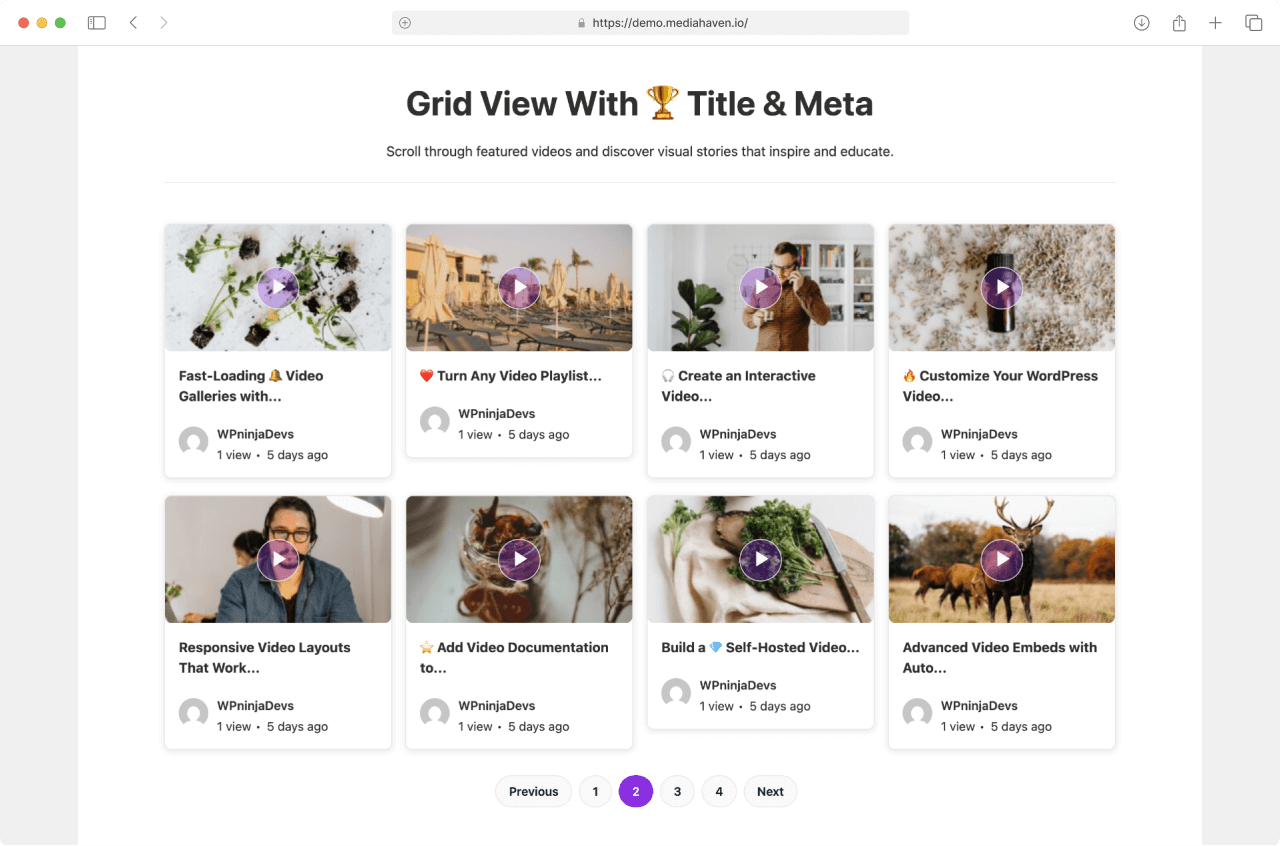
MediaHaven Feature Breakdown: Free vs. Pro
Free (MediaHaven Lite) — Available Now
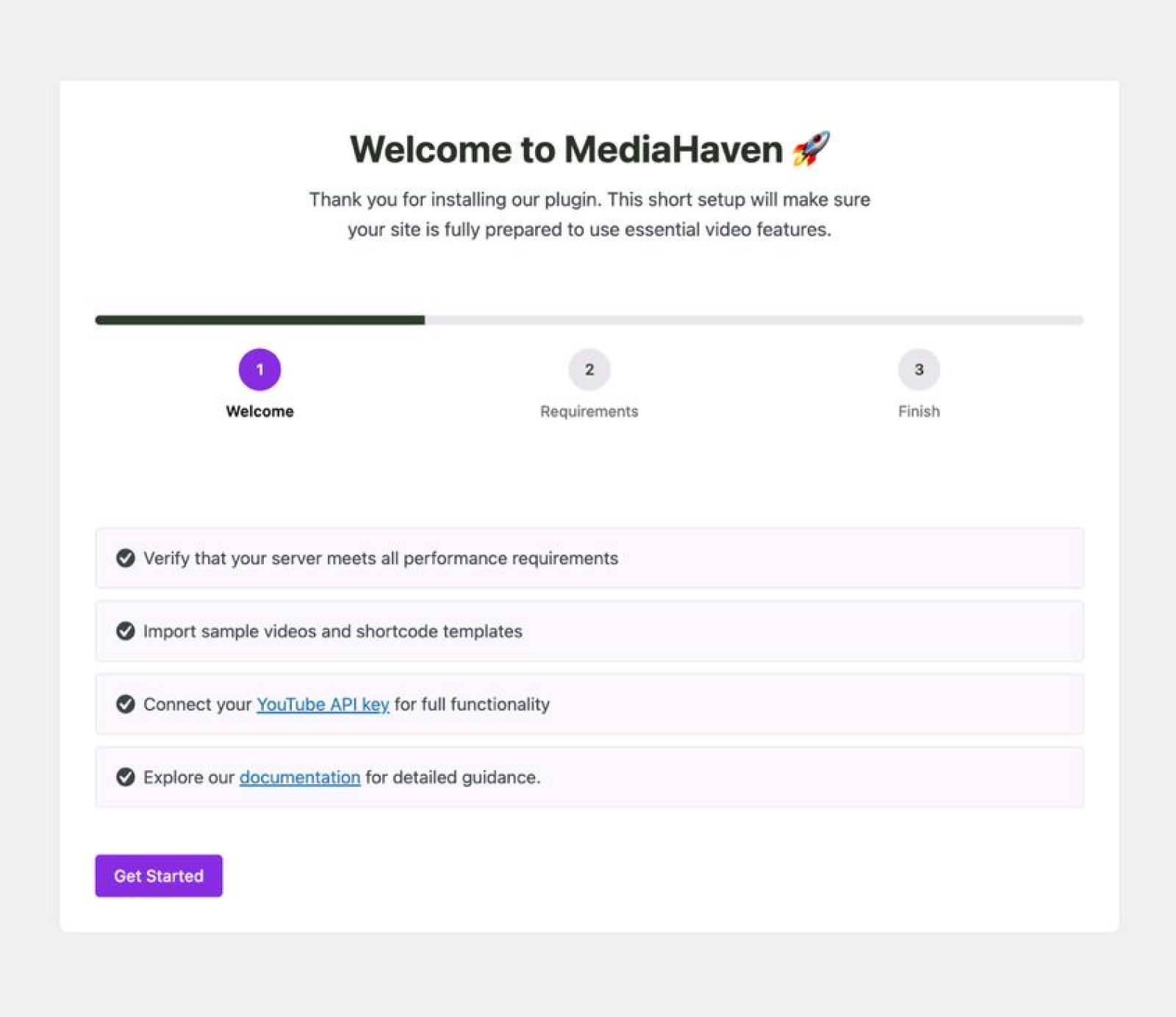
Setup Wizard A guided onboarding experience walks you through configuration, YouTube API connection, and your first gallery. Includes sample videos and shortcode templates. New in v1.6.5: an embedded video tutorial to accelerate setup.
14 Video Sources Embed from YouTube, Vimeo, TikTok, Facebook, Instagram, LinkedIn, Twitch, Wistia, Dailymotion, Rumble, HLS live streams, and self-hosted MP4 — all in one gallery.
Three Responsive Layout Options
- Grid — Classic multi-column layout for content archives and product showcases
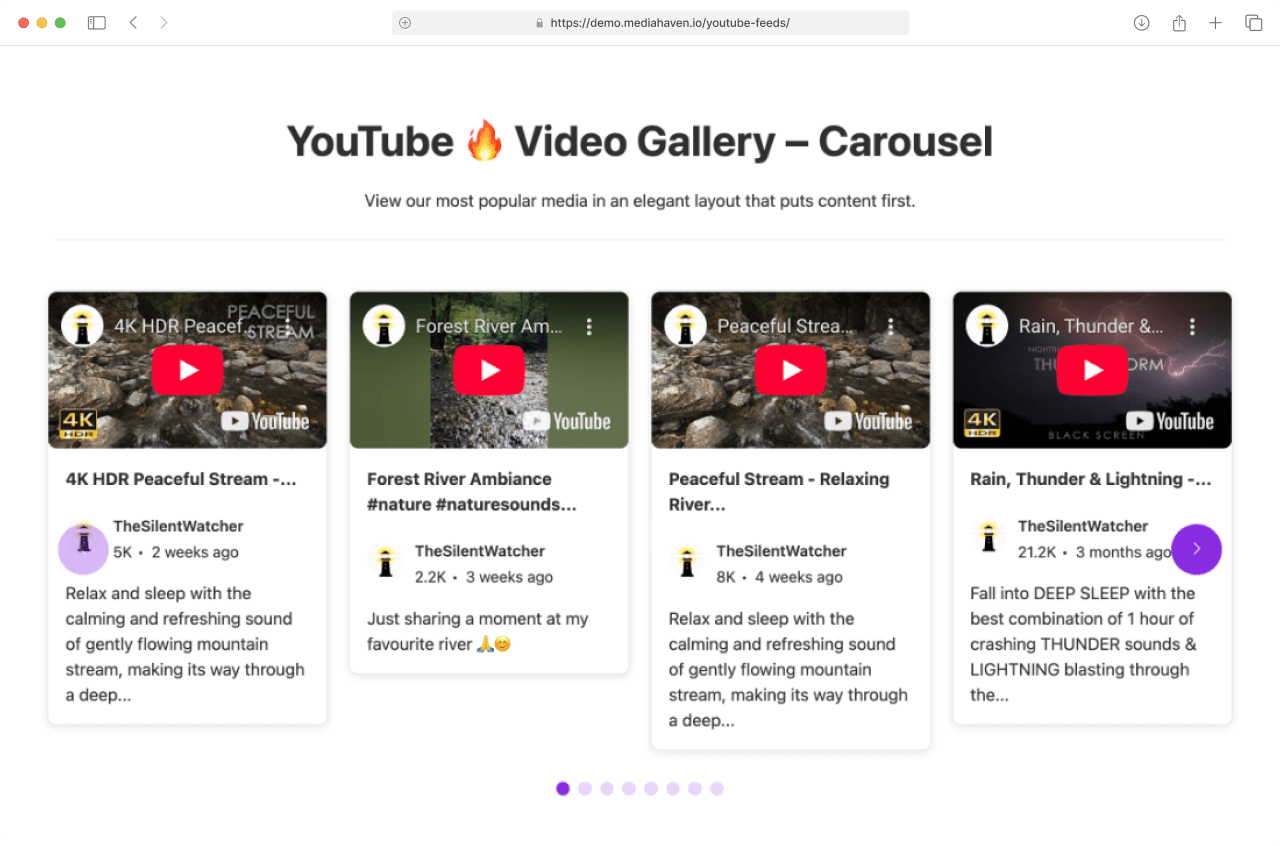
- Carousel — Horizontal scroll with navigation arrows for featured highlights
- Multi-row Carousel — Rich content hub layout combining multiple carousels
Every layout is fully responsive across xs, sm, md, lg, and xl breakpoints (fully configurable).
YouTube Feeds with Smart Caching Connect any YouTube Channel ID or Playlist ID. MediaHaven pulls videos automatically, displays real-time view and like counts, caches API results intelligently, and supports multiple YouTube API key rotation to prevent quota exhaustion. Auto-generates Channel ID from a channel handle.
AJAX Load More Visitors load additional videos without page reloads — keeping engagement momentum.
Built-in Schema.org VideoObject Markup Every video receives automatic structured data markup — no SEO plugin required. This enables Google Video Rich Results: thumbnail, duration, and date badges directly in search results.
Semantic HTML5 + WCAG Accessibility Clean, crawler-friendly markup that passes accessibility audits and helps Google understand your content structure.
Smart Asset Loading Plugin CSS and JS only load on pages where a gallery shortcode is present. Zero performance penalty on the rest of your site.
Lazy Loading Engine Videos, images, and iframes load only when they enter the viewport — dramatically improving LCP (Largest Contentful Paint) scores.
Built-in Image Optimization Thumbnail compression is automatic. Soft and hard crop options, image quality control, and poster show/hide toggle.
Video Subtitles Upload WebVTT (.vtt) or SubRip (.srt) subtitle files per video. Multiple languages supported. Subtitles improve accessibility, mobile engagement (silent viewing), and SEO via crawlable text.
Ajax Live Filters Discover videos faster with instant filtering — no page reload required.
Export/Import (JSON and CSV) Manage large video libraries with bulk export and import tools. Ideal for migrating content across sites or backing up gallery configurations.
Video View Counter + AJAX Like/Dislike Real-time engagement metrics that create social proof and provide content performance data.
Keyboard Shortcuts Full playback control via keyboard:
Space— Play/Pause |F— Fullscreen |M— Mute← / →— Seek 5 seconds |↑ / ↓— Volume0–9— Jump to timestamp percentage
Gutenberg Shortcode View Block Embed galleries in the block editor with live preview — see exactly how your gallery looks before publishing.
Dynamic Global + Per-Shortcode Styles Apply styles globally across all galleries or individually per shortcode — giving you flexibility without style conflicts.
Built-in Single Video Page Support Dedicated video detail pages with customizable templates, related video sections, and clean URL slugs.
Pro — Where Business Growth Accelerates
Video Chapters Divide videos into clickable chapters with precise timestamps. Viewers jump to exactly what they need. For tutorials, courses, and long-form content, chapters dramatically improve completion rates, time-on-page, and perceived content value.
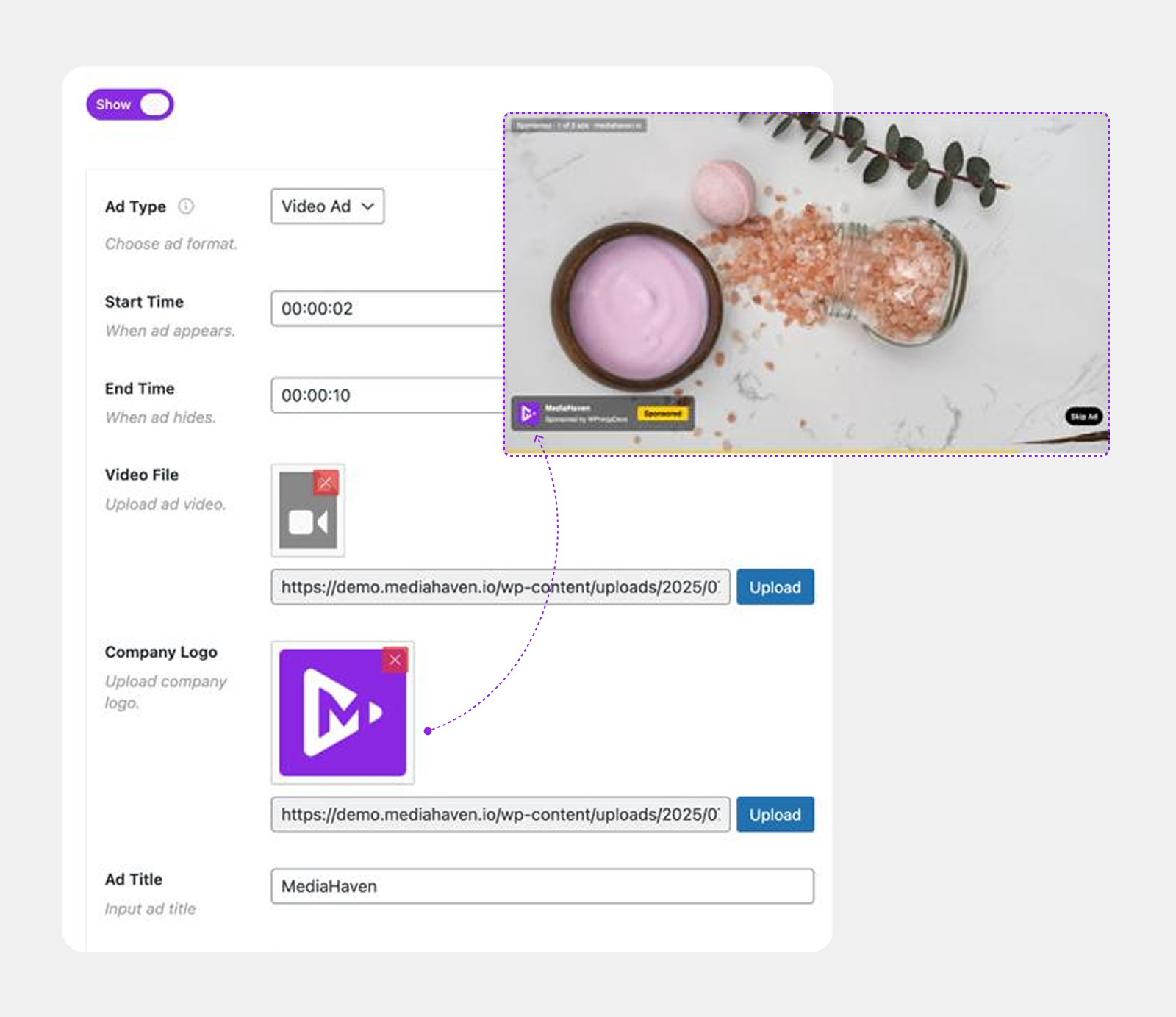
VAST Video Ad Monetization The most powerful revenue feature in MediaHaven Pro. Run industry-standard VAST ads at any position:
- Pre-roll, mid-roll, post-roll
- Custom timestamp positions
- Multiple ad types: video ads, banner ads, clickable link ads
- Ad position controls: top-left, top-center, top-right, middle, bottom (9 positions)
- Clickable ads with custom button label
- Mute/unmute control for audio in ads
- Ad data stored securely in your WordPress database
- Ad performance tracking dashboard — coming very soon
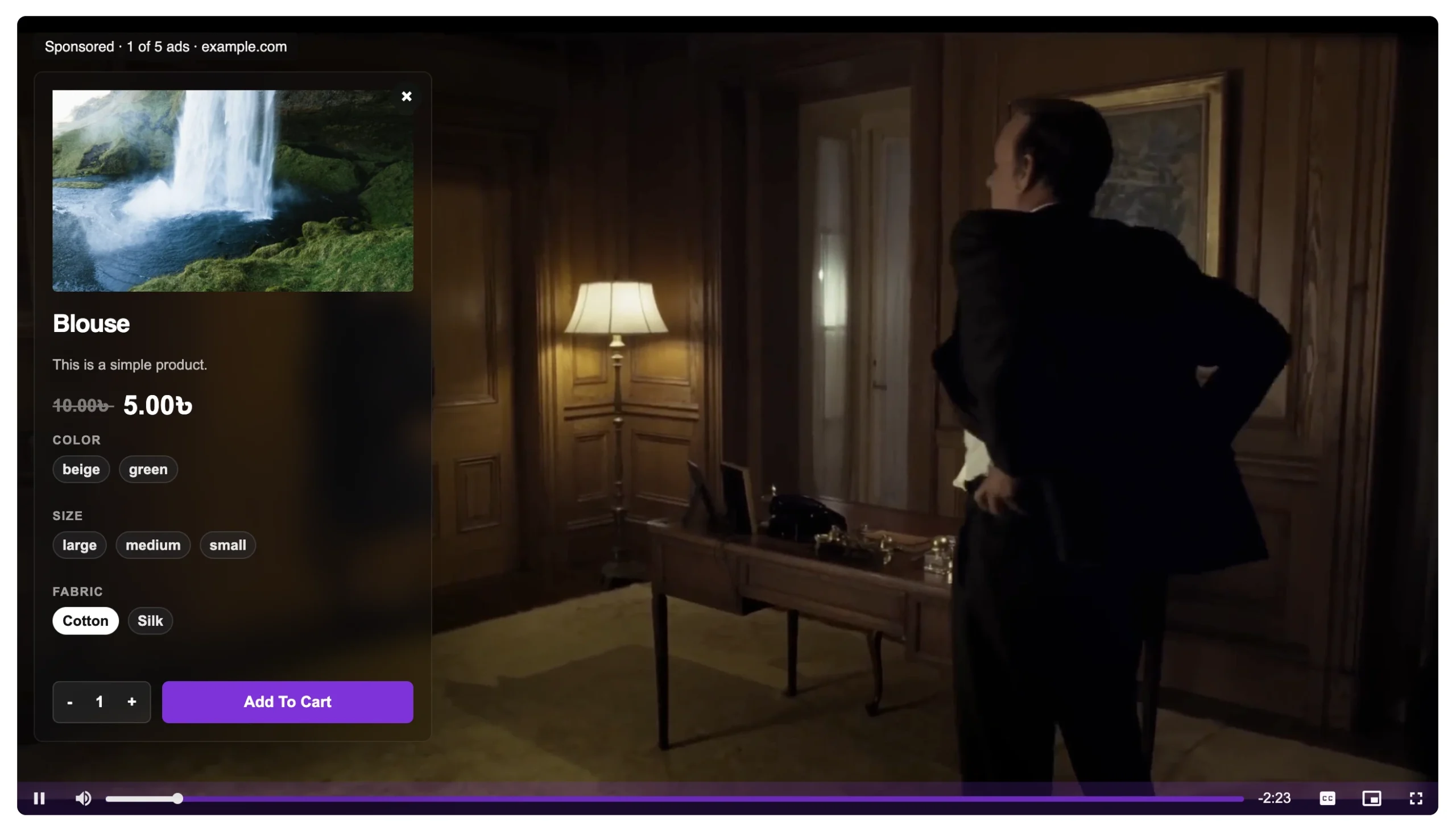
Video-Driven E-commerce Product Promotions Show a product demo video and let viewers add the product to cart — directly inside the player. Works with WooCommerce, FluentCart, and SureCart. Upsell and cross-sell without sending shoppers away from the page.
Blazing Fast Ajax Video Live Filter Full-power filtering engine with:
- Ajax video search
- Filter by category, tag, author, duration, resolution, featured status
- SEO-friendly filter URLs — each filtered view is indexable by Google
- Compatible with YouTube feeds, self-hosted HLS, Vimeo, TikTok, and all embedded sources
- Lightweight, mobile-optimized, built for high-traffic sites
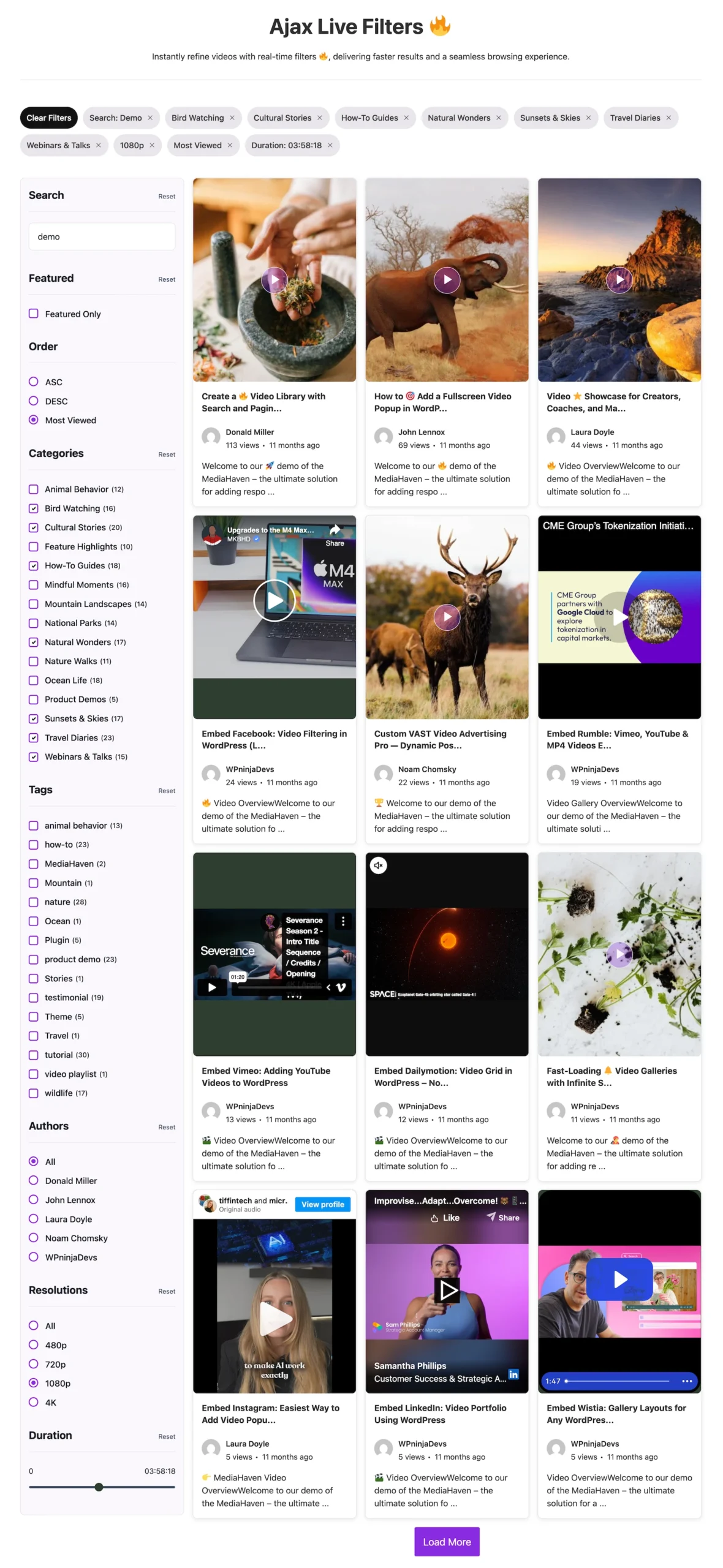
Indexed Lookup Table for High-Performance Filtering A custom database lookup table enables blazing-fast AJAX filtering even on libraries with thousands of videos — no slow full-table queries.
Drag & Drop Video Card Sections Reorder and configure every element of the video card:
- Drag to reorder: media, title, meta, description sections
- Show/hide any section with a toggle
- Control title and excerpt length
- Per-section padding controls
- Custom borders, radius, box-shadow, hover states
- Toggle author, avatar, views, date, comments, likes, categories, tags
Player Unlimited Styles Full branding control over the video player:
- Play button style options
- Control bar style options
- Volume bar style options
- Progress bar style options
- Brand colors, hover states
Image to WebP Conversion Automatically convert all gallery thumbnails to WebP format — reducing image file sizes by 25–35% without quality loss. Directly improves page speed and Core Web Vitals scores.
Drag & Drop Single Video Page Sections Build custom single video page layouts with drag-and-drop section control — no coding required.
Header Right Button Add a custom CTA button in the gallery header for lead capture, product links, or subscription prompts.
Advanced Term Appearance Turn categories and tags into visual, clickable navigation:
- Term grids, carousels, multi-row carousels
- Icons or background images per term
- Custom colors, hover states, borders per term
- Grid and carousel demo views
Pricing: Transparent, Honest Value
| Plan | Sites | Annual Price | Included |
|---|---|---|---|
| Single Site | 1 site | $79/year | All Pro features, 1-year updates, premium support |
| 5 Sites | 5 sites | $159/year | All Pro features, 1-year updates, premium support |
| 10 Sites | 10 sites | $249/year | All Pro features, 1-year updates, premium support |
| 50 Sites | 50 sites | $499/year | All Pro features, 1-year updates, premium support |
✅ 14-day money-back guarantee — no questions asked
✅ No credit card required to start with the free Lite version
✅ Staging/dev site use included in all licenses
✅ Upgradeable — remaining value credited toward higher plan
✅ Payments secured via Freemius | PayPal and all major cards accepted
Prices exclude local VAT/Sales Tax, calculated at checkout.
Integrations That Multiply MediaHaven’s Business Value
MediaHaven is built to work inside your existing WordPress stack, not replace it:
| Integration | Business Use |
|---|---|
| WooCommerce | Product video overlays, shoppable galleries, demo video carousels |
| FluentCart | E-commerce product promotions inside video player |
| SureCart | Checkout-connected product video promotions |
| Elementor | Drag-and-drop gallery placement with full shortcode support |
| Yoast SEO | Works alongside Yoast — MediaHaven handles VideoObject schema independently |
| Gutenberg | Native Shortcode View block with real-time live preview |
| Divi, WPBakery, Beaver Builder | Shortcode-based embedding in all major page builders |
Setting Up Your WordPress Video Gallery: Step-by-Step
Step 1: Install MediaHaven Lite
WordPress Admin → Plugins → Add New → Search “MediaHaven” → Install → Activate
Step 2: Run the Setup Wizard
The Setup Wizard guides you through:
- Basic settings and performance configuration
- YouTube API key connection (required for YouTube channel feeds)
- Creating a sample gallery with your first videos
- Next-step recommendations for advanced features
Step 3: Add Your Videos
MediaHaven → Videos → Add New
For each video:
- Select Video Source (YouTube, TikTok, Vimeo, HLS, etc.)
- Add title, description, and thumbnail poster image
- Assign categories and tags for organization and SEO
- Add subtitle files (VTT/SRT) for accessibility
- Configure display settings (poster, player options)
Step 4: Create a View (Gallery Shortcode)
MediaHaven → Views → Add New
Configure:
- Layout: Grid / Carousel / Multi-row Carousel
- Column counts per breakpoint (xs through xl)
- Video source filter (all videos, by category, by tag, specific videos)
- Pagination type: numbered / load more / infinite scroll
- Display elements: title, meta, description, likes, views, author
- Header controls including YouTube Subscribe button
- Carousel navigation and pagination styles
Step 5: Embed Anywhere
Copy the generated shortcode and paste it anywhere on your site:
[wpnd_mhpro_views id="x"]Embed via:
- Gutenberg Shortcode View block (with live preview)
- Elementor Shortcode widget
- Divi Text module
- WPBakery Raw HTML element
- Any WordPress page, post, or widget area
Step 6: Configure Global Styles
MediaHaven → Global Styles — Set brand colors, typography (Google Fonts), spacing, and hover effects for all galleries. Override per-shortcode as needed.
Step 7: Verify SEO (Pro Tip)
Test your video page in Google’s Rich Results Test to confirm VideoObject schema is rendering correctly. Expect to see structured data entries for every video on the page.
Business Use Cases: Industry-by-Industry Revenue Impact
E-Commerce Stores
Challenge: Product pages with static images underperform. Managing product demo videos across a large catalog is complex and usually fragmented across multiple tools.
MediaHaven Implementation:
- Build a product video gallery per category with grid layout
- Use WooCommerce (or FluentCart/SureCart) product video overlays — viewers add to cart directly from the video player
- Embed video testimonials as a shoppable carousel on the homepage
- Run VAST pre-roll or mid-roll ads on high-traffic product category pages
Revenue Impact:
- Product pages with video see 64–85% higher purchase intent
- Shoppable video removes the gap between “interested” and “purchased” — a documented conversion rate multiplier
- VAST ad revenue monetizes every page visit whether or not the visitor converts
Digital Publishers and News Sites
Challenge: Video content earns revenue through advertising, but YouTube takes a significant cut of ad revenue while simultaneously sending your audience to competitor content.
MediaHaven Implementation:
- Host video via HLS (Bunny.net, Cloudflare Stream) and embed with VAST monetization
- Build a categorized video news archive with Ajax live filters
- Schema.org markup earns video rich results in Google News
- Video chapters for long-form documentary and investigative content
Revenue Impact:
- 100% of VAST ad revenue stays on your site vs. splitting with YouTube
- Video rich results in Google News drive significantly more click-throughs than text-only listings
eLearning Platforms and Course Creators
Challenge: Course video needs organized, navigable libraries. Students need to find specific lessons instantly. Content must be accessible and searchable.
MediaHaven Implementation:
- Organize course videos by module (category) and topic (tag)
- Add video chapters per lesson for immediate navigation
- Enable multilingual subtitles for global students
- Ajax live filters let students search by module, duration, or instructor
Revenue Impact:
- Structured, chapter-navigable content reduces student churn and support volume
- Subtitles expand your addressable market to international and hearing-impaired audiences
- Higher course completion rates improve review scores, driving more sales
Fitness and Health Trainers
Challenge: Delivering workout content on WordPress without relying on YouTube’s unpredictable algorithm for reach and revenue.
MediaHaven Implementation:
- Self-hosted HLS videos for premium workout content
- YouTube feed integration for free/preview workout content
- VAST ad monetization on the free tier; gated access to premium HLS content
- Multi-row carousel layout for workout category browsing
Revenue Impact:
- Hybrid monetization: VAST ads on free content + subscription gating for premium content
- Keeps audience on your domain where email signups and product upsells are possible
Agencies and WordPress Developers
Challenge: Building video-heavy client sites quickly at high quality, without plugin bloat or performance tradeoffs.
MediaHaven Implementation:
- Setup Wizard for rapid, consistent deployment across client sites
- Export/import gallery configurations via JSON — reuse across client projects
- Per-shortcode styles match individual client branding precisely
- Schema.org automation means no manual SEO configuration per video
- 5-site or 10-site license covers an agency’s entire client portfolio cost-effectively
Revenue Impact:
- 40–60% reduction in video gallery setup time vs. assembling multiple individual tools
- Single-plugin support relationship vs. multiple plugin developers
- 50-site license ($499/year) works out to under $10/site/year for agencies
YouTube Creators and Vloggers
Challenge: Building an owned audience on a platform you control rather than depending entirely on YouTube’s algorithm.
MediaHaven Implementation:
- Auto-updating YouTube channel feed via Channel ID
- Real-time view and like counts for social proof on every video card
- Ajax Load More for unlimited discovery without pagination friction
- Smart caching keeps API calls minimal and feed performance high
- YouTube Subscribe button embedded in gallery header
Revenue Impact:
- Organic search traffic flows to your domain, not YouTube — enabling email capture, product sales, and monetization you control
- Schema-powered Google Video Rich Results increase click-through rates from search
Performance Benchmarks: Speed as Revenue
Site speed has a documented, direct relationship with revenue:
- 1-second delay in page load → 7% conversion rate decrease
- 3-second load time → 53% of mobile users abandon the page
- Google’s Core Web Vitals are a confirmed ranking signal — poor LCP directly reduces organic traffic
MediaHaven addresses performance at every layer:
| Performance Layer | MediaHaven Solution | Business Impact |
|---|---|---|
| Plugin CSS/JS loading | Smart asset loading — only on gallery pages | No site-wide performance penalty |
| Image file size | Built-in compression + WebP (Pro) | 25–35% smaller thumbnails |
| Video thumbnail loading | Lazy loading — only on scroll | Faster initial page render |
| YouTube API calls | Smart caching + multi-key rotation | No API quota failures; faster feed loads |
| Video player init | Lazy loading — initializes on scroll | Excellent LCP scores even on video-heavy pages |
| Database queries | Indexed lookup table (Pro) | Instant filtering on libraries with thousands of videos |
SEO Strategy: Turning Your Video Gallery Into a Traffic Engine
1. Automatic Schema.org VideoObject Markup
MediaHaven generates VideoObject structured data for every video automatically. No configuration required. This enables Google to display:
- Video thumbnails directly in search results (Video Rich Results)
- Duration badges
- Publication dates
- Timestamp-specific jump links in search snippets
Action: After setup, verify your schema in Google’s Rich Results Test, then submit your video sitemap to Google Search Console.
2. SEO-Friendly Rewrite Slugs
Configure custom URL slugs for individual videos and gallery archive pages under MediaHaven → Settings → Rewrite Slugs. Clean, keyword-rich URLs like /videos/product-demo-2026/ significantly outperform generic IDs in click-through rates.
3. Subtitles as Crawlable Content
Subtitle files (WebVTT/SRT) create thousands of indexable text words from a single video. A 10-minute training video with accurate subtitles adds an entire article’s worth of keyword-rich content to your page.
4. Ajax Filter URLs as SEO Landing Pages (Pro)
MediaHaven Pro’s SEO-friendly Ajax filter URLs mean each filtered gallery view — /videos/?category=tutorials, /videos/?tag=2026 — becomes a separately indexable landing page. One gallery can create dozens of additional organic entry points.
5. Content Freshness via Auto-Updating YouTube Feeds
A YouTube feed that automatically updates as you publish new content sends continuous freshness signals to Google, triggering more frequent crawls and supporting higher rankings across your entire domain.
90-Day Revenue Growth Roadmap
Month 1: Foundation and SEO
- Install MediaHaven Lite and complete the Setup Wizard
- Organize all existing video content into categories and tags
- Create your first responsive grid gallery and embed on a key page
- Verify VideoObject schema with Google’s Rich Results Test
- Submit a video sitemap to Google Search Console
- Enable lazy loading; verify Core Web Vitals improvement via Google PageSpeed Insights
Month 2: Engagement and Depth
- Upgrade to MediaHaven Pro
- Add video chapters to your 10 most-watched pieces of content
- Enable VAST ad monetization — connect your ad network
- Implement Ajax Live Filters with SEO-friendly URLs
- Add multilingual subtitles for your top 5 videos to expand international reach
- Build custom single video page layouts with drag-and-drop sections
Month 3: Monetization and Scale
- Configure WooCommerce/FluentCart/SureCart product video overlays on top product pages
- A/B test VAST ad positions (pre-roll vs. mid-roll) for maximum revenue
- Build term appearance layouts (category/tag visual navigation) for discovery
- Review view count data to identify highest-value content for promotion
- Export gallery configuration as JSON template for efficient reuse
Frequently Asked Questions
Can I use MediaHaven with Elementor, Divi, WPBakery, or Beaver Builder? Yes — fully compatible. Paste any MediaHaven shortcode into the page builder’s shortcode or HTML widget. No special module required.
Does MediaHaven slow down my site? No. Smart asset loading means the plugin only adds CSS/JS on pages where a gallery is present. Lazy loading ensures videos don’t impact initial page render. The plugin is explicitly architected for performance at scale.
How many galleries can I create? Unlimited galleries (“Views”) — each with its own layout, source, and style configuration.
Does MediaHaven include its own SEO plugin or do I need Yoast? MediaHaven handles VideoObject schema.org structured data automatically. You don’t need a separate SEO plugin for video markup, but MediaHaven is fully compatible with Yoast SEO if you’re already using it for other page SEO features.
Can I display videos from channels I don’t own? Yes — any public YouTube channel ID or playlist ID can be used as a source. Useful for curated industry content, partner channels, or UGC aggregation.
Is there a refund policy? Yes — 14-day money-back guarantee on all Pro plans. No credit card required for the free Lite version.
What’s the difference between Lite and Pro? Lite covers multi-source galleries, YouTube feeds, all layouts, schema.org markup, lazy loading, subtitles, and core performance tools — everything you need to build a professional video gallery. Pro adds video-driven monetization (VAST ads, product overlays), video chapters, the blazing-fast Ajax Live Filter, player branding, WebP conversion, drag-and-drop card builder, and the indexed lookup table for high-volume libraries.
Conclusion: Video Gallery as Revenue Infrastructure
The most successful WordPress businesses in 2026 treat their video gallery not as a cosmetic feature but as revenue infrastructure. A properly configured gallery with MediaHaven:
✅ Increases organic visibility through automatic VideoObject schema and SEO-friendly URLs
✅ Improves Core Web Vitals through smart asset loading, lazy loading, and WebP thumbnails
✅ Retains audiences on your platform by centralizing multi-source content in a branded hub
✅ Generates direct revenue through VAST ad monetization and e-commerce video overlays
✅ Scales to enterprise through indexed lookup tables, bulk import/export, and 50-site licensing
Businesses that implement MediaHaven Pro report the potential to multiply video-driven revenue by up to 5x — not through magic, but through the compounding effect of better SEO, better engagement, and monetization that didn’t exist before.
Start free. Start today.
→ Download MediaHaven Lite Free
→ Upgrade to Pro from $79/year
Last updated: June 2026 | Based on MediaHaven Lite v1.7.1 & Pro | Plugin by WPninjaDevs
Leave a Reply