

For store owners, content creators, and bloggers who upload to YouTube and want more from their content.
The Problem Nobody Talks About
You spend hours creating a YouTube video. You share the link on your website. Visitors click it — and land on YouTube.
Within seconds, YouTube’s algorithm is showing them other channels. Your competitor’s product review. A trending video. Anything but your store or your content. The visitor is gone, and you have no idea where they went.
This is not a small problem. It is how most WordPress sites unknowingly hand their audience to YouTube every single day.
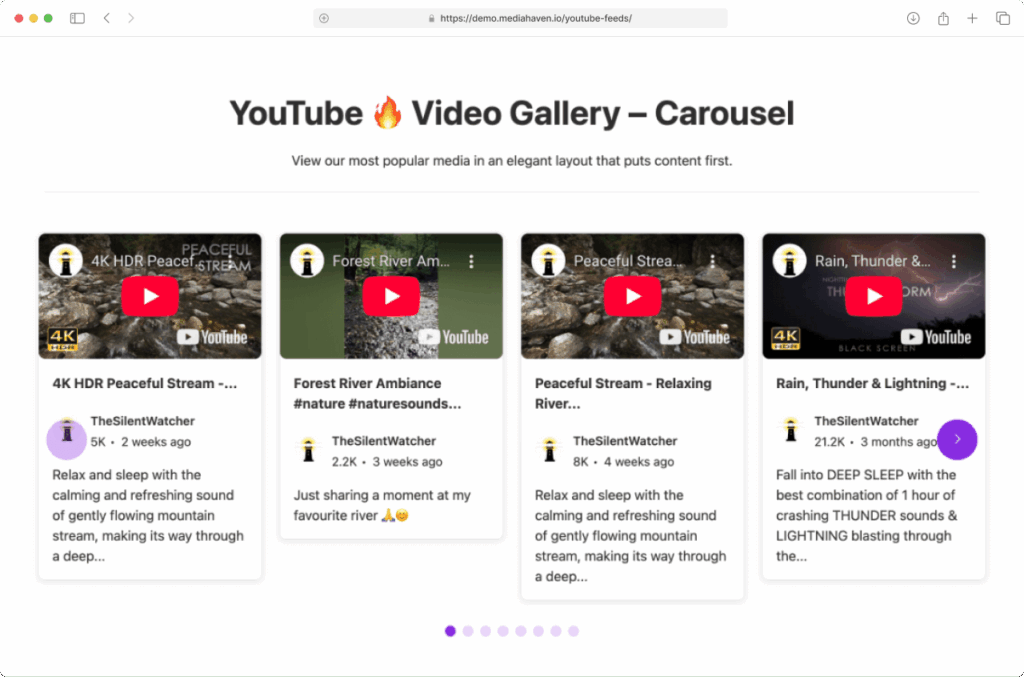
MediaHaven’s YouTube Feed feature stops this. It brings your YouTube videos directly into your WordPress site — in a beautiful, responsive gallery — so visitors watch, browse, and buy without ever leaving your domain.
What Changes When Your Videos Live on Your Site
Your audience stays yours
When a visitor watches a video on your site, you control what they see next. Your products. Your other videos. Your email signup. Your checkout page. YouTube controls none of it.
When they watch on YouTube, YouTube controls everything — and their goal is to keep the viewer on YouTube, not send them back to you.
Your site gets the SEO credit
Google indexes video content. Pages with video are 53× more likely to rank on Google’s first page (Forrester Research). But that SEO value only flows to wherever the video is embedded. If your videos only exist on YouTube, YouTube gets the ranking benefit. When they are embedded on your site through MediaHaven, your site earns it.
Visitors stay longer — and longer visits convert better
On average, visitors spend 88% more time on pages with video than on text-only pages (Wyzowl, 2024). More time on your site means more product views, more trust, and more purchases. MediaHaven’s gallery keeps visitors watching video after video — on your domain, not someone else’s.
Your content updates itself
Every time you publish a new video on YouTube, it appears automatically in your MediaHaven gallery. No manual uploads. No copy-pasting links. Your site stays fresh and current with zero extra effort.
Who Gets the Most Value From This Feature
WooCommerce store owners — Embed product demo videos directly on product pages. Shoppers who watch a product video are 1.81× more likely to purchase (Adobe Analytics). Your existing YouTube demos become your highest-converting product page element.
Content creators and bloggers — Turn your YouTube channel into a full video library on your site. Visitors who find your site through Google can browse your entire content catalog without being redirected to YouTube’s platform.
Coaches and course creators — Display your free YouTube content as a curated preview library. Visitors browse, build trust, and upgrade to your paid course — all within your site.
Agencies and service businesses — Showcase your portfolio, case study videos, and testimonials in a professional gallery that reflects your brand — not YouTube’s interface.
Free vs. Pro: What’s the Difference
API Key — Single vs. Multiple (the most important difference)
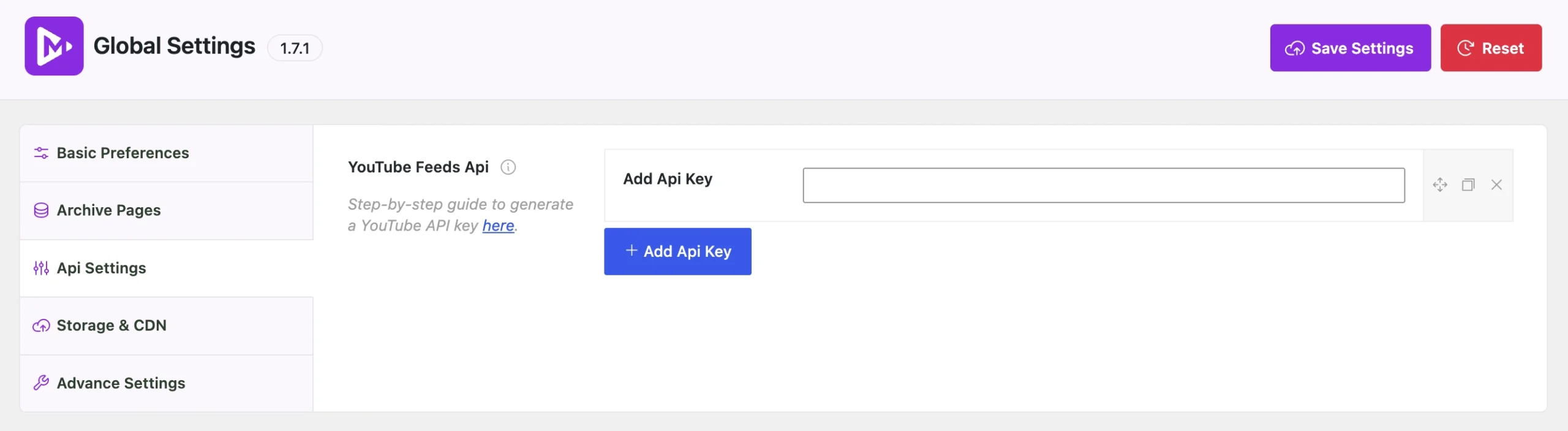
To display YouTube videos, your site needs a YouTube API Key — a free access credential from Google. Google’s free tier allows 10,000 API calls per day per key.
For most new and growing sites, one free key is perfectly sufficient.
On high-traffic sites, a single key can hit that daily limit — causing your video feed to stop loading until midnight when the quota resets. This is a silent problem: visitors see a broken gallery and leave, and you may not notice for hours.
Pro solves this with multiple key rotation. You add 2, 3, or more API keys, and MediaHaven rotates between them automatically. When one key approaches its limit, the next one takes over. Your gallery stays live 24/7 with no interruptions.
| Free | Pro | |
|---|---|---|
| API Keys | 1 | Multiple (random rotation) |
| Quota protection | Basic | Full — virtually no downtime |
| Best for | New sites, moderate traffic | Growing and high-traffic sites |
Items to Display — All vs. Selected (editorial control)
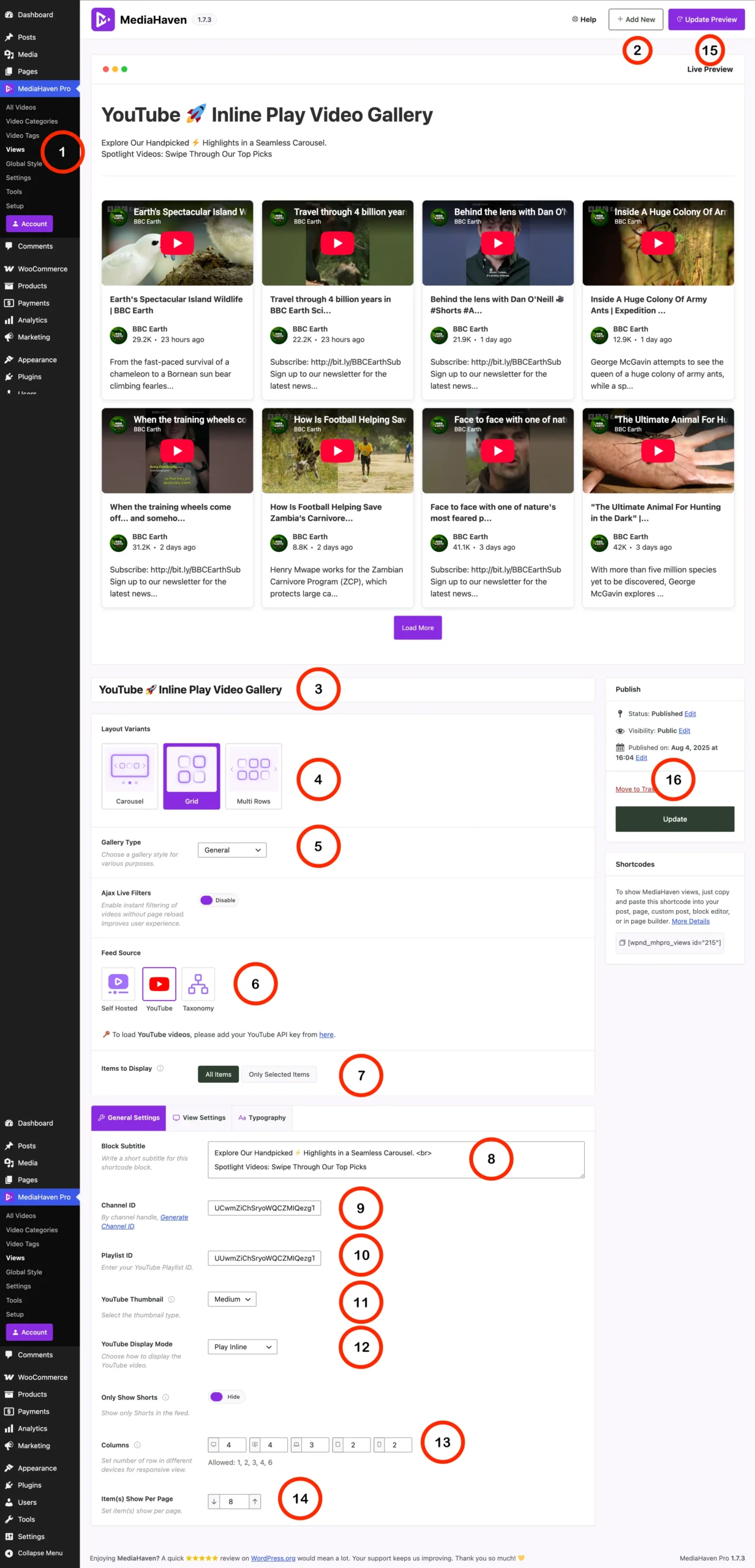
Free: Your gallery automatically shows all videos from your connected channel or playlist. Every time you publish, it appears. Zero maintenance.
Pro: You can search YouTube directly from within MediaHaven and hand-pick exactly which videos appear in your gallery. This matters when:
- You want to show only your best 8 videos, not all 60
- You want different videos on different pages (product demos on product pages, tutorials on a blog)
- You have older or lower-quality videos you do not want featured
- You are curating a specific campaign or seasonal collection
Curated galleries consistently outperform unfiltered ones because they match visitor intent precisely. A product page showing 6 highly relevant demos converts better than the same page showing 40 mixed videos.
Key Features That Directly Affect Your Results
Three Layout Options
Carousel — A horizontal scrolling row, ideal for homepage featured sections or spotlighting a specific series. Keeps the page compact while surfacing multiple videos.
Grid — The most versatile layout. Works on any page type and scales cleanly from 1 to 6 columns across devices. The right starting point for most sites.
Multi Rows — Best for dedicated video library pages or large content archives. Displays many videos in a structured, scannable format.
Ajax Live Filters
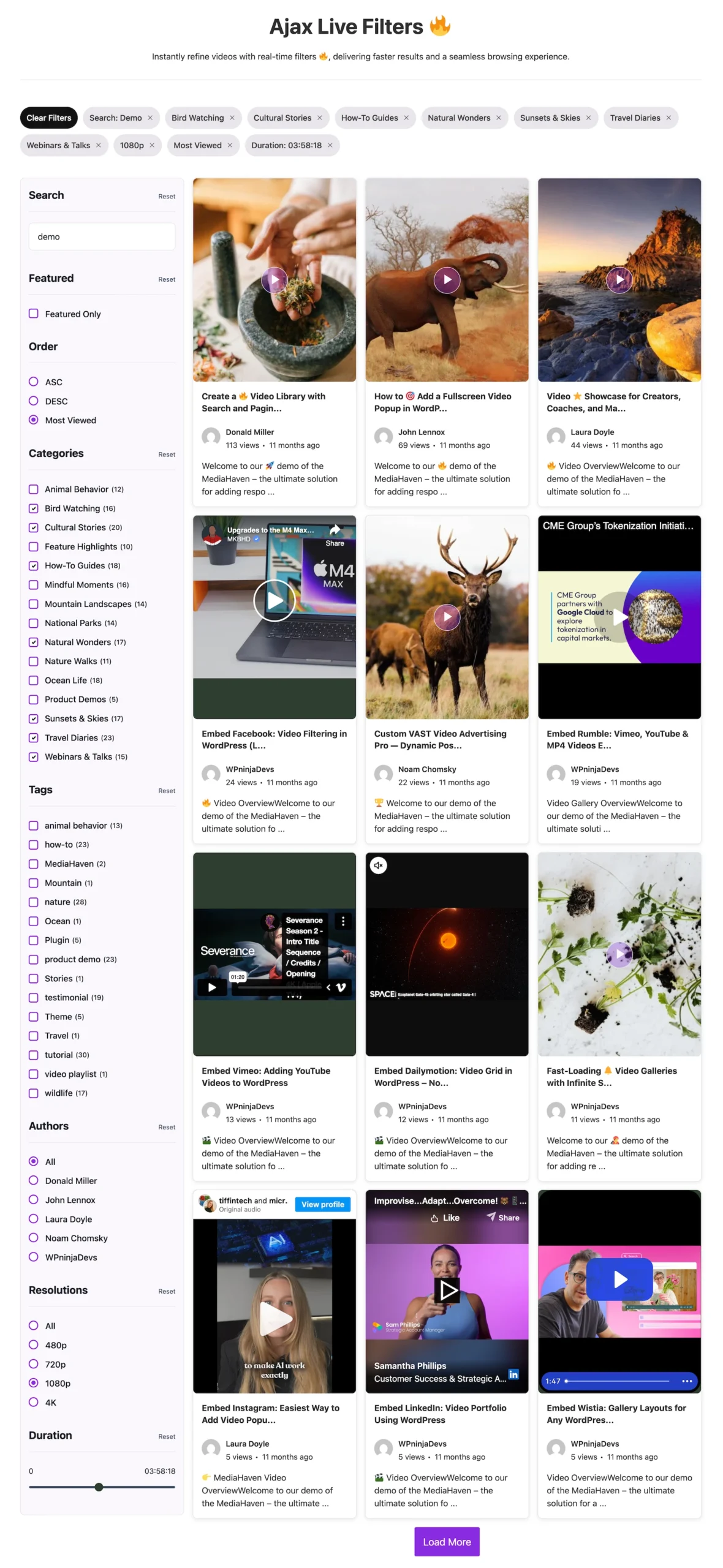
Visitors can instantly filter your video gallery by category, tag, duration, or other attributes — without the page reloading. Results update in real time.
This matters for two reasons. First, visitors who can find relevant content quickly engage more deeply and stay longer — sites with live filtering see up to 40% more pages per session (Nielsen Norman Group). Second, MediaHaven generates SEO-friendly URLs for filtered states, meaning pages like /videos?category=product-demos can be independently indexed by Google and rank for long-tail searches you would never have targeted otherwise.
YouTube Thumbnail Quality
You choose from five thumbnail sizes — from low-resolution defaults up to full 1280×720 Maxres quality. MediaHaven automatically converts thumbnails to WebP format, which loads significantly faster than JPEG while maintaining visual quality.
Thumbnail quality affects first impressions. A gallery of crisp, high-resolution thumbnails looks professional and trustworthy. A gallery of blurry low-res thumbnails does the opposite — and trust is a direct factor in purchase decisions.
Play Inline vs. Popup
Play Inline keeps the viewer on the page — the video plays inside the gallery card. This is the right choice for product pages and landing pages where you want the customer to stay in the buying context.
Thumbnail Only opens videos in a clean lightbox popup. This is better for library and archive pages where you want a fast, browsable experience without the page layout shifting.
YouTube Shorts Control
Toggle Shorts on or off independently from your regular videos. This keeps your gallery layout consistent — Shorts are vertical 9:16 format and look out of place in a landscape video grid. If you actively produce Shorts, you can build a dedicated Shorts gallery separately for mobile-optimized pages.
Fully Responsive Columns
Set different column counts for every device breakpoint — desktop, tablet, and mobile — independently. This ensures your gallery looks intentional and polished on every screen size, not just on desktop. Given that over 60% of web traffic now comes from mobile (Statista, 2024), a gallery that breaks on phones is a gallery that loses most of your audience.
The Bottom Line
If you are already uploading to YouTube, you are doing the hard work. MediaHaven’s YouTube Feed makes sure that work pays off on your site — not just on YouTube’s platform.
Your videos become a traffic tool, a conversion tool, and an SEO tool all at once. Visitors arrive, stay longer, trust you more, and buy more often — because your content is right there, inside your brand’s experience, rather than one click away on someone else’s platform.
Start free. One API key, automatic feed, beautiful gallery. Upgrade to Pro when your traffic grows or when you need precise editorial control over what appears where.
→ Download MediaHaven Free → View Live Demo → See Pricing
Frequently Asked Questions
Do I need a paid YouTube account? No. The YouTube API Key is free for any Google account. The free quota is sufficient for most sites.
Will my gallery update automatically when I post new videos? Yes. MediaHaven syncs with your channel. New videos appear in your gallery automatically.
Can I show videos from multiple channels? You can create separate gallery blocks for different channels or playlists and place them on different pages.
What happens if I hit the API quota limit? On the free plan, your feed stops loading until Google resets the quota at midnight. On Pro, multiple keys rotate automatically so this does not happen.
Does this slow down my site? MediaHaven uses smart caching and WebP-compressed thumbnails to minimize load time. Only assets visible on screen load initially.
Can I use this with Elementor or Gutenberg? Yes. MediaHaven works with both, as well as shortcodes for any other page builder.
Statistics sourced from Wyzowl 2024 Video Marketing Report, Forrester Research, Adobe Analytics, Nielsen Norman Group, and Statista 2024 Mobile Traffic Report.
MediaHaven is built by WPNinjaDevs. Version 1.7.1.
Leave a Reply