


Video content is no longer optional for websites. From blogs and news portals to WooCommerce and digital product platforms, video drives higher engagement, longer session times, and stronger conversions. But creating videos is only half the story — monetizing them effectively is where most WordPress users get stuck.
If you’ve ever wondered how video ads work on websites, what VAST actually means, or whether you can run video ads on WordPress without relying on YouTube, this guide covers everything — including how to set it up.
What Is VAST Advertising?
VAST (Video Ad Serving Template) is an industry-standard XML format used to deliver video ads from ad servers to video players. It allows advertisers and publishers to communicate in a structured, predictable way.
In simple terms:
- Advertisers provide video ads via a VAST tag (URL)
- Your video player reads that tag
- The ad plays inside your video player before, during, or after the content
VAST is maintained by the IAB (Interactive Advertising Bureau) and is supported by almost every major ad network, including Google Ad Manager and programmatic platforms.
For WordPress publishers, VAST is the most reliable and scalable way to run video ads without giving up control of your content.
How Video Ads Work on Websites
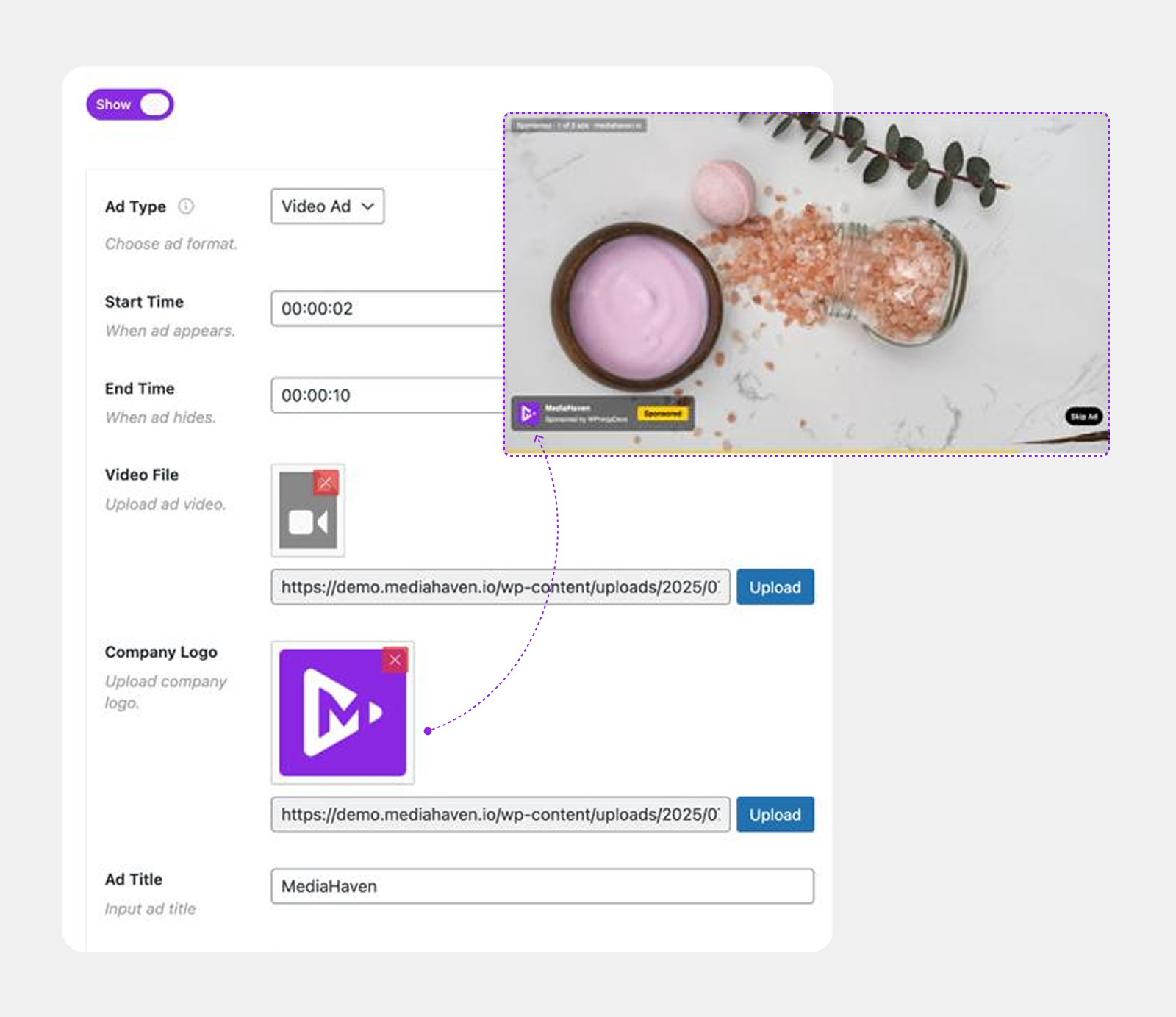
Video ads typically appear in three main formats:
Pre-roll Ads
These ads play before the main video content starts. They have the highest completion rates and are the most commonly used format.
Best for: Tutorials, product demos, news videos
Mid-roll Ads
These ads play during the video, similar to TV commercial breaks. They work best for longer videos where viewers are already engaged.
Best for: Educational content, webinars, long-form reviews
Post-roll Ads
These ads play after the video ends. They usually have lower engagement but still add incremental revenue.
Best for: Branding campaigns, remarketing
A modern WordPress video setup lets you control where ads appear and how long they run.
💡 Pro Tip: MediaHaven Pro’s VAST ad system supports image, video, link, and text ads, placed at any of 9 positions on the player (top/middle/bottom, left/center/right), with precise control over start time and duration — plus an option to mute ad audio.
See it running live in the shoppable video demo.
VAST vs VPAID vs VMAP – What Should WordPress Users Use?
Understanding these terms helps you avoid outdated or insecure setups.
VAST
- Lightweight and fast
- Widely supported
- Secure and privacy-friendly
- Ideal for WordPress
Recommended for almost all publishers
VPAID
- Allows interactive ads (JavaScript-based)
- Heavier and slower
- Increasingly blocked for security reasons
| Feature | VAST | VPAID |
|---|---|---|
| Standard Format | ✅ XML-based standard | ❌ JavaScript/Flash-based |
| Industry Adoption | ✅ Widely adopted | ❌ Largely deprecated |
| Interactive Ads | ⚠️ Limited (via companion tech like SIMID) | ✅ Full interactive capabilities |
| Browser Compatibility | ✅ Excellent | ❌ Limited in modern browsers |
| Mobile Support | ✅ Strong | ❌ Poor |
| Security | ✅ More secure | ❌ Higher security concerns |
| Performance | ✅ Faster and lightweight | ❌ Heavier execution |
| Google IMA Support | ✅ Fully supported | ⚠️ Limited/legacy |
| Future Development | ✅ Actively maintained by IAB Tech Lab | ❌ Deprecated |
| Recommended for New Projects | ✅ Yes | ❌ No |
Not recommended for modern WordPress sites
VMAP
- Works together with VAST
- Useful for complex ad timelines
- Defines ad schedules (when ads should appear across a full video)
Optional for advanced use cases — mostly relevant to large publishers running multiple pre-set ad breaks across long-form video via a full ad-server integration.
Bottom line: For WordPress users, VAST is the safest, fastest, and most future-proof choice for the vast majority of sites.
How Video Monetization Works for Small Publishers and E-commerce Sites
You don’t need millions of views to benefit from video monetization.
For Content Publishers
- Monetize self-hosted or CDN-hosted videos
- Use VAST tags from ad networks or direct advertisers
- Keep full ownership of traffic and data
For WooCommerce Stores
- Add product videos to the product page, product tabs, or gallery
- Promote related products via video
- Upsell or cross-sell using branded video ads
Only in MediaHaven Pro:
- Shoppable Video Overlays: Clickable product cards inside the video with live pricing, variations, quantity selectors, coupons, and Add to Cart — customers buy without leaving the video
- VAST Video Ads: Image, video, link, and text ads at 9 positions, with full timing and style controls
- Product Gallery Videos: Replace static WooCommerce gallery images with video, or display them side by side
- Promotional Banners In-Video: Flash limited-time offers or discount codes at the perfect moment
⚠️ Important: VAST ads and shoppable overlays work with self-hosted, HLS, and Bunny Stream videos only. YouTube, TikTok, Vimeo, and other embedded-platform videos use their own player and ad systems, so these features don’t apply to them.
See how shoppable video ads & in-video purchases work in the MediaHaven WordPress plugin:

For WooCommerce, FluentCart, SureCart, and Digital Products
- Use video to explain features or onboarding
- Insert promotional or partner ads
- Increase perceived value and trust
Video ads are not just for ad revenue — they’re powerful marketing tools when combined with your own products.
WordPress Shoppable Video Plugin: Turn Every Video Play Into a Purchase Opportunity
Can You Run Video Ads on WordPress Without YouTube?
Yes — and you should.
YouTube:
- Takes control of your traffic
- Shows competitor ads
- Limits customization
- Shares revenue on their terms
WordPress-native video solutions:
- Let you host videos yourself
- Support VAST ad tags directly
- Work inside posts, pages, and blocks
- Scale with caching, CDNs, and custom databases
A WordPress-native approach means faster performance, better SEO, and full control over ads, branding, and analytics.
How to Set Up VAST Video Ads on WordPress (Step-by-Step)
- Install a VAST-compatible video player plugin, such as MediaHaven Lite
- Upload or connect a self-hosted, HLS, or Bunny Stream video — VAST ads don’t run on embedded YouTube/TikTok/Vimeo videos
- Get a VAST tag from your ad network (Google Ad Manager or similar) — or set up direct image/video/link/text ads
- Choose your ad position and timing — pick from the available placement options and set when the ad starts and how long it plays
- Publish and test playback across desktop and mobile
MediaHaven Lite gets you a fast, responsive video gallery with 10+ video sources, free automatic HLS hosting via Bunny Stream CDN, and basic single-language subtitles — everything you need to get videos live.
MediaHaven Pro adds the actual monetization layer on top: VAST video ads, shoppable WooCommerce overlays, video chapters, multi-language subtitles, and the Ajax Live Filter for large libraries.
MediaHaven Free vs Pro — What You Actually Get
(Pulled directly from the official feature comparison, current as of plugin v1.7.3)
| Feature | Free (Lite) | Pro |
|---|---|---|
| Grid, Carousel, Multi-row Carousel layouts | ✅ | ✅ |
| Setup Wizard | ✅ | ✅ |
| Export/Import (JSON & CSV) | ✅ | ✅ |
| Schema.org SEO markup | ✅ | ✅ |
| View counter & AJAX like/dislike | ✅ | ✅ |
| Aspect ratio controls (16:9, 4:3, 1:1, 4:5, 9:16, 21:9) | ✅ | ✅ |
| Image optimization | ✅ | ✅ |
| 10+ video sources (YouTube, Vimeo, TikTok, HLS, etc.) | ✅ | ✅ |
| Keyboard shortcuts for playback | ✅ | ✅ |
| Video subtitles (single language) | ✅ | ✅ (multi-language + VTT) |
| YouTube Feeds (Grid/Carousel) | ✅ | ✅ |
| Bunny Stream CDN — automatic secure HLS hosting | ✅ | ✅ |
| WooCommerce Product Video Tab | ✅ | ✅ |
| WooCommerce Product Gallery Video (replace images) | ❌ | ✅ |
| Bunny Storage — offload all media (images, audio, docs) | ❌ | ✅ |
| Shoppable video for WooCommerce | ❌ | ✅ |
| Interactive Video Chapters | ❌ | ✅ |
| Indexed lookup table for fast filtering | ❌ | ✅ |
| VAST video ads (image/video/link/text, 9 positions) | ❌ | ✅ |
| Drag & Drop video card sections | ❌ | ✅ |
| Unlimited player style controls | ❌ | ✅ |
| Ajax Live Filter (search, category, tag, duration) | ❌ | ✅ |
| WebP image conversion | ❌ | ✅ |
If you’re starting with a single gallery or a handful of embedded videos, Lite genuinely covers a lot — including free HLS streaming through Bunny Stream, which most competing free plugins don’t offer at all. Download it free.
Once you want to actually run ads, sell inside your videos, or manage a larger self-hosted library, that’s exclusively a Pro feature set — VAST ads and shoppable video aren’t available in Lite at any level.
Why WordPress-Native VAST Video Galleries Are the Future
Modern WordPress sites need solutions that scale to thousands of videos, support multiple video sources, work without third-party lock-in, and respect performance and privacy.
A WordPress-native VAST video gallery gives you ad control on your own hosted content, flexible layouts, native block and shortcode support, and integration with WooCommerce and other plugins.
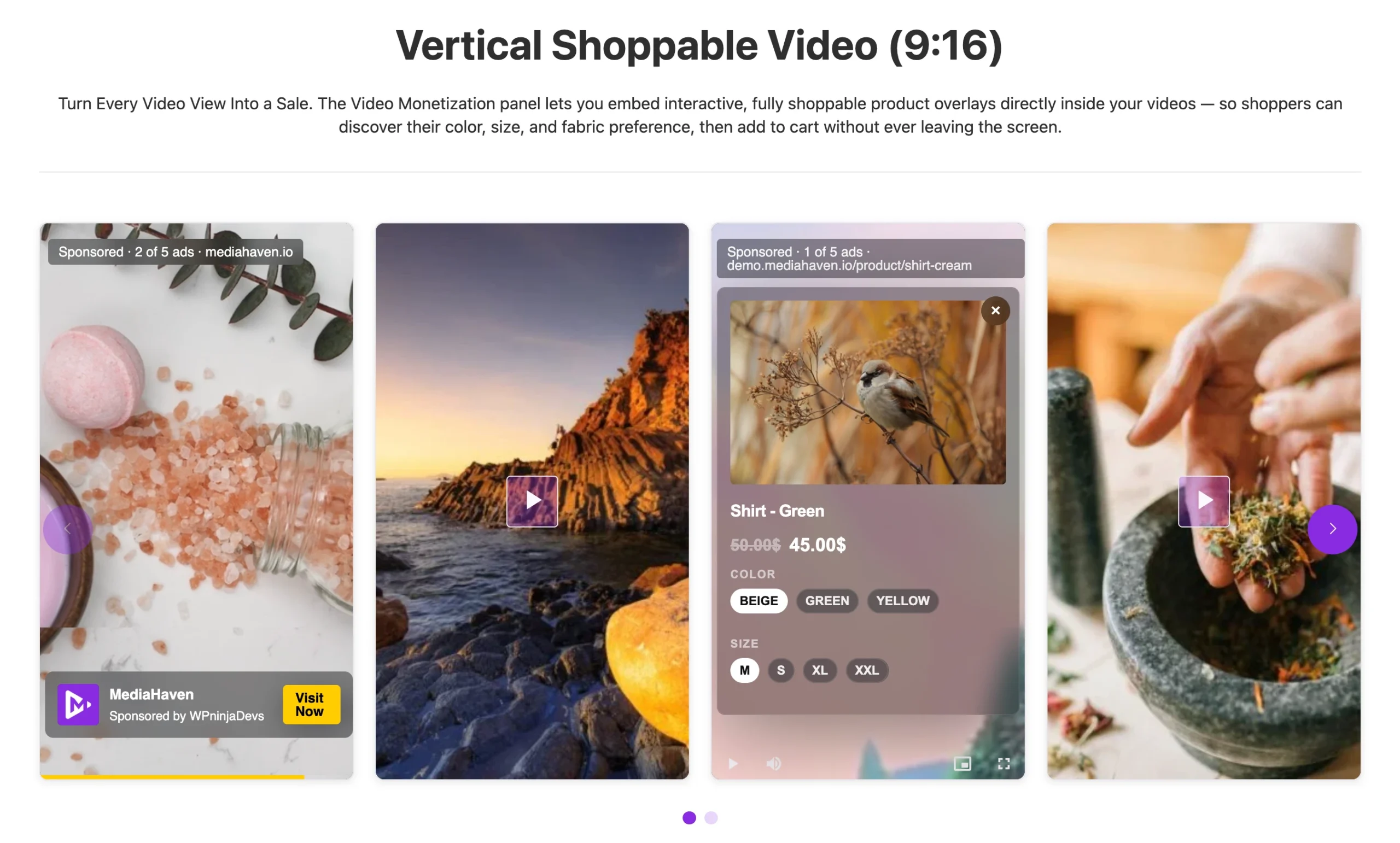
See it running live in the shoppable video demo.
Frequently Asked Questions
1. What does VAST stand for?
VAST stands for Video Ad Serving Template. It is an XML-based standard developed by the IAB Tech Lab that allows video players to communicate with ad servers and display video advertisements consistently across different platforms.
2. How does VAST advertising work?
When a visitor plays a video, the video player requests a VAST tag from an ad server. The server returns an XML response containing the video ad, tracking URLs, and playback instructions. The player then displays the ad before, during, or after the main video while reporting impressions and other engagement metrics.
3. Can I use VAST ads on a WordPress website?
Yes. Modern WordPress video plugins like MediaHaven support VAST-style advertising. With MediaHaven Pro, you paste a VAST tag or set up direct image/video/link/text ads, choose a position, and set the timing — no ad server required if you’d rather run your own ads.
4. What is a VAST tag?
A VAST tag is a URL provided by an advertising platform or ad server. When your video player requests this URL, it receives XML instructions describing which ad to play, how long it lasts, and how impressions and clicks should be tracked. e.g.
<VAST>
   <Ad>
      <InLine>
         <Creatives>
            <Linear>
               <MediaFiles>
                   video.mp4
               </MediaFiles>
               <TrackingEvents>
               </TrackingEvents>
            </Linear>
         </Creatives>
      </InLine>
   </Ad>
</VAST>
5. Which video ad formats does VAST support?
VAST commonly supports pre-roll ads (before the video), mid-roll ads (during playback), and post-roll ads (after the video). Some players also support companion banner ads alongside video advertisements.
6. What is the difference between VAST and VPAID?
VAST is the standard for delivering video ads, while VPAID was designed for interactive video advertisements. Today, VPAID is largely considered outdated because of security and compatibility concerns, making VAST the recommended choice for most WordPress publishers.
7. Is VAST advertising compatible with self-hosted videos?
Yes — and with MediaHaven, that’s the only place it works. VAST-style ads and shoppable overlays run on self-hosted MP4/WebM/MOV/MKV/AVI files, HLS streams, and Bunny Stream videos. They do not run on embedded YouTube, TikTok, or Vimeo videos, since those platforms control their own player.
8. Can I monetize WooCommerce product videos using VAST?
Yes, if the product video is self-hosted, HLS, or Bunny Stream. MediaHaven Pro adds shoppable overlays on top — clickable product cards, live pricing, and Add to Cart buttons directly inside the video.
9. Where can I get a VAST tag?
VAST tags are available from advertising platforms and ad servers, including Google Ad Manager and other video advertising networks. After creating a video ad unit, you’ll receive a VAST tag URL that can be added to your video player.
10. Is VAST advertising better than YouTube monetization?
They serve different purposes. YouTube monetization only works within the YouTube ecosystem, while VAST-style advertising lets you monetize video hosted on your own WordPress site, with full control over branding and placement — though it only applies to self-hosted or HLS video, not embedded YouTube clips.
11. Does VAST advertising slow down my website?
A properly optimized video player loads ads asynchronously, so the performance impact is generally minimal. MediaHaven’s smart asset loading and Bunny Stream CDN delivery help keep pages fast even with video ads running.
12. Can beginners set up VAST ads without coding?
Yes. MediaHaven Pro provides a settings page where you add ad creatives (or a VAST tag), pick a position from the 9 available slots, and set timing — no programming required.
13. Do VAST ads work on mobile devices?
Yes. VAST-style ads are supported on modern HTML5 video players across desktop, tablet, and mobile.
14. What is the best ad placement for maximizing video revenue?
Pre-roll ads typically deliver the highest completion rates because viewers see them before the main content begins. Mid-roll ads can lift revenue on longer videos, while post-roll ads add incremental branding value. Testing more than one position — something MediaHaven Pro’s 9 placement options support — usually beats a single fixed placement.
15. Why should WordPress publishers choose VAST advertising?
VAST is an open industry standard supported by most major ad networks and video players. It offers reliable ad delivery, accurate tracking, broad compatibility, and gives publishers control over how video ads are displayed on their own self-hosted content instead of relying solely on third-party platforms.
Final Thoughts
Video monetization is no longer reserved for large media companies. With VAST-style advertising on self-hosted video and a WordPress-native gallery, any publisher or business owner can turn videos into a scalable growth channel — without relying on YouTube or external platforms.
Start free with the basics, or go straight to full monetization:
- → Download MediaHaven Lite Free — responsive galleries, 10+ video sources, and free automatic HLS hosting via Bunny Stream.
- → Explore the live demo — see VAST ad positions and shoppable overlays running on a real product page.
- → Upgrade to Pro from $79/year — unlocks VAST video ads, shoppable WooCommerce video, video chapters, multi-language subtitles, and the Ajax Live Filter. Backed by a 14-day money-back guarantee.
Learn More: From Views to Revenue: How Shoppable Videos Increase Conversion Rates
Leave a Reply