

Choosing the wrong WordPress video gallery plugin doesn’t just mean a mildly inconvenient admin experience. It means video content that doesn’t rank, missed ad revenue, and product pages that underperform. With video driving 82% of all internet traffic in 2025, the stakes of this decision are higher than most site owners realize.
Two plugins come up repeatedly when businesses search for a dedicated WordPress video gallery solution: MediaHaven and All-in-One Video Gallery. This comparison covers both in detail — architecture, features, pricing, monetization capability, SEO output, and the specific business scenarios where each performs best.
No affiliate arrangements influence this comparison. The goal is a clear, factual picture of what each plugin actually does.
Quick Comparison: MediaHaven vs All-in-One Video Gallery
| Feature | MediaHaven (Free) | MediaHaven (Pro) | All-in-One Video Gallery (Free) | All-in-One Video Gallery (Pro) |
|---|---|---|---|---|
| Schema.org markup | ✅ Automatic | ✅ Automatic | ✅ Yes | ✅ Yes |
| Video sources | 12 supported sources (YouTube, Vimeo, Twitch, Wistia, Dailymotion, Rumble, TikTok, Facebook, Instagram, LinkedIn, and HLS) | Same as free | YouTube, Vimeo, Dailymotion, MP4, etc. | Same as free + Bunny Stream |
| YouTube Feed (channel) | ✅ | ✅ | ❌ | ✅ |
| Gallery layouts | Grid, Carousel, Multi-row Carousel | Same + unlimited styles | Grid, Masonry, List | Same |
| VAST ad monetization | ❌ | ✅ | ❌ | ❌ |
| eCommerce product overlays boost sale 5x | ❌ | ✅ | ❌ | ❌ |
| WooCommerce Product Gallery Videos | ❌ | ✅ | ❌ | ❌ |
| WooCommerce Video Commerce & Shoppable Videos | ❌ | ✅ | ❌ | ❌ |
| Ajax live filter | ❌ | ✅ | ✅ | ✅ |
| Video subtitle | ✅ | ✅ | ✅ | ✅ |
| Video chapters | ❌ | ✅ | ✅ | ✅ |
| User access restriction | ❌ | ✅ | ✅ | ✅ |
| Bunny Stream | ✅ | ✅ | ❌ | ✅ |
| Bunny Storage | ❌ | ✅ | ❌ | ❌ |
| Image Optimization | ✅ | ✅ | ❌ | ❌ |
| Convert to WebP format | ❌ | ✅ | ||
| Export / Import | JSON & CSV | JSON & CSV | CSV | CSV |
| Setup wizard | ✅ | ✅ | ❌ | ❌ |
| Pricing (single site) | Free | $79/year | Free | ~$47.88/year |
Plugin Profiles
MediaHaven
MediaHaven is developed by WPninjaDevs (10+ years in the WordPress marketplace) and positioned as a video revenue platform — not just a gallery display tool. Its Pro tier is built around three revenue drivers: VAST ad monetization, WooCommerce in-video product overlays, and conversion-optimized video layouts. The free version is genuinely capable, including schema.org markup and YouTube feeds that most plugins put behind a paywall.
Current version: 1.6.8 (April 2026). Active development, with updates releasing approximately every 2–3 weeks based on the WordPress.org changelog.
View MediaHaven → mediahaven.io
Download free → WordPress.org
All-in-One Video Gallery
All-in-One Video Gallery (AIOVG) is a mature plugin developed around the “video posts” concept — each video in your library is a custom post type with its own URL, title, description, and SEO-friendly page. It’s well-maintained, has strong user reviews, and covers a solid set of features including Ajax filtering, video access restrictions by user role, and Bunny Stream CDN integration. The Pro tier is priced modestly at around $47.88/year for a single site.
Architecture: How Each Plugin Thinks About Video
MediaHaven treats video galleries as an embeddable, monetizable content format. The emphasis is on converting viewers — through product overlays, ad impressions, or engagement that drives organic search growth. The architecture prioritizes business outcomes: revenue from ads, revenue from WooCommerce sales, traffic from schema markup.
All-in-One Video Gallery treats video as posts — each video has a dedicated URL and behaves like standard WordPress content. This is excellent for building video-centric sites where individual video pages need SEO authority, URL customization, and access control. The access restriction features (restrict by logged-in status, user role, or subscription) make it well-suited for membership and LMS sites.
Neither approach is universally superior. The right choice depends on what your site is trying to accomplish.
Feature-by-Feature Comparison
Video Sources
MediaHaven supports 12 sources in the free version: YouTube embeds, YouTube channel feeds, YouTube playlists, Vimeo embeds, TikTok, Twitch, Wistia, Dailymotion, Rumble, Facebook, Instagram, LinkedIn, HLS (HTTP Live Streaming), and self-hosted MP4. All sources work within the same gallery display system.
All-in-One Video Gallery supports YouTube embeds, Vimeo, Dailymotion, self-hosted MP4, and Bunny Stream (Pro). The source set is smaller, but Bunny Stream integration is a standout for sites that self-host video and want CDN-accelerated delivery with token authentication.
Verdict: MediaHaven wins on breadth.
YouTube Feed Integration
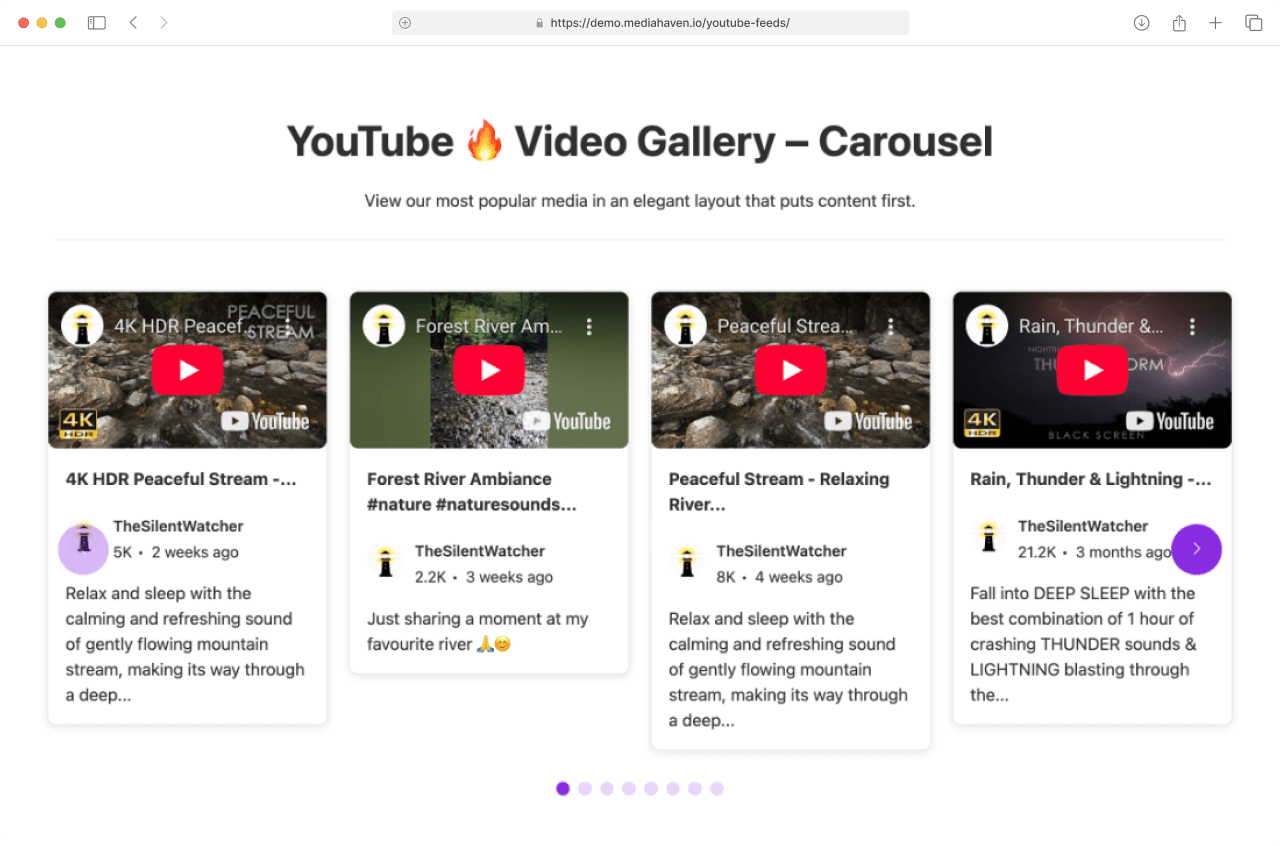
MediaHaven includes YouTube channel feed and YouTube playlist gallery support in the free version, with smart caching and multiple API key rotation to prevent quota exhaustion. Real-time view and like counts are displayed and updated intelligently.
All-in-One Video Gallery added YouTube feed support in a recent update, but it’s a Pro feature.
Verdict: MediaHaven, particularly for sites that want YouTube feed galleries at no cost.
SEO and Schema Markup
Both plugins generate schema.org VideoObject markup automatically. Both produce semantic HTML5 output. Both are WCAG-accessible.
MediaHaven goes further with SEO-friendly URLs on the Ajax live filter (filtered views are indexable), and the built-in schema includes all recommended VideoObject properties: embedUrl, thumbnailUrl, uploadDate, duration, description, and name.
All-in-One Video Gallery generates schema markup, and the post-based architecture means each video gets a proper WordPress URL — which gives individual video pages more SEO authority over time as they accumulate backlinks.
Verdict: Tie, with different strengths. MediaHaven is stronger for gallery-page SEO. AIOVG is stronger for individual video page authority.
Monetization
This is the clearest differentiator.
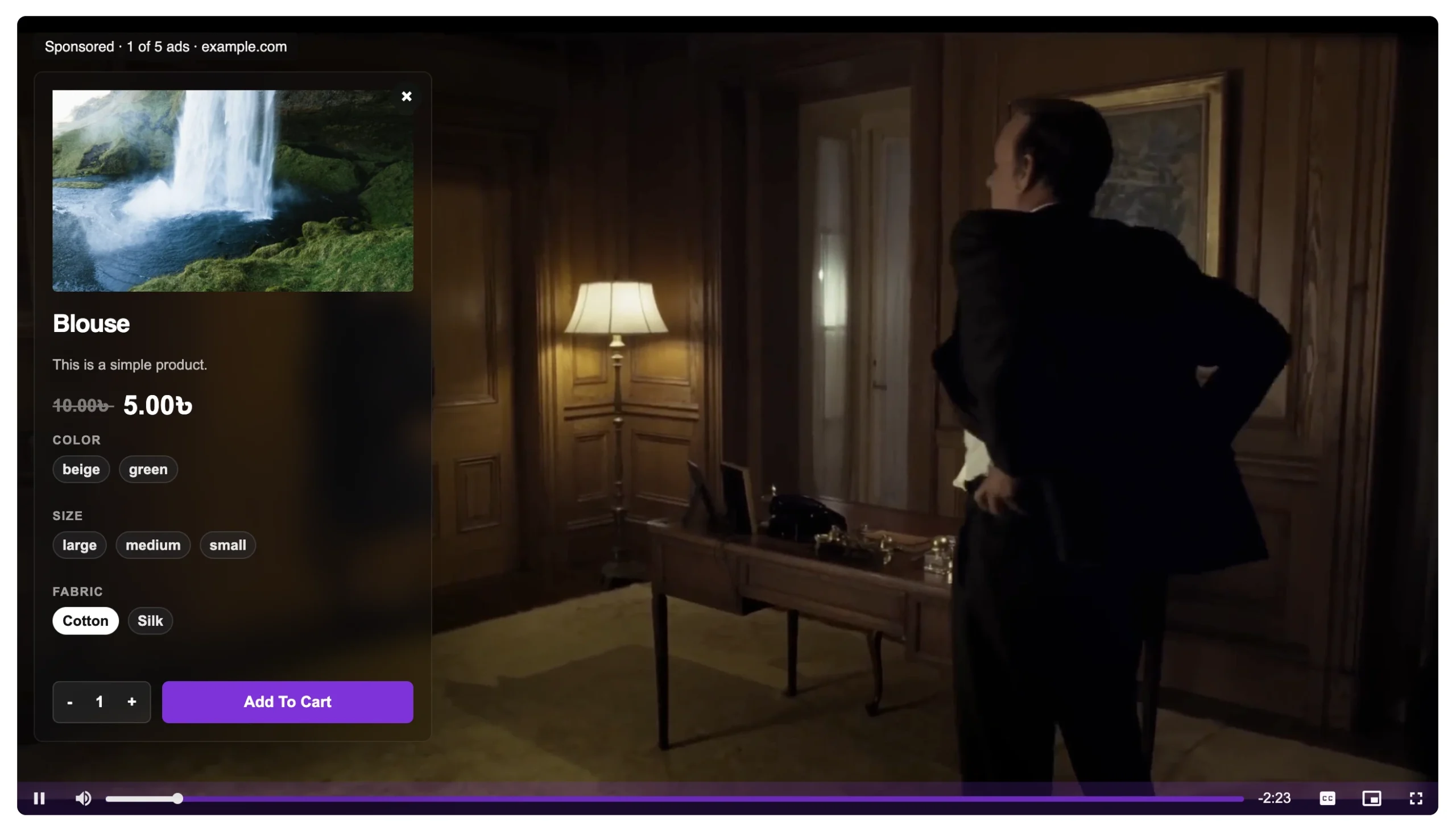
MediaHaven Pro includes a full VAST ad system: pre-roll, mid-roll, post-roll, and custom timestamp placement. Supports video ads, banner ads, and clickable link ads. Any VAST-compliant ad network can be connected. You keep 100% of revenue. The WooCommerce product video overlay feature lets you upsell and cross-sell directly inside the video player.
All-in-One Video Gallery has no ad monetization features in either the free or Pro version. There is no VAST support, no ad placement system, and no WooCommerce integration for in-video product promotion.
Verdict: MediaHaven Pro, decisively. If ad revenue or WooCommerce conversion from video is part of your model, AIOVG cannot serve this need.
Access Control and User Restrictions
MediaHaven Pro includes built-in video access restrictions—allowing you to restrict content globally, by category, or per-video based on logged-in status or guest roles. It also supports trailer videos for restricted content and secure HLS streaming via Bunny Stream.
All-in-One Video Gallery includes access restriction in both free and Pro versions — restrict videos globally or per-video based on logged-in status or user role. This is purpose-built for membership sites, LMS platforms, and paid content libraries.
Verdict: Tie / Depends on Stack. Both plugins offer strong gated content features. MediaHaven Pro is ideal if you also need native Bunny Stream HLS support and integrated video trailers, while All-in-One Video Gallery remains a reliable option for dedicated membership sites.
Performance
MediaHaven uses per-page smart asset loading (CSS/JS only loaded when a shortcode is present), lazy loading for video iframes, and WebP thumbnail optimization. The result is minimal impact on page speed for pages without galleries.
All-in-One Video Gallery has added performance improvements over recent versions and includes lazy loading. However, some user reports note higher overhead on pages with large video libraries compared to MediaHaven’s indexed lookup table approach (a Pro feature).
Verdict: MediaHaven, particularly at scale.
Setup Experience
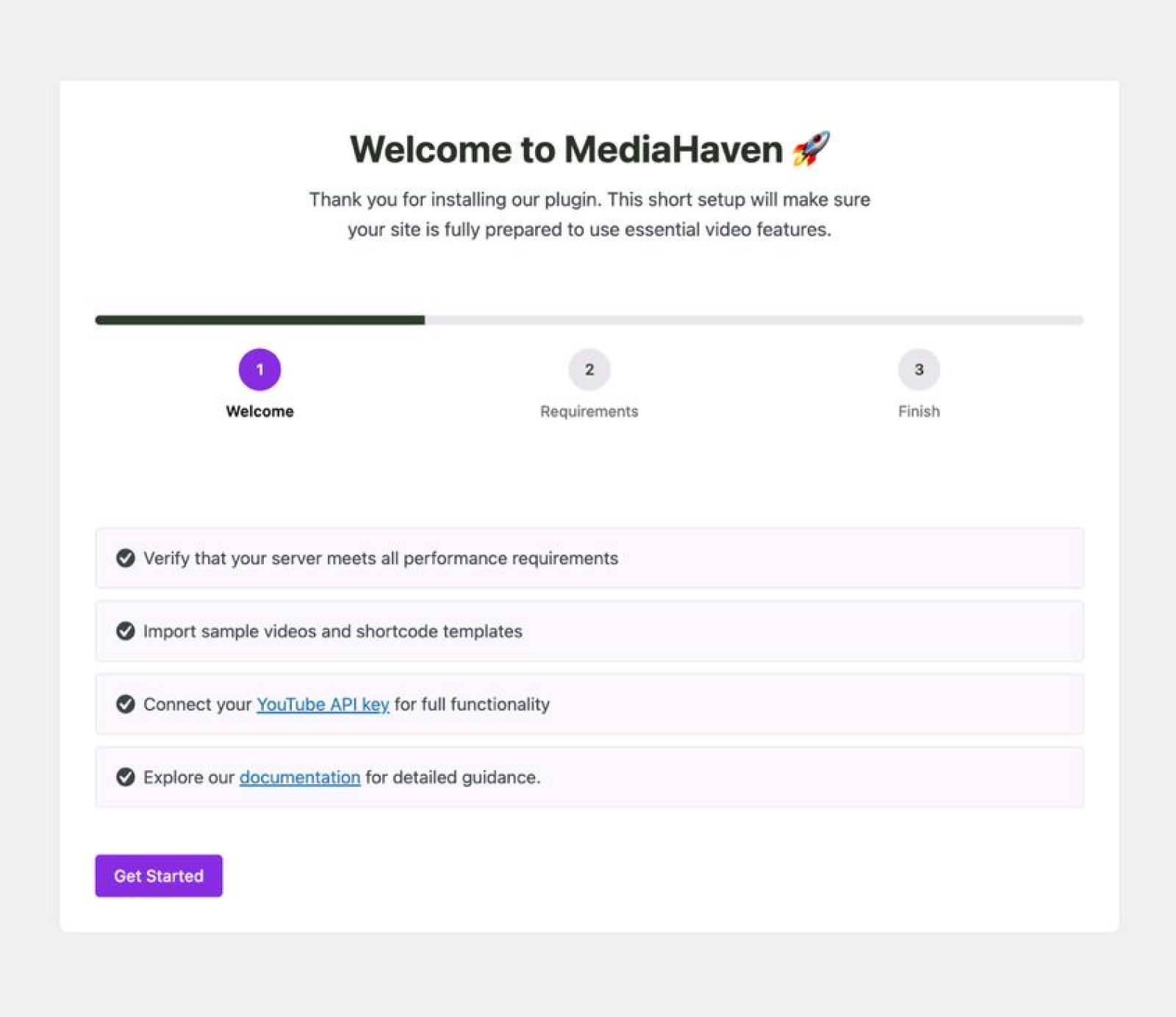
MediaHaven includes a guided setup wizard on first activation. It handles YouTube API connection, runs a server performance check, and creates sample gallery content with a working shortcode. A new user can have a functioning gallery on their site in under 10 minutes.
All-in-One Video Gallery does not include a setup wizard. Configuration requires navigating the settings panel independently — functional, but less guided.
Verdict: MediaHaven for new users and agencies onboarding clients quickly.
Import / Export
Both plugins support CSV export/import. MediaHaven adds JSON format, which is useful for structured data portability across environments and for programmatic gallery configuration.
Verdict: MediaHaven, for the JSON option and developer use cases.
When to Choose MediaHaven
Choose MediaHaven if your primary goal is revenue from video content:
- You run a WooCommerce store and want to demonstrate products through video, then convert viewers in-player
- You publish video content and want to earn ad revenue through VAST-compliant ad networks, bypassing YouTube’s revenue share
- You need YouTube channel feeds in the free tier without API key complexity
- You’re building a video-heavy site and want the gallery SEO infrastructure (schema markup, Ajax filtered URLs) from day one
- You manage multiple sites and want a scalable, export-friendly system
MediaHaven is also the better choice for agencies and developers who need rapid deployment (setup wizard), JSON portability, and multi-site licensing.
When to Choose All-in-One Video Gallery
Choose All-in-One Video Gallery if your primary goal is gated or role-restricted video access:
- You run a membership site, LMS, or subscription platform where videos are only accessible to logged-in or paid users
- You self-host video and want Bunny Stream CDN integration for token-authenticated, fast delivery
- You want individual video pages with dedicated WordPress URLs to accumulate SEO authority over time
- Ad revenue and WooCommerce conversion are not part of your video strategy
Pricing Comparison
MediaHaven:
- Free: Full gallery functionality, 12 sources, YouTube feeds, schema.org markup
- Pro: $79/year (1 site), $159/year (5 sites), $249/year (10 sites), $499/year (50 sites)
- 14-day money-back guarantee
All-in-One Video Gallery:
- Free: Core gallery, Ajax filter, access restrictions, schema.org
- Pro: ~$47.88/year (1 site), $149 lifetime (1 site)
- Terms vary
MediaHaven Pro carries a higher per-site price, but the difference is justified when monetization features are in use. A single site running VAST pre-roll ads at a modest $3 CPM across 5,000 monthly video plays generates ~$15/month in ad revenue — more than covering the $6.60/month Pro cost.
The Bottom Line
Both MediaHaven and All-in-One Video Gallery are legitimate, well-maintained WordPress video gallery plugins. The choice comes down to what your site needs to accomplish:
MediaHaven is the right choice when video is a revenue channel — through ads, WooCommerce conversions, or organic search growth. Its free tier is more capable than most competitors’ paid tiers. The Pro upgrade is financially justified at scale.
All-in-One Video Gallery is the right choice when your video strategy requires gated access, Bunny Stream hosting, or individual video page authority. It’s also the more affordable Pro option for sites that don’t need monetization features.
For most business sites — content publishers, WooCommerce stores, educators, agencies — MediaHaven is the stronger recommendation. The combination of no-cost schema markup, YouTube feeds, and the path to VAST monetization represents better business value than any competing plugin in the same category.
Frequently Asked Questions
Can I migrate from All-in-One Video Gallery to MediaHaven?
Yes. Export your video data from AIOVG using its CSV export, then import using MediaHaven’s CSV import. You’ll need to re-create your gallery shortcodes, but the video metadata (titles, descriptions, URLs) transfers cleanly.
Does MediaHaven work on the same site as All-in-One Video Gallery?
Yes, both plugins can be active simultaneously. However, running redundant video gallery plugins adds unnecessary overhead. Choose one and remove the other after migrating content.
Is the MediaHaven free version actually usable for a business site?
Yes. The free version includes schema.org markup, YouTube feeds, multi-source gallery support, responsive layouts, and the setup wizard — all of which are production-quality features. The main limitations are no VAST ad support, no WooCommerce overlays, and no Ajax live filter.
Does All-in-One Video Gallery plan to add monetization features?
As of April 2026, there is no indication in the plugin’s changelog or official communications of planned VAST ad or WooCommerce overlay support.
Comparison data based on April 2026 plugin versions: MediaHaven 1.6.8, All-in-One Video Gallery (current release). Features subject to change with plugin updates.
Leave a Reply