


YouTube makes monetization look easy. Connect AdSense, hit 1,000 subscribers and 4,000 watch hours, and you’re in the Partner Program. Ads start running. Money comes in.
Except it doesn’t work that way in practice.
YouTube takes 45% of ad revenue. The algorithm decides which of your videos get promoted and which get buried. YouTube can demonetize your channel, restrict your content, or remove it entirely — with minimal recourse. Your viewers, after watching your video, are immediately served recommendations to your competitors’ content. And for creators who haven’t hit the Partner Program threshold, there’s zero revenue at all.
For WordPress site owners who publish video content, there’s a better path: running video ads directly on your own site, keeping 100% of the ad revenue, and controlling every aspect of the viewer experience.
This guide covers exactly how to do that — what infrastructure you need, which ad networks to work with, and how to set it all up on WordPress using MediaHaven Pro.
Why YouTube Monetization Falls Short for WordPress Publishers
Before getting into the alternative, it’s worth being specific about what the YouTube model costs you.
The Revenue Split
YouTube’s Partner Program pays creators approximately 55% of ad revenue from their content. YouTube keeps 45%. On a video that generates $10 in ad revenue, you receive $5.50.
This split is fixed — you can’t negotiate it, regardless of your traffic volume.
The Platform Dependency Risk
YouTube’s monetization policies change without notice. A single policy update can demonetize entire categories of content — finance, health, politics, and countless niches have all experienced mass demonetization events in recent years.
When your revenue lives on someone else’s platform, it can disappear overnight. Publishers who have spent years building a YouTube channel have lost their income stream in 24 hours due to guideline changes, automated strikes, or account terminations they had no ability to appeal effectively.
The Traffic Leakage Problem
Every YouTube embed on your WordPress site sends your viewers to YouTube’s platform. After the video ends, YouTube’s recommendation algorithm immediately presents competing content. Your viewer — someone who came to your site — is now consuming content from other creators on YouTube’s interface.
Hosting your video content on your own WordPress site, with your own player, eliminates this entirely. When a video ends, you control what comes next.
The Content Discovery Problem
YouTube’s algorithm determines whether your video gets discovered. You can publish excellent content and watch it sit at zero views while identical content from higher-authority channels gets promoted. Your success depends on a black-box recommendation system you have no control over.
Video content published on your own WordPress site, indexed by Google with proper VideoObject schema markup, competes on Google Search — where quality, relevance, and proper structured data matter more than channel history.
The WordPress Video Monetization Stack
Running video ads independently on WordPress requires four components working together:
1. Video Hosting
You need somewhere to store and serve your video files. Options:
Object storage + CDN (recommended for most publishers): Store MP4 files on Amazon S3, Cloudflare R2, or Backblaze B2. Serve through Cloudflare CDN or BunnyCDN. Cost-effective, fast, and scalable.
Managed video hosting: Platforms like Mux, Cloudflare Stream, or Bunny Stream accept your MP4, transcode it to HLS automatically, and provide a CDN-delivered stream URL. You pay per storage and delivery (GB), but skip all infrastructure management.
Self-hosted HLS: Using Nginx with VOD module on your own VPS, you serve HLS streams directly. Requires technical setup but gives maximum control.
What NOT to use for monetization: YouTube-embedded videos can’t have external VAST ads injected into them. If you’re embedding from YouTube’s player, you’re using YouTube’s ad system (and their revenue split) — not your own.
Learn more about Bunny, the most affordable option for video storage.
2. A VAST-Compatible WordPress Video Player
Your video player must natively implement the VAST protocol — it needs to request the ad from your ad network’s VAST tag URL, render it at the correct timing (pre-roll, mid-roll, post-roll), fire tracking events, and handle skip functionality.
MediaHaven Pro is the most complete implementation of this in the WordPress plugin ecosystem. It supports:
- Standard VAST pre-roll, mid-roll, and post-roll
- Video ads, banner/image ads, and link/text overlay ads
- 9-zone ad positioning within the player
- Ad click tracking and impression data stored locally
- Compatible with any VAST-compliant ad network
- Works with both HLS streams and self-hosted MP4
3. An Ad Network or Direct Advertiser
You need a source of VAST tags. Two paths:
Programmatic ad networks: Connect to an ad network that delivers VAST tags programmatically (based on audience targeting, content category, geography, etc.). Revenue comes from CPM (cost per thousand impressions). You set up the integration once and ads fill automatically.
Direct advertising relationships: Sponsors or brands provide you with VAST-formatted ad creative and a VAST tag for their campaign. This is typically negotiated at a flat rate (e.g., “$500 for 30-day pre-roll placement on all tutorial videos”) and offers higher CPMs than programmatic.
Most publishers start with programmatic and layer in direct deals as their inventory becomes valuable enough to command them.
4. Analytics
Track what’s working. Which videos have the highest completion rates? Which ad positions drive the best CTR? MediaHaven Pro stores impression and click data per ad per video in your WordPress database. For deeper analytics (Google Analytics integration, Search Console video performance data), you build on top of this local data.
Ad Networks That Provide VAST Tags for Independent Publishers
Google Ad Manager
Google Ad Manager (formerly DoubleClick for Publishers) is the most widely used ad server for independent publishers. It’s free to use (the standard tier has no cost) and provides access to Google’s programmatic demand — a massive pool of advertisers competing in real-time auctions for your ad inventory.
How to get started:
- Apply at admanager.google.com
- Create a new Ad Unit (Video)
- Set up a Line Item targeting your content
- Generate a VAST tag URL from the ad unit
- Paste it into MediaHaven Pro’s VAST tag field
Google Ad Manager is also the gateway to YouTube’s demand through Google’s ad network — you can access YouTube’s advertiser pool without sending your viewers to YouTube.
Realistic CPMs for independent publishers: $2–$8 CPM for US/UK/AU traffic. Varies widely by content niche, audience demographics, and season (Q4 is significantly higher due to holiday advertising spend).
AdSense for Video
Google’s simpler video monetization product. Easier setup than Ad Manager but less configuration control. Also generates VAST tags. Good for publishers who want the simplest path to programmatic video revenue.
SpotX / Magnite
Premium programmatic video platforms with generally higher CPMs than Google’s programmatic tier. Require an application and minimum traffic requirements (typically 500K+ monthly video starts). Best for publishers with established audiences.
Primis (formerly ConnatixVideo)
A video content discovery and monetization network that specializes in publisher video monetization. Provides VAST tags with competitive CPMs for quality content.
Direct Sponsorship / Brand Deals
For niche content creators with engaged audiences, direct advertising relationships often generate 5–10x higher CPMs than programmatic. A sponsor pays a flat rate for pre-roll placement on your content — you deliver the VAST tag they provide (or host their ad creative yourself and generate your own VAST tag).
Typical direct deal structure for a content creator with 50K monthly video starts in a specific niche: $500–$2,000 per month for a dedicated pre-roll across all content. That’s $10–$40 CPM — significantly above programmatic rates.
Setting Up Your Full Monetization System in MediaHaven Pro
Step 1: Install MediaHaven Pro and Add Your Videos
Install MediaHaven Lite from WordPress.org, upgrade to Pro at mediahaven.io/pricing, and activate your license.
For each video you want to monetize, create a video entry under MediaHaven → Videos → Add New and set the video source to your HLS stream URL or self-hosted MP4 URL.
Step 2: Configure VAST Ads Per Video
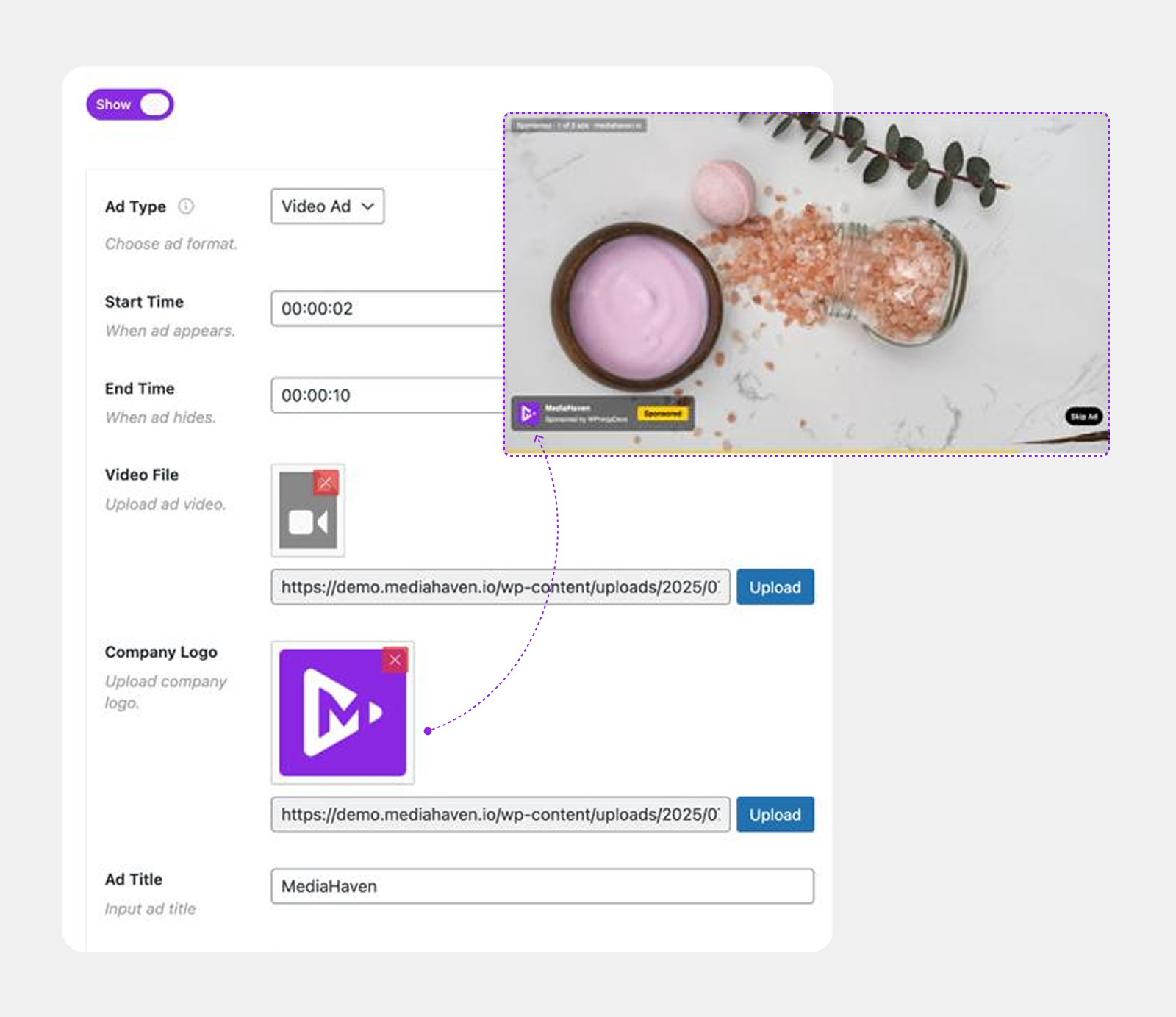
In the video editor, go to the Ads tab and configure your ad placements:
Pre-roll: Your VAST tag URL, ad type (video/banner/link), position, click-through URL.
Mid-roll(s): VAST tag URL + timestamp(s) in seconds. Add multiple mid-roll breaks for longer content.
Post-roll: VAST tag URL + your post-roll creative choice.
You can use the same VAST tag for all placements (Google Ad Manager will serve appropriate creatives for each position) or different tags for pre/mid/post if you have separate advertiser relationships for each.
Step 3: Create Your Video Galleries
In MediaHaven → Views, create galleries for different content categories. Each gallery becomes a browsable video library section on your site.

With MediaHaven Pro’s Ajax Live Filter, visitors can filter by category, tag, duration, and resolution — finding exactly the content they want without a page reload. This increases time on site and the number of video starts per session, directly increasing your ad impressions.
See it running live in the shoppable video demo.
Step 4: Build Your Video Hub
Create a dedicated video section on your WordPress site — a page or series of pages organized around your content categories. This is your video hub: the destination you want viewers to bookmark and return to.
Key pages:
- All videos page — your full library with Ajax filtering
- Category pages — curated collections (e.g., “Tutorials,” “Reviews,” “Courses”)
- Single video pages — each video’s dedicated URL with full player, description, related videos below
The single video page is the most important monetization page — it’s where pre/mid/post-roll ads play in full sequence, and where related videos keep viewers watching (and triggering more ad impressions) after each video ends.
Step 5: Optimize for Google Video Search
Self-hosted video content on your own domain, with MediaHaven’s automatic VideoObject schema markup, competes in Google Video Search independently of YouTube. This is a traffic source most WordPress publishers completely ignore.
For each video, MediaHaven generates VideoObject structured data including title, description, thumbnail, duration, and upload date. This helps Google index and surface your videos as standalone search results — each with a thumbnail in the SERP — for queries matching your content.
Combined with proper page SEO (meta titles, clean URLs, internal linking from related posts), your video pages can rank for high-value queries that bring qualified viewers directly to your monetized pages.
The Revenue Math: Self-Hosted vs. YouTube
Let’s run a realistic scenario for a content creator with 100,000 monthly video views.
YouTube scenario:
- 100,000 views
- $5 CPM (typical for instructional content)
- $500 gross revenue
- YouTube keeps 45%: Creator receives $275/month
Self-hosted WordPress + MediaHaven Pro + direct advertiser scenario:
- 100,000 video starts
- 70,000 pre-roll impressions (some viewers will block ads; 70% delivery is a realistic assumption)
- $15 CPM from direct sponsor (niche content commands higher CPMs)
- Creator receives $1,050/month — zero platform cut
Self-hosted WordPress + MediaHaven Pro + programmatic (Google Ad Manager):
- 70,000 pre-roll impressions
- $4 CPM (programmatic US average)
- Creator receives $280/month — comparable to YouTube, but with full control, no platform risk, and viewers staying on your site
The programmatic scenario breaks even with YouTube at similar CPMs. The direct advertising scenario dramatically outperforms. As your audience grows and your content establishes authority in a niche, direct deals become increasingly accessible — and the gap between YouTube revenue and self-hosted revenue widens substantially.
What Happens When a Viewer Watches Your Video Off-Site?
The analytics question comes up often. “If my video is self-hosted, how do I know how many people are watching?”
MediaHaven tracks view counts per video within your WordPress site — updated via AJAX without a page reload. This is your own data, stored in your database, not dependent on YouTube’s analytics.
For deeper video analytics (watch time, drop-off rates, rewatch behavior), you can integrate Google Analytics 4 event tracking on your MediaHaven-powered pages to track video play events, completion rates, and engagement.
Frequently Asked Questions
Can I monetize YouTube-embedded videos with MediaHaven Pro’s VAST ads? No. YouTube-embedded videos use YouTube’s iframe player. External VAST injection into YouTube’s player isn’t possible. To run your own VAST ads, your video must be hosted on your own server or a compatible CDN/streaming platform (HLS stream URL or direct MP4 URL).
Do I need a minimum audience to start? For programmatic ad networks (Google Ad Manager), no minimum is required — you can start immediately with any traffic level, though very low-traffic sites will earn minimal revenue. For premium networks (SpotX, Magnite), minimum thresholds apply. For direct sponsorships, having a clearly defined, engaged audience matters more than raw traffic numbers.
Is VAST compatible with ad blockers? Client-side VAST requests can be blocked by ad blockers, just like display ads. There’s no WordPress-plugin-level solution to this. Server-side ad insertion (SSAI) addresses this at the infrastructure level but is beyond the scope of a WordPress plugin.
Can I run VAST ads and also have videos on YouTube? Yes. Many publishers maintain a YouTube channel for discovery (YouTube’s algorithm still drives significant traffic) while self-hosting the same or additional content on their WordPress site for monetization. The two are not mutually exclusive.
Does MediaHaven Pro work with WooCommerce? Yes. You can add VAST-monetized video players to WooCommerce product pages, combining product video demonstrations with ad revenue.
Getting Started
The complete setup — video hosting, MediaHaven Pro, ad network integration — can be done in a weekend for most publishers. The long-term upside of owning your monetization stack completely, rather than depending on YouTube’s terms, is significant.
👉 Start with MediaHaven Lite (free) — explore the plugin, understand the gallery and video system
👉 Upgrade to MediaHaven Pro from $79/year — unlock VAST ads, Ajax filtering, video chapters, and all monetization features
👉 View the live VAST ad demo — see exactly how ads render in the player
The platform risk is real. Every year, more creators experience the cost of building their audience on rented land. MediaHaven Pro is the WordPress-native infrastructure to build your video business on ground you own.
Leave a Reply