

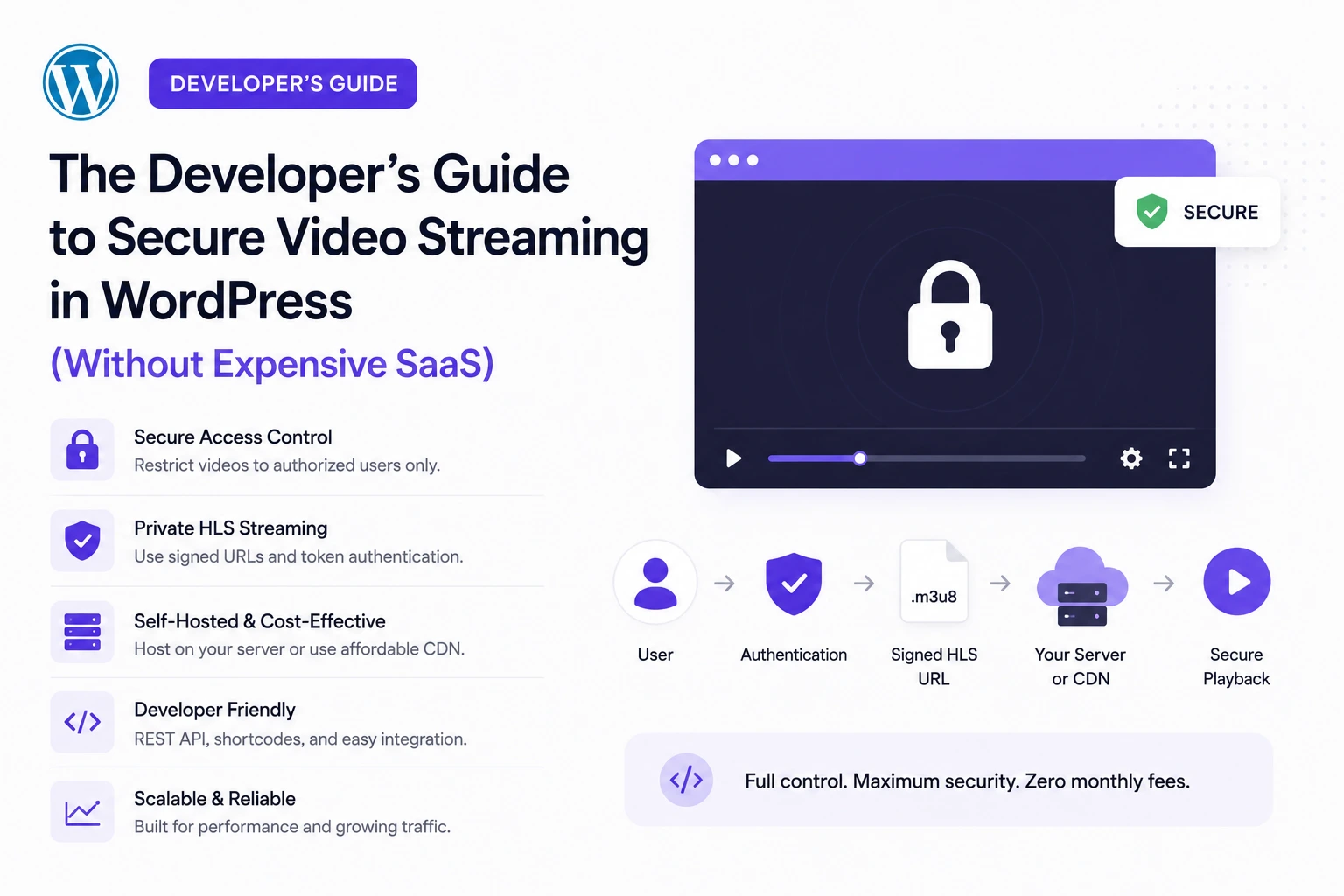
If you’ve searched for a WordPress secure video streaming plugin, you’ve probably already found the same four options everyone recommends: pay a SaaS platform $129–$1,549+ per year for hosted video security, self-host and accept that your videos are one right-click away from being downloaded, hand your content to YouTube and lose control over ads and branding, or hire a developer to hand-roll HLS encoding and signed URLs from scratch.
There’s a fifth option most guides don’t mention, because it didn’t fully exist until recently: a free WordPress plugin that automatically converts your videos to encrypted, token-authenticated HLS streaming, using the same CDN infrastructure that powers Netflix and Apple — with zero server load and zero manual encoding.
This guide is written for developers and technical site owners who want to actually understand the mechanics of secure video streaming in WordPress — not just install a plugin and hope. We’ll cover how video theft actually happens, what real security requires at the protocol level, and how to implement it using MediaHaven (free, WordPress.org) connected to Bunny Stream.
Why “Secure Video Streaming” Is Widely Misunderstood
Most WordPress tutorials that claim to “secure” your videos do one of the following: disable the right-click context menu, hide the download button in the video player controls, or add a JavaScript overlay that blocks screenshots.
None of these are actual security. They are UI-level friction, and any user with browser developer tools open (F12) can bypass all three in under a minute — the video file URL is still sitting in the page’s network requests, fully downloadable, regardless of what the visible player controls allow.
Real video security operates at the delivery protocol level, not the UI level. This means:
- The video isn’t served as a single downloadable file — it’s split into small segments delivered via a streaming protocol
- Each segment request requires cryptographic proof of authorization — a signed token, not just a session cookie
- The token expires — so a URL captured today can’t be replayed next week
- The delivery can be domain-restricted — so even a valid, unexpired token doesn’t work if requested from an unauthorized referrer
If your current WordPress video setup doesn’t do all four of these, it isn’t secure — it’s obscured. And obscurity is not a defense against anyone who knows how to open browser dev tools.
How Video Theft Actually Happens (The Technical Reality)
Understanding the real attack surface changes how you architect a solution. According to industry piracy research (VdoCipher, 2026), video content theft happens through a consistent set of mechanisms:
Hotlinking — someone copies your video’s direct file URL and embeds it on their own site, using your bandwidth and exposing your content to an unintended audience (Bplugins, 2026).
Direct download via browser tools — any HTML5 <video> tag with a direct src attribute pointing to an MP4 file can be downloaded via right-click → Save As, or via the download icon Chrome automatically adds to its native video player controls (Spotlightr, 2026).
Token theft — streaming systems that use access tokens to identify authorized viewers can have those tokens copied and replayed by unauthorized users if the tokens don’t expire or aren’t bound to specific conditions (VdoCipher piracy research, 2026).
Credential/password sharing — for membership and course sites, one legitimate login can be shared across many unauthorized viewers unless the platform detects and restricts concurrent sessions (VdoCipher, 2026).
Screen recording — the one vector that cannot be fully prevented by any technology. Watermarking (overlaying viewer-identifying information on the video) is the only mitigation, and it works by making leaked recordings traceable back to the source, not by preventing the recording itself (Spotlightr, 2026; Gumlet, 2026).
The business stakes here are real: a 2025 OTT industry report found that 54% of streaming providers had lost revenue to piracy before adopting stronger protections (Spotlightr, 2026). For course creators, membership sites, and premium video publishers, this isn’t a hypothetical risk.
The Protocol-Level Solution: HLS + Signed Token Authentication
The only approach that addresses hotlinking, direct download, and token replay simultaneously is HLS (HTTP Live Streaming) delivered through signed, expiring, domain-restricted URLs.
Why HLS Specifically
HLS breaks a video into small segments (typically 2–10 seconds each) referenced by a playlist file (.m3u8). Instead of one large, directly downloadable video file, the browser requests dozens or hundreds of small segment files in sequence. This has two independent benefits:
- No single file to download — there’s no “Save Video As” target, because the “video” isn’t one file
- Adaptive bitrate streaming — the player can request different quality segments based on the viewer’s real-time connection speed, eliminating buffering (this is the same technology Netflix, YouTube, and Apple TV+ use)
Why Signed Tokens Specifically
A signed URL uses cryptographic hashing (typically HMAC-SHA256) to combine a secret key, the file path, and an expiration timestamp into a token that’s appended to the URL as a query parameter:
https://yourzone.b-cdn.net/videos/course-1/playlist.m3u8?token=abc123&expires=1598024587The CDN server validates this token on every single segment request. If the token is missing, expired, or doesn’t match the hash the server computes independently, the request is rejected — regardless of whether the requester has the “correct” URL (Bunny.net Token Authentication documentation, 2026).
This is fundamentally different from hiding a download button. A signed, expiring token makes the URL itself worthless outside its authorized window — copying it and sharing it doesn’t help an unauthorized viewer once the expiration timestamp passes, which can be set as short as a single viewing session.
The Directory Token Extension for Streaming
For HLS specifically, a single signed token needs to authorize an entire directory of segment files, not just one URL — because a single video generates dozens of segment requests during playback. Bunny.net’s token authentication system supports exactly this via a directory/path-based token, where one signed token authorizes every file under a specific path (e.g., /videos/course-1/), which is what makes secure adaptive streaming technically workable rather than requiring a fresh signature for every 5-second segment (BunnyNet-PHP documentation, 2026).
The Traditional Build: What This Requires Without a Plugin
If you were building this from scratch as a developer, here’s the real technical scope:
- Video encoding pipeline — convert uploaded MP4/MOV files into multi-bitrate HLS segments (typically using FFmpeg with multiple output renditions: 360p, 720p, 1080p)
- CDN configuration — set up storage and a pull zone or equivalent CDN distribution
- Token signing implementation — server-side code (PHP, Node, etc.) to generate HMAC-SHA256 signed tokens on each authorized page load, with appropriate expiration windows
- Player integration — an HLS-compatible player (hls.js for non-Safari browsers, since Safari has native HLS support) configured to handle the signed manifest URLs
- Domain/referrer restriction configuration — locking playback to your specific domain(s) at the CDN level
- Ongoing key rotation and security maintenance
This is a legitimate multi-day engineering project for a developer unfamiliar with video infrastructure — which is exactly why SaaS platforms charging $129–$5,499/year for “secure video hosting” have a market. They’re selling you the result of this engineering work as a subscription.
The Plugin-Based Approach: MediaHaven + Bunny Stream
MediaHaven (free, WordPress.org, v1.7.3) automates the entire pipeline above and connects it directly to Bunny Stream, without requiring you to write encoding scripts, token-signing code, or CDN configuration by hand.
What Happens When You Click “Sync”
Per MediaHaven’s official plugin documentation, once you connect a Bunny Stream account:
“One-click HLS conversion — hit Sync and your video is automatically converted to secure adaptive HLS format on Bunny Stream. Full control over what gets offloaded and when.”
“Encrypted HLS delivery — signed URLs and token authentication block hotlinking and direct downloads.”
This means the entire technical stack described above — encoding, CDN distribution, signed token generation, and directory-level authentication — happens automatically when you click one button in your WordPress admin, rather than requiring custom server-side signing code.
The Exact Setup Process (Documented, 10 Minutes)
From MediaHaven’s official FAQ on wordpress.org:
- Create a free account at bunny.net
- Create a Stream Library and copy your API Key, Library ID, and CDN Hostname
- Enable Token Authentication in your Bunny Stream library settings
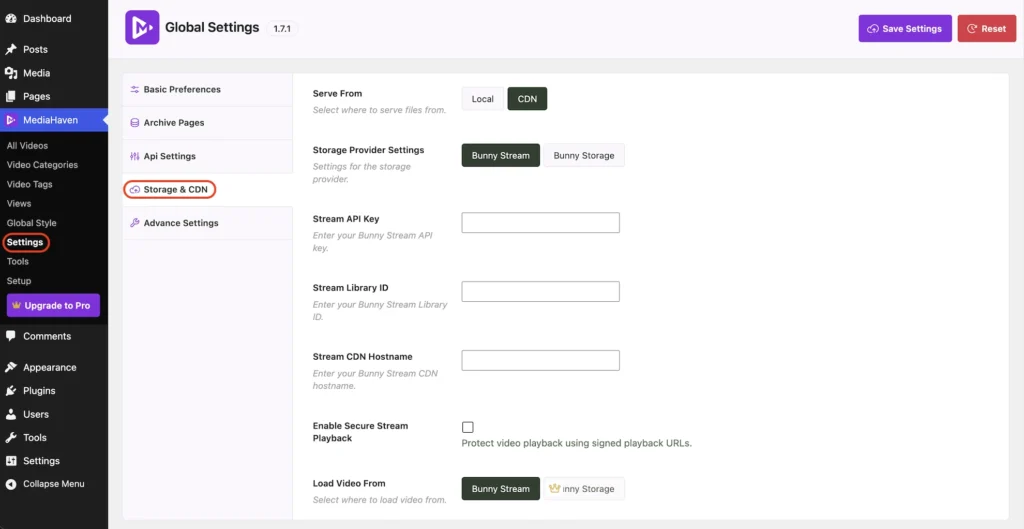
- In WordPress, go to MediaHaven → Settings → Storage & CDN
- Select CDN under “Serve From”
- Select Bunny Stream as your Storage Provider
- Enter your Bunny Stream credentials and enable Secure Stream Playback
- Save settings, upload a test video, then click Sync to push it to Bunny Stream
Once synced, every subsequent video request from a viewer is served through Bunny’s global CDN using signed, expiring URLs — with zero video bytes ever touching your WordPress hosting server.
What This Protects Against, Specifically
| Attack vector | How MediaHaven + Bunny Stream addresses it |
|---|---|
| Hotlinking (embedding your video URL on another site) | Signed tokens expire and are validated per-request; a copied URL stops working outside its authorized window |
| Direct file download via browser | HLS delivers small segments via a manifest, not a single downloadable file — there is no “video file” to save |
| Token replay after the fact | Tokens carry an expiration timestamp validated server-side on every segment request |
| Domain hotlinking on unauthorized sites | Bunny Stream supports referrer/domain restriction at the CDN level, blockable independent of the token system |
| Server bandwidth exhaustion from theft attempts | Zero server load — your WordPress hosting never serves the video; all delivery is offloaded to Bunny’s CDN |
What This Does NOT Protect Against
Being precise about limitations matters for a developer audience. No technology — including enterprise DRM systems like Widevine — fully prevents screen recording. Any video that can be watched can, in principle, be screen-recorded by a determined user with third-party capture software. This is architecturally true of every video security system on the market, including six-figure Hollywood DRM deployments.
What signed HLS delivery does accomplish is eliminating the casual, zero-effort theft vectors — hotlinking, right-click download, and simple URL sharing — which account for the overwhelming majority of unauthorized redistribution in practice. For the small minority of determined screen-recording pirates, the mitigation is watermarking (available in some enterprise DRM tools), not prevention.
Cost Comparison: What You’re Actually Paying For
| Solution | Annual cost | What you get |
|---|---|---|
| MediaHaven (free) + Bunny Stream | $12–$50/year typical (Bunny charges ~$0.01/GB storage + ~$0.01/GB bandwidth, $1/month account minimum) | Signed HLS delivery, adaptive bitrate, global CDN, zero server load |
| MediaHaven Pro | $79/year (1 site) | Adds Bunny Storage for all media types, shoppable video, VAST ads, Ajax filtering |
| VdoCipher Starter | $129–$149/year | DRM encryption, dynamic watermarking, 1,000 GB bandwidth, 100 GB storage |
| VdoCipher Value/Express/Pro tiers | $429–$1,549/year | Scaled bandwidth/storage, same core DRM feature set |
| Presto Player Starter | ~$69–$99/year | Private video (login-gated), Bunny.net integration, branded player — token signing handled by Presto’s own layer |
| Custom-built HLS pipeline | Developer time (multi-day build) + CDN costs | Full control, but requires ongoing security maintenance |
The critical technical distinction: VdoCipher’s higher price reflects enterprise DRM (Widevine) and dynamic per-viewer watermarking — a genuinely different security tier suited to Hollywood-style content protection where screen-recording deterrence matters as much as URL security. For the majority of WordPress site owners — course creators, membership sites, agencies, and publishers whose primary threat is hotlinking and casual downloading rather than professional piracy operations — signed HLS token authentication via MediaHaven + Bunny Stream addresses the actual attack surface at a fraction of the cost, using the same underlying protocol-level security (HLS + signed tokens) that VdoCipher itself is built on.
Implementation Checklist for Developers
- Bunny.net account created, Stream Library provisioned
- Token Authentication enabled in Bunny Stream security settings
- MediaHaven Lite installed from wordpress.org/plugins/mediahaven-lite
- Storage & CDN settings configured: Serve From → CDN, Storage Provider → Bunny Stream
- Bunny credentials entered, Secure Stream Playback enabled
- Test video uploaded and synced — confirm
.m3u8manifest URL includes atokenandexpiresparameter - Verify direct segment URL access fails after token expiration (test by waiting past the expiry window)
- Confirm hotlinking test: attempt to embed the video URL on a separate unauthorized domain, verify it’s blocked
- For membership/course content: layer WordPress-level login gating (MemberPress, LearnDash, etc.) on top of MediaHaven’s stream security — token authentication protects the delivery layer; your membership plugin protects the access layer
- Document your token expiration window based on realistic viewing session length (too short causes mid-playback failures; too long increases the replay window)
Why This Matters Beyond Security: Performance and SEO
The same HLS + CDN architecture that provides security also solves two problems most WordPress video guides treat as separate issues:
Performance: Because your WordPress server never serves video bytes, your hosting bandwidth and CPU are entirely insulated from video traffic — even under a traffic spike. Bunny’s global CDN with adaptive bitrate streaming means viewers on slow connections get automatically downgraded quality rather than buffering, addressing the “buffering playback” complaint MediaHaven’s own plugin description identifies as a top WordPress video pain point.
SEO: MediaHaven generates Schema.org VideoObject structured data automatically for every video gallery, which is required for Google’s video rich results eligibility — a benefit entirely independent of, but complementary to, the security layer.
The Bottom Line for Developers
Secure video streaming in WordPress doesn’t require choosing between “pay a SaaS $1,500/year” and “build a custom encoding and token-signing pipeline yourself.” The protocol-level mechanics — HLS segmentation, HMAC-signed expiring tokens, directory-level authentication, domain restriction — are the same regardless of which path you take. MediaHaven automates the implementation of that protocol on top of Bunny’s CDN infrastructure, for free, with the paid tier ($79/year) unlocking additional media offloading and monetization features rather than gating the core security mechanism itself.
For a technical audience evaluating build-vs-buy: the free tier of MediaHaven plus a Bunny Stream account (typically $12–$50/year in actual usage costs for small-to-mid catalogs) delivers the same fundamental security architecture — signed, expiring, token-authenticated HLS — that underpins every premium video security SaaS on the market, at approximately 5–95% of the cost, without writing a line of encoding or signing code yourself.
Frequently Asked Questions
What is secure video streaming in WordPress?
Secure video streaming protects your videos from unauthorized access, hotlinking, and direct downloads while delivering smooth playback to legitimate viewers. Modern solutions typically combine adaptive HLS streaming, encrypted delivery, HTTPS, and token-based access to improve both security and performance.
How does MediaHaven help secure WordPress videos?
MediaHaven integrates with Bunny Stream to deliver videos using secure adaptive HLS streaming. After syncing a video, Bunny Stream handles HLS conversion and secure delivery, while MediaHaven manages playback inside WordPress, helping reduce direct file exposure and improving the viewing experience.
Do I need an expensive SaaS platform for secure video streaming?
Not necessarily. Many WordPress websites can achieve secure, high-quality video delivery by combining MediaHaven with Bunny Stream. This approach provides adaptive HLS streaming, global CDN delivery, and security features without the complexity or cost of many enterprise video platforms.
Can MediaHaven automatically convert videos to secure HLS?
Yes. When connected to Bunny Stream, MediaHaven lets you upload or sync videos with a single click. Bunny Stream automatically converts them into secure adaptive HLS streams, while MediaHaven handles playback through its WordPress video player.
How does HLS improve both security and performance?
HLS breaks videos into small segments and automatically adjusts playback quality based on each viewer’s internet speed. Combined with secure delivery methods such as signed URLs and token authentication, it helps reduce buffering while making unauthorized access more difficult.
Can I protect videos from hotlinking and unauthorized sharing?
Yes. When using Bunny Stream with MediaHaven, you can enable features such as signed URLs and token authentication to help prevent hotlinking and unauthorized playback. These controls restrict video access to approved viewers and websites.
Can I use secure streaming for WooCommerce product videos?
Absolutely. MediaHaven supports WooCommerce product videos and can deliver compatible videos through Bunny Stream’s secure HLS infrastructure. This allows customers to watch high-quality product demonstrations while helping protect your video assets.
Does secure streaming improve website performance?
Yes. With Bunny Stream handling video delivery through its global CDN, your WordPress server no longer serves large video files directly. Combined with MediaHaven’s smart asset loading and responsive player, this reduces server load and improves playback performance.
Does MediaHaven support existing HLS (.m3u8) streams?
Yes. MediaHaven supports existing HLS (.m3u8) streams from compatible providers. If you already have an HLS playlist, simply add it as a video source. Alternatively, you can use the Bunny Stream integration to automatically generate secure HLS streams during synchronization.
Does MediaHaven work with Gutenberg and page builders?
Yes. MediaHaven includes native Gutenberg blocks and shortcode support for Elementor, Divi, Beaver Builder, WPBakery, and other popular page builders. You can publish secure video players and responsive galleries anywhere on your WordPress website without custom coding.
Is MediaHaven suitable for growing video businesses?
Absolutely. MediaHaven combines secure HLS streaming, Bunny Stream integration, responsive galleries, multiple video source support, WooCommerce compatibility, VideoObject schema, and performance optimizations in one scalable platform, making it well suited for creators, publishers, educators, and businesses with expanding video libraries.
Why choose MediaHaven for secure video streaming on WordPress?
MediaHaven brings together secure HLS streaming through Bunny Stream, responsive video galleries, multiple video source support, automatic VideoObject schema, WooCommerce integration, Gutenberg blocks, and performance-focused optimization in a single plugin. Instead of managing several separate tools, you get a unified platform for delivering secure, scalable, and professional video experiences on WordPress.
- Install free: wordpress.org/plugins/mediahaven-lite
- Official documentation: mediahaven.io/docs/
- Upgrade to Pro: mediahaven.io/pricing — $79/year · 14-day money-back guarantee
- Support: support@wpninjadevs.com
Leave a Reply